AudioPriorityBar Review: Mastering Audio Switching on macOS
Priority-based audio switching for macOS menu bar
发布时间: 12/30/2025
Product Overview
AudioPriorityBar is a highly focused and elegantly designed native macOS utility built to solve one of the most persistent, low-level annoyances for power users: manual audio device switching. Tagged as a "Priority-based audio switching for macOS menu bar," this application slips seamlessly into your system tray, offering granular control over how your Mac handles connected speakers, headphones, and microphones.
The core function of AudioPriorityBar is automation. Instead of manually diving into System Settings every time you plug in or unplug a device—perhaps switching from wired headphones to a Bluetooth headset, or enabling a high-quality external microphone for a call—AudioPriorityBar handles the transition automatically based on a predefined hierarchy. This makes it an essential tool for anyone who frequently juggles multiple audio peripherals throughout their workday, whether they are remote workers, streamers, or productivity enthusiasts.
Its immediate value proposition lies in reclaiming cognitive load. By intelligently managing device priority, AudioPriorityBar ensures that the "best" or most desired audio output and input device is always active without requiring user intervention, leading to a smoother, less interrupted workflow on the Mac operating system.
Problem & Solution: Eliminating Audio Annoyances
The established problem with macOS audio management is its often unpredictable or slow default behavior when devices connect or disconnect. If you are on a Zoom call using AirPods, and then you plug in your external monitor which has its own speakers, macOS often defaults to the monitor speakers, cutting off your call audio unless you manually intervene. This friction is maddening.
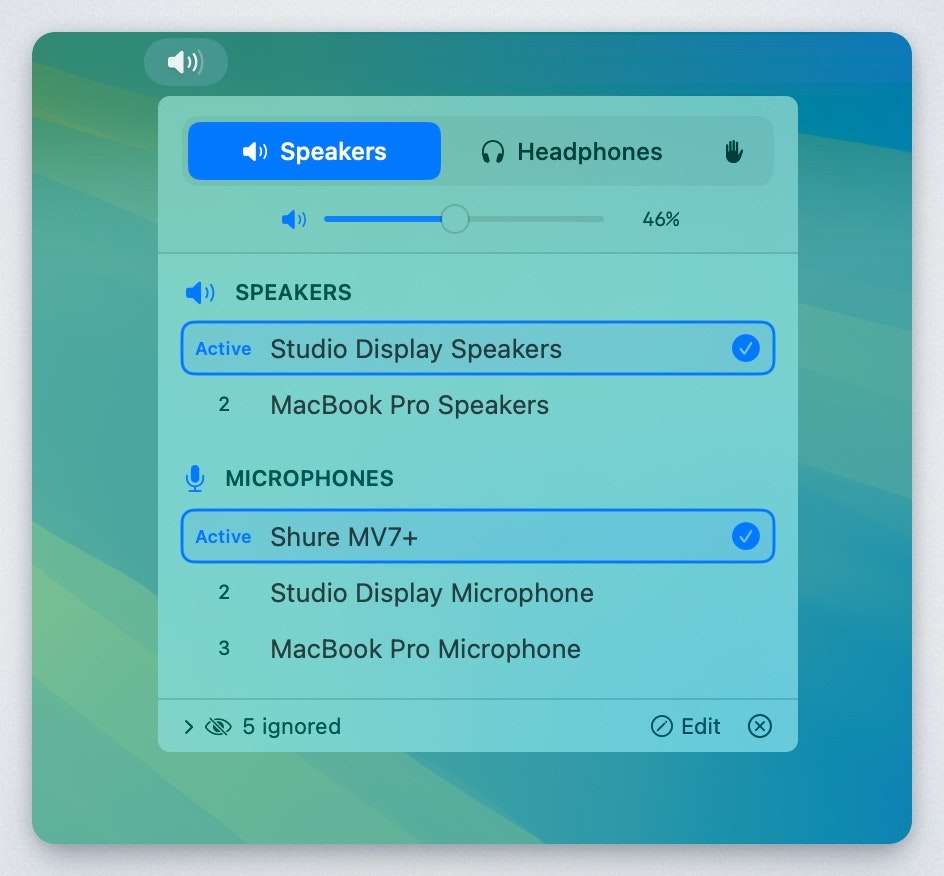
AudioPriorityBar directly addresses this by allowing users to define a fixed preference list. This isn't just about which device is connected; it’s about which device should be used first when multiple options are available. For instance, you can set your primary studio monitors as priority 1, your noise-canceling headphones as priority 2, and your laptop speakers as priority 3. The application constantly monitors device status and instantly switches to the highest-available priority, filling a crucial gap that Apple's native settings often leave open for manual management.
Key Features & Highlights
AudioPriorityBar distinguishes itself through its simplicity and deep integration into the macOS environment. As a native menu bar app, it avoids the bloat sometimes associated with cross-platform utilities.
The most notable feature is the intuitive, customizable priority setting. Users can drag and drop their recognized audio inputs and outputs into their preferred order.
Key highlights include:
- Priority-Based Automation: The core functionality ensures the highest ranked, currently connected device is always active for both input and output.
- Native Menu Bar Integration: It lives quietly in the menu bar, offering quick access without cluttering the main interface.
- Input/Output Separation (Implied): While the description focuses on "devices," true utility suggests it manages input (mic) and output (speaker) streams independently, crucial for professional setups.
- Seamless Switching: The speed of the transition is key; it needs to be fast enough to catch audio mid-sentence when switching between devices like USB mics and internal hardware.
The user experience appears streamlined—set it once, and forget it. This focus on background operation is where AudioPriorityBar truly shines compared to complex audio routing software.
Potential Drawbacks & Areas for Improvement
While the concept behind AudioPriorityBar is strong, a few areas could enhance its appeal to advanced users. As a focused utility, its limitations often lie in what’s not present.
A primary area for improvement would be deeper integration with context switching, perhaps triggering priority changes based on application usage. For example, automatically switching to the 'Zoom Mic' when the Zoom application is foregrounded, regardless of the general device priority list.
Additionally, while the menu bar icon provides status, incorporating a small, instant-access dropdown that shows the currently active input/output devices (and perhaps a one-click override) would boost usability during troubleshooting. Users will need assurance that the app is correctly interpreting the connection status, and visual confirmation is helpful. Finally, better support for Bluetooth connection reliability management, such as forcing reconnection attempts or providing notifications on failed pairing, would be valuable for wireless peripheral users.
Bottom Line & Recommendation
AudioPriorityBar is a stellar utility for any macOS user tired of wrestling with audio settings mid-task. If your daily routine involves swapping between high-fidelity headphones, external USB microphones, or different monitor setups, this tool will quickly become indispensable. It successfully automates a nagging manual process, delivering significant productivity gains through background efficiency.
We highly recommend AudioPriorityBar for remote professionals, creators, and multi-peripheral Mac owners looking for an elegant, native solution to device audio management. It’s a small investment in time that pays dividends in uninterrupted focus.
Featured AI Applications
Discover powerful tools to enhance your productivity
MindMax
与AI互动的新方式
超越 AI 聊天,将对话转化为无限画布。结合头脑风暴、思维导图、批判性与创造性思维工具,帮助你可视化想法、高效解决问题、加速学习。
AI Slides
AI 驱动幻灯片,Markdown 魔法加持
革命性幻灯片创作,融合 AI 智能与 Markdown 灵活性 - 随处编辑,随时优化,轻松迭代。让每个想法,都能快速变成专业演示。
AI Markdown Editor
打开即写 - AI驱动的Markdown编辑器
极其高效的写作体验:AI助手、斜杠命令、极简界面。打开即用,轻松写作。✍️ Markdown简洁 + 🤖 AI强大 + ⚡ 斜杠命令 = 完美写作体验
FunBlocks AI Extension
🚀 AI驱动的浏览器扩展
用FunBlocks AI助手改变您的浏览体验。您的智能伴侣,为网络上的AI驱动阅读、写作、头脑风暴和批判性思维提供支持。