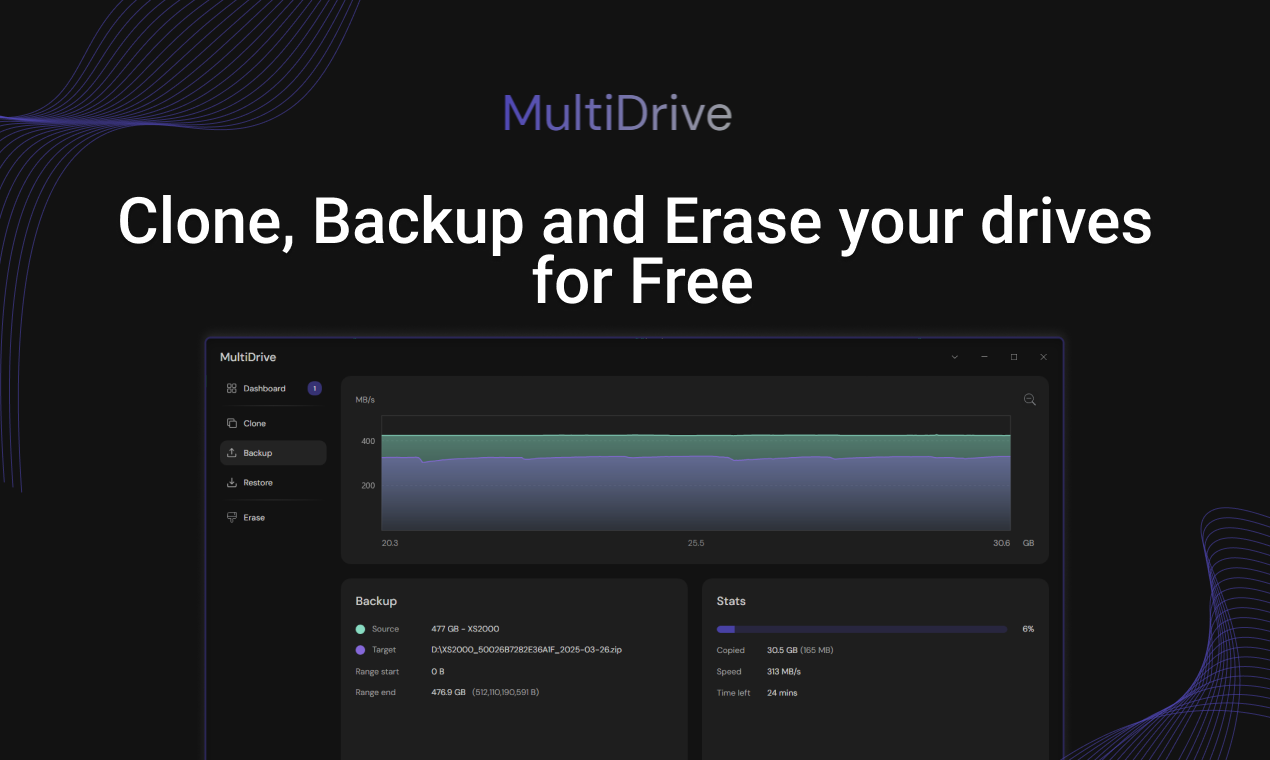
MultiDrive: A Free, Powerful Solution for Disk Management
Free disk cloning, backup and erasing software
Published: 12/8/2025
MultiDrive is a robust, free-to-use Windows utility designed for comprehensive disk management, offering essential tools for cloning, backing up, and securely erasing entire drives. Developed by Atola Technology, a company with 22 years of experience in B2B markets, MultiDrive marks their foray into the consumer and small business space, aiming to provide professional-grade features without the typical cost or complexity. It caters to a wide audience, from everyday PC users looking to upgrade their storage or protect data, to tech professionals and system administrators needing to deploy images, manage large-scale migrations, or securely decommission hardware.
The core value proposition of MultiDrive lies in its accessibility and power. It's genuinely free, with no hidden costs, ads, or locked "premium features," offering a clean and intuitive user interface alongside a powerful Command Line Interface (CLI) for advanced users. This dual-interface approach ensures that both casual users and IT experts can leverage its capabilities effectively.
Addressing Common Disk Management Challenges
MultiDrive directly addresses several common pain points associated with disk management. Many users find existing software confusing, expensive, or laden with unnecessary features. MultiDrive simplifies these critical tasks, providing a straightforward solution for scenarios such as upgrading from an HDD to a faster SSD, migrating an operating system to a new drive without reinstalling everything, creating reliable backups to prevent data loss, or securely wiping sensitive information before selling an old drive.
What sets MultiDrive apart from many alternatives is its commitment to being truly free for its core functionalities, combined with a user-friendly design. While competitors like Macrium Reflect, Acronis, AOMEI, and EaseUS offer similar features, they often come with a price tag or a more complex user experience. MultiDrive fills a market gap by providing a high-quality, free, and intuitive tool for essential disk operations, including support for cloning drives with bad sectors.
Key Features and Highlights
MultiDrive boasts a comprehensive set of features designed for efficiency and reliability:
- Disk Cloning: Create exact, bit-by-bit replicas of entire drives, ideal for upgrading to a new SSD or creating bootable backups. It supports cloning boot drives to transfer your OS, apps, and settings seamlessly. The software can even clone drives with errors or bad sectors.
- Backup and Restore: Generate full drive or partial backups in either ZIP or RAW format. Data integrity is ensured through hash verification, and backups can be split into smaller files. MultiDrive also allows for pausing and resuming long backup tasks.
- Secure Drive Erasing: Permanently wipe full drives or specific parts using secure wiping methods, with the option to specify a Hex pattern. This is crucial for protecting sensitive data before disposal or resale.
- Command Line Interface (CLI): For power users and system administrators, MultiDrive offers a powerful CLI to automate disk operations and integrate them into scripts.
- Parallel Operations: The ability to run multiple disk operations simultaneously significantly saves time, especially for users managing several drives.
- User-Friendly Interface: Despite its powerful capabilities, MultiDrive features a clean, intuitive graphical user interface (GUI) that makes it accessible even for those without extensive technical knowledge.
- Portability: A portable edition is available, allowing users to run the tool from a USB flash drive without installation.
MultiDrive's commitment to being genuinely free, coupled with its robust feature set and user-centric design, positions it as a strong contender in the disk management software landscape.
Potential Drawbacks and Areas for Improvement
While MultiDrive excels in its core offerings, there are a few areas where it could potentially improve or expand. Currently, MultiDrive's backup module is more of a dedicated disk imaging tool and does not support features like incremental backups or backup sets. This means that making regular, ongoing full backups might consume significant disk storage for typical users. Additionally, it does not yet provide functionality for mounting disk image backups as drives within Windows, nor can individual files and folders be recovered directly from these disk images.
The software is currently available only for Windows. While the developers have hinted at cross-platform coding, Mac and Linux versions are not yet available. Expanding to these platforms would significantly broaden its appeal. As a relatively new product (launched in April 2025), MultiDrive is still actively being developed, and it will be interesting to see how these features evolve.
Bottom Line and Recommendation
MultiDrive is an excellent, genuinely free utility that delivers on its promise of simplifying disk cloning, backup, and erasing for Windows users. Its blend of a clean GUI and a powerful CLI makes it suitable for a broad spectrum of users, from home users upgrading their PCs to IT professionals managing multiple systems. The ability to handle damaged drives, perform parallel operations, and its commitment to remaining free without upsells or ads, truly sets it apart.
If you're a Windows user in need of reliable, high-speed disk management tools for cloning your drive for an upgrade, backing up critical data, or securely wiping old disks, MultiDrive is a highly recommended solution. While it may not replace a full-fledged, feature-rich backup solution that includes incremental backups or individual file recovery, it serves as a powerful and accessible tool for its defined core functions. Given its origins with a reputable company like Atola Technology and its promise of maintaining free core features, MultiDrive is definitely worth trying for anyone seeking an efficient and cost-free disk utility.
Featured AI Applications
Discover powerful tools to enhance your productivity
MindMax
New Way to Interact with AI
Beyond AI chat, transforming conversations into an infinite canvas. Combining brainstorming, mind mapping, critical and creative thinking tools to help you visualize ideas, solve problems efficiently, and accelerate learning.
AI Slides
AI Slides with Markdown
Revolutionary slide creation fusing AI intelligence with Markdown flexibility - edit anywhere, optimize anytime, iterate easily. Turn every idea into a professional presentation instantly.
AI Markdown Editor
Write Immediately
Extremely efficient writing experience: AI assistant, slash commands, minimalist interface. Open and write, easy writing. ✍️ Markdown simplicity + 🤖 AI power + ⚡ Slash commands = Perfect writing experience.
Chrome AI Extension
AI Assistant Anywhere
Transform your browsing experience with FunBlocks AI Assistant. Your intelligent companion supporting AI-driven reading, writing, brainstorming, and critical thinking across the web.