⚡ AI Browser Extension for Real Web Context

Capture webpage context for AI — then act without leaving the tab

Instead of copying pages into ChatGPT, Claude, or Gemini, FunBlocks captures webpage content, YouTube transcripts, selected text, screenshots, and input areas as action-ready context so you can summarize, analyze, write, and reply in place.

Works on articles, YouTube, email, docs, social posts, forms, and any text you select.

🌐Webpage, YouTube, selection, screenshot
✂️Summarize, analyze, reply, rewrite
Stay in flow on the page you are on
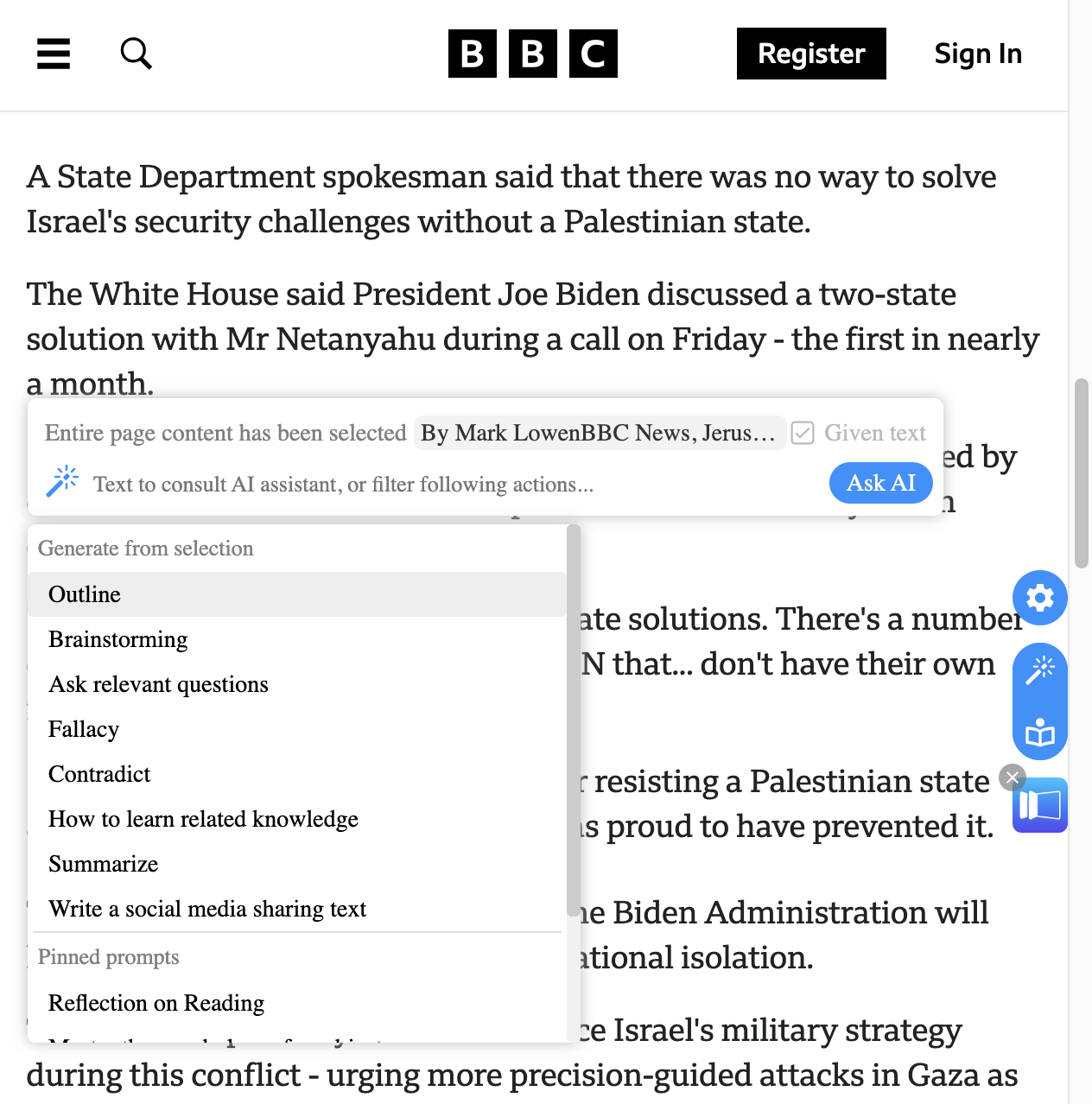
FunBlocks AI Assistant showing context-aware reading, analysis, and writing tools inside the browser
Click to view the full product interface

Why not just use ChatGPT?

ChatGPT, Claude, and Gemini are powerful — but they start with a blank box. Web work does not. When the task lives on a page, the real bottleneck is getting the right context into the model fast.

Time: 5-10 seconds
🎯 Tab switches: 0
🌐 Context stays grounded in the page

The problem is not AI quality. It is context handoff.

Every extra copy, paste, tab switch, and missing detail lowers output quality and slows you down. FunBlocks removes that handoff by capturing context where the work already exists.

😵

Blank chat + copy-paste workflow

1Read a page or watch a video and decide what context matters
2Copy text or manually summarize what is on the page
3Switch to ChatGPT, Claude, or Gemini in another tab
4Paste context and rebuild the prompt from scratch
5Bring the answer back and apply it manually in the original page
⏱️ Time: 2-3 minutes
🔄 Tab switches: 3-5 times
🧩 Context is incomplete and easy to lose
VS
🚀

Page-aware FunBlocks workflow

1Capture the current page, transcript, selection, screenshot, or input box as context
2Choose the right AI action from the in-page assistant menu
3Get a grounded result and use it immediately in the same workflow
Time: 5-10 seconds
🎯 Tab switches: 0
🌐 Context stays grounded in the page

What changes when AI starts with the page

🌐
Real context, not guesswork
The AI sees what you are reading, watching, selecting, or drafting.
🔄
No copy-paste loop
Stay on the current page instead of bouncing between tabs and prompts.
🧰
AI action menu for web tasks
Summarize, explain, reply, rewrite, brainstorm, and analyze from one menu.
Higher quality output
Grounded answers are more useful than generic replies with missing context.

Context capture is the product

FunBlocks does not ask you to rebuild context manually. It captures the exact page, transcript, selection, screenshot, or input area you are working with, then turns that into AI-ready action.

Capture the right contextChoose the AI actionUse the result immediately
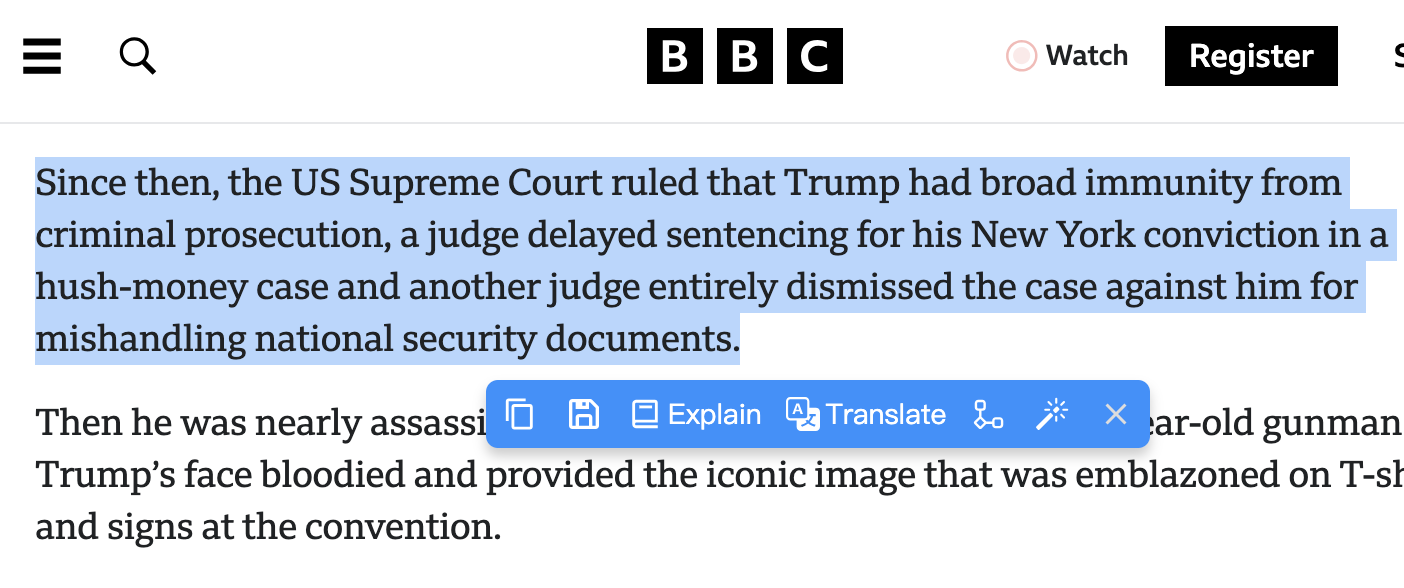
FunBlocks AI contextual toolbar for quick text-based actions including brainstorming, mindmapping, critical thinking analysis, translation, explanation, and text polishing

Capture context from the page, then run the right AI action

Select text or open the page assistant menu to summarize, explain, rewrite, brainstorm, or analyze with the exact context already attached.

FunBlocks turns browsing context into action-ready AI input:
Page content + selected paragraph + screenshot + current input box = faster prompts, better grounding, and outputs you can use immediately.
🌐

Full webpage

Summarize long articles, extract arguments, or build a mind map from the current page.

🎬

YouTube transcript

Turn videos into searchable notes, summaries, and key takeaways.

✂️

Selected text

Explain, translate, challenge, rewrite, or continue from exactly what you selected.

🖼️

Screenshots

Ask questions about charts, UI blocks, diagrams, or visual details on the page.

⌨️

Input areas and widgets

Draft emails, replies, and form inputs directly where the work happens.

FunBlocks AI email widget for generating professional replies in Gmail with AI-powered brainstorming and critical thinking assistanceFunBlocks AI video widget for summarizing and analyzing YouTube content with critical thinking frameworks including Six Thinking Hats and SWOT Analysis

Context-aware AI Buttons for efficient browser tasks

From YouTube summaries to Gmail replies and on-page writing, FunBlocks gives you the right AI actions without leaving the workflow.

  • Turn videos into searchable notes, summaries, and key takeaways.
  • Draft emails, replies, and form inputs directly where the work happens.
  • Explain, translate, challenge, rewrite, or continue from exactly what you selected.

This is why FunBlocks becomes indispensable while browsing

The model still matters, but web tasks succeed or fail on context. FunBlocks gives the LLM the missing page context and the right in-page action menu, so AI can help you finish the task instead of starting from scratch.
Turn any page into understanding, notes, and analysis

FunBlocks reads the page with you, so you can summarize, explain, compare, and extract what matters without copying content into a separate chat.

FunBlocks AI reading assistant showing page-based summaries, explanations, comparisons, and structured notes

Understand the page faster

  • Summarize long articles, posts, or docs into key takeaways
  • Explain difficult sections, terms, or arguments in simpler language
  • Compare claims, perspectives, or evidence directly from the current page

Turn page context into useful outputs

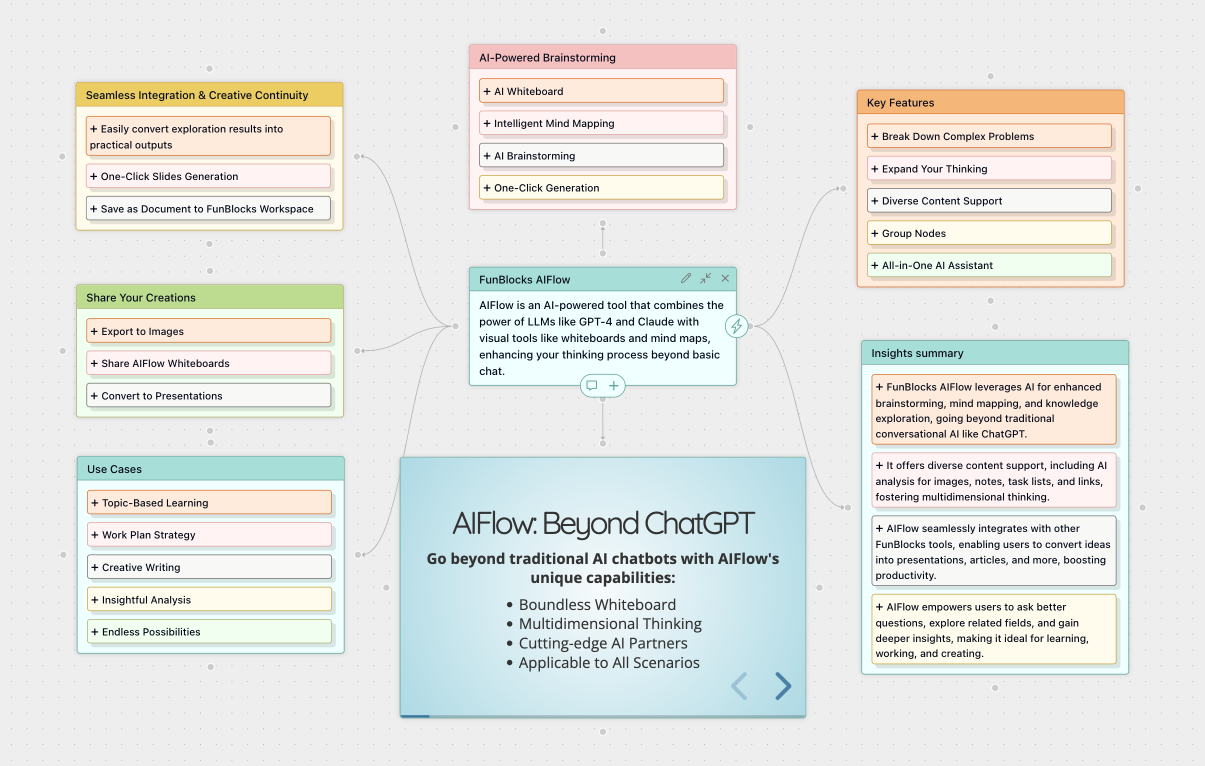
📝Structured notes and outlines you can keep or share
🎯Key points, action items, and quick study or research summaries
💡Mind maps, and visual breakdowns of complex information without leaving the page
📊Infographics, charts base on the page content and data to visualize insights in new ways

Write, rewrite, and reply inside the current input box

Use page context and the current draft together, so AI can help you respond, polish, expand, or shorten text where you are already writing.

AI in the current input box
Page-awareIn-placeOne-click apply

Ways to open writing actions in-place:

  • Select text to rewrite, simplify, continue, or change tone
  • Type '/' to open fast actions without leaving the page

What you can do with the current context:

  • Draft replies and follow-ups based on the page, thread, or form you are viewing
  • Polish wording, tone, clarity, and structure for the current draft
  • Expand short notes into fuller messages, posts, or documents
  • Generate context-aware responses for email, social media, support, and community workflows

Your AI action menu, model switcher, and workflow hub

Choose the right model, open the right action, and reuse the same browser workflow across reading, research, and writing.

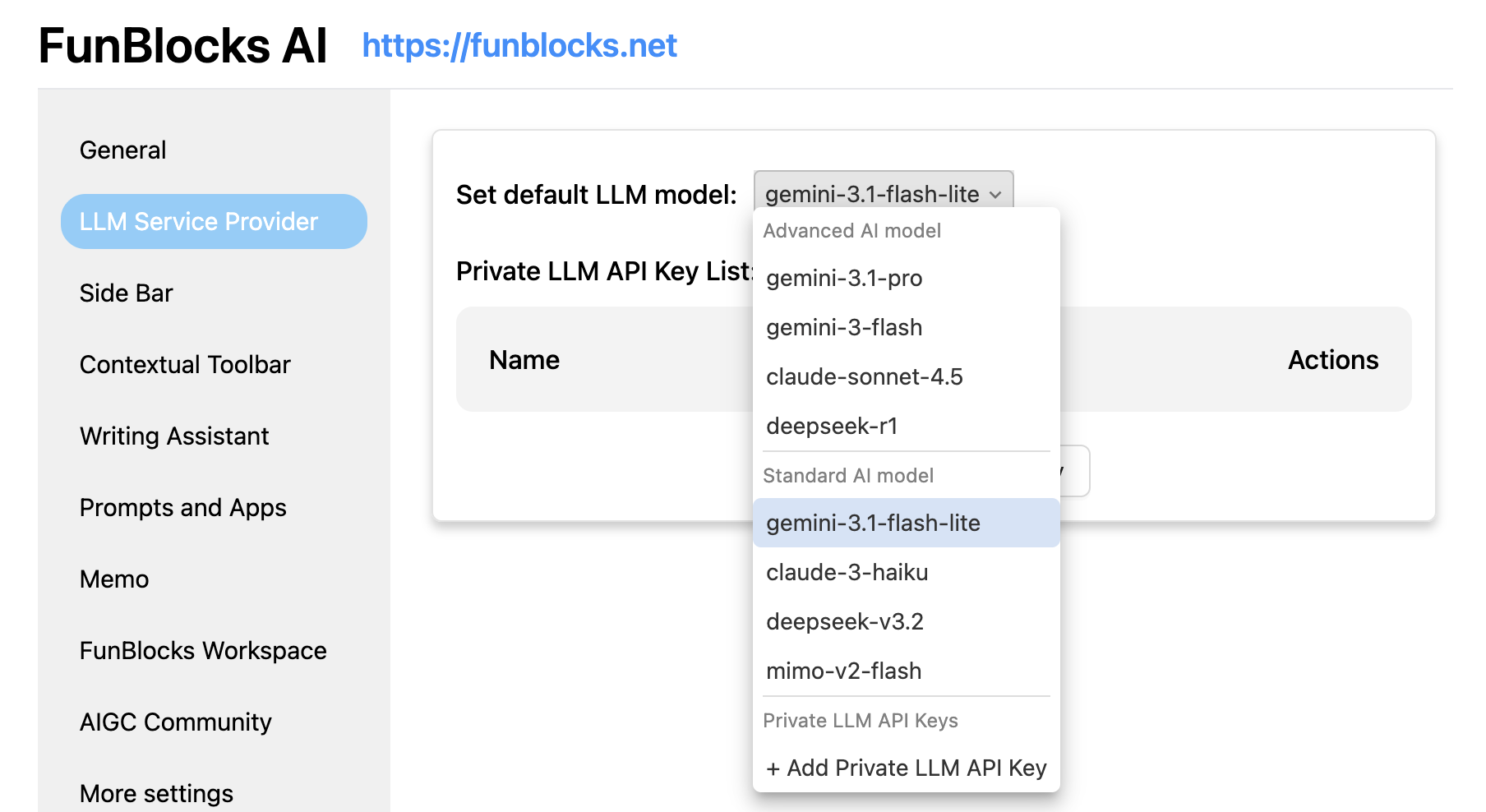
FunBlocks AI action menu and model settings showing how to switch models and launch structured browser-side AI actions

Open the right action for the current page

  • Summarize, explain, extract key points, or compare ideas from the page
  • Launch reading, analysis, and reply actions from the same AI menu
  • Use structured actions instead of rewriting prompts from scratch

Work with the model that fits the task

  • Switch across mainstream LLMs without leaving your browser workflow
  • Keep one consistent action menu for reading, drafting, and follow-up tasks

How FunBlocks compares to direct AI apps and generic extensions

FunBlocks is built around context capture and in-page execution, not just a blank chat box. See why that matters for real browsing and research workflows.

← Swipe horizontally to see more →
CapabilityFunBlocks AIChatGPT / Claude / GeminiGeneric AI ExtensionsWriting-only Tools
Auto-capture full webpage context
Use YouTube transcripts as ready-to-work contextLimited
Actions on selected text and screenshotsLimited
In-page AI action menu for reading, analysis, and replyLimited
Stay in the current tab and apply results directlyLimited
Structured thinking, mindmaps, and analysis workflowsLimitedLimited
Multiple LLMs in one browser workflowLimitedLimited

Direct AI apps are strong general tools, but they do not automatically understand the page you are on. FunBlocks closes that gap by capturing the missing context and giving you the right AI actions exactly where the task happens.

Watch FunBlocks handle real browser tasks

See how FunBlocks captures webpage, transcript, selection, screenshot, and input-box context, then turns it into AI actions without sending you to a blank chat tab.

🌐

Capture the page before you prompt

Pull in the full webpage, YouTube transcript, selected text, screenshot, or current input box as usable AI context.

Choose the right in-page action

Run summarize, explain, compare, rewrite, reply, and other actions from one browser-native AI menu.

💡

Finish work where the task already lives

Use the output back in your reading, research, and writing flow instead of rebuilding context in a separate app.

Where FunBlocks proves its value fastest

FunBlocks is strongest when the hard part is not asking AI a question, but giving it the right browser context quickly and using the answer inside the page.

🔎

Research and understanding on live pages

Read long articles, docs, and selected passages with AI that sees the actual page, so summaries, explanations, and notes stay grounded in the source.

  • Summarize long webpages without manual copy-paste
  • Explain difficult sections from the exact selection
  • Turn page context into notes, outlines, and mind maps
🎥

Video learning and transcript workflows

Use YouTube transcript and surrounding page context to extract key ideas, compare claims, and build study notes faster.

  • Capture transcript context in one click
  • Compare what the speaker said with the page or your notes
  • Turn video content into structured summaries and follow-up questions
✍️

Writing and replying inside web apps

Draft, rewrite, and respond in the current input box while keeping the reference page, selected text, or screenshot attached to the task.

  • Draft replies with the right context already attached
  • Rewrite selected text without leaving the page
  • Use screenshots and page details to create more accurate output

Why browser-native AI workflows feel faster in real work

These users do not just want smarter answers. They want AI that starts with the real page, keeps context attached, and helps them finish the task without breaking flow.

✍️

Emma

Content Strategist

⭐⭐⭐⭐⭐

I used to copy source material from articles into ChatGPT and rebuild the prompt every time. With FunBlocks, I capture the page once and can immediately summarize, outline, and rewrite in the same workflow. It feels less like using another AI app and more like adding an AI layer to the browser.

📊

Michael

Research Analyst

⭐⭐⭐⭐⭐

The difference for research is context fidelity. FunBlocks lets me analyze reports, selected passages, and competitor pages without losing what the source actually said. I spend less time moving text around and more time comparing, extracting, and making decisions.

🎓

Sophia

Graduate Student

⭐⭐⭐⭐⭐

For study workflows, the YouTube transcript and selected-text actions are the killer features. I can turn lectures and papers into explanations, notes, and mind maps while staying on the source page. That makes revision much faster.

📣

Daniel

Digital Marketer

⭐⭐⭐⭐⭐

Most AI tools help after I leave the page. FunBlocks helps while I am still inside the campaign, landing page, or inbox. I use it to analyze copy, draft replies, and turn reference pages into briefs without the usual tab chaos.

👩‍🏫

Olivia

Language Teacher

⭐⭐⭐⭐⭐

I use FunBlocks when teaching from online texts because it keeps explanations tied to the exact paragraph students are reading. It is great for turning selections into simpler explanations, questions, and structured notes without losing context.

🚀

James

Startup Founder

⭐⭐⭐⭐⭐

What sold me was being able to go from competitor page to notes to draft reply in one browser workflow. The model choice matters, but the bigger win is that FunBlocks already has the context from the page I am working on.

Frequently asked questions

Why use FunBlocks if I already have ChatGPT, Claude, or Gemini?
When does FunBlocks feel better than a normal chat app?
What context can FunBlocks capture from the browser?
Can FunBlocks work on the actual websites where I read, research, and reply?
Can I choose different AI models inside the same workflow?

Install the AI assistant that works with the page you are on

If your reading, research, video watching, writing, and replies all happen in the browser, FunBlocks captures the missing context and turns it into useful AI actions.

Install on Chrome or Edge in under a minute
Start from any page, transcript, selection, screenshot, or input box
Use the same workflow for reading, research, and writing
Switch models without rebuilding prompts