AI Prompt Optimizer for ChatGPT, Claude & Gemini
Rewrite vague prompts into clearer requests, fill in missing context, and get better AI answers faster—right inside your favorite AI chats.
Why install Prompt Optimizer?
Prompt Optimizer helps you write clearer prompts, add missing context, and get better answers across your favorite AI chats.
Get better AI answers
Turn rough requests into clearer prompts so ChatGPT, Claude, Gemini, and other AI chats can respond with more useful results.
Reduce retries and back-and-forth
Send a stronger prompt first instead of rewriting the same request again and again to get the answer you actually need.
Turn vague ideas into clear instructions
Prompt Optimizer helps shape incomplete thoughts into structured prompts with clearer intent, scope, and output expectations.
Learn better prompting patterns
By seeing optimized rewrites and missing-context prompts, you gradually learn how to ask better questions on your own.
Explore better next questions
Generate related questions and new angles so you can keep exploring a topic after the first answer instead of stopping too early.
Works in your favorite AI chats
Use it directly inside ChatGPT, Claude, Gemini, Perplexity, DeepSeek, and other supported AI chat experiences.
Why better prompts lead to better AI answers
Most AI problems are not model problems—they are prompt clarity problems. When your request is vague, missing context, or underspecified, the answer is usually weaker too.
Clear requests produce clearer results
AI tools work best when they understand your goal, constraints, audience, and desired output. Better prompts reduce ambiguity and improve answer quality from the start.
Fewer retries, less wasted time
Instead of rewriting the same request three times, you can send a stronger prompt first. That means less back-and-forth and faster progress on writing, coding, research, and planning.
Better prompting becomes a daily advantage
If you rely on AI chats regularly, better prompting compounds. Small improvements in each request add up to more useful outputs and better decisions over time.
How it works on your favorite AI chats
Install the extension, open ChatGPT, Claude, Gemini, or other supported AI chats, and rewrite your prompt before you send it for clearer, more useful answers.
Add the extension
Install Prompt Optimizer from the Chrome Web Store in a few clicks and pin it for easy access.
Open your AI chat
Go to ChatGPT, Claude, Gemini, Perplexity, DeepSeek, or another supported AI site and start typing as usual.
Rewrite and send a better prompt
Use one click to clarify intent, add missing details, and replace your draft with a stronger version before sending.
Rewrite vague prompts into clear instructions
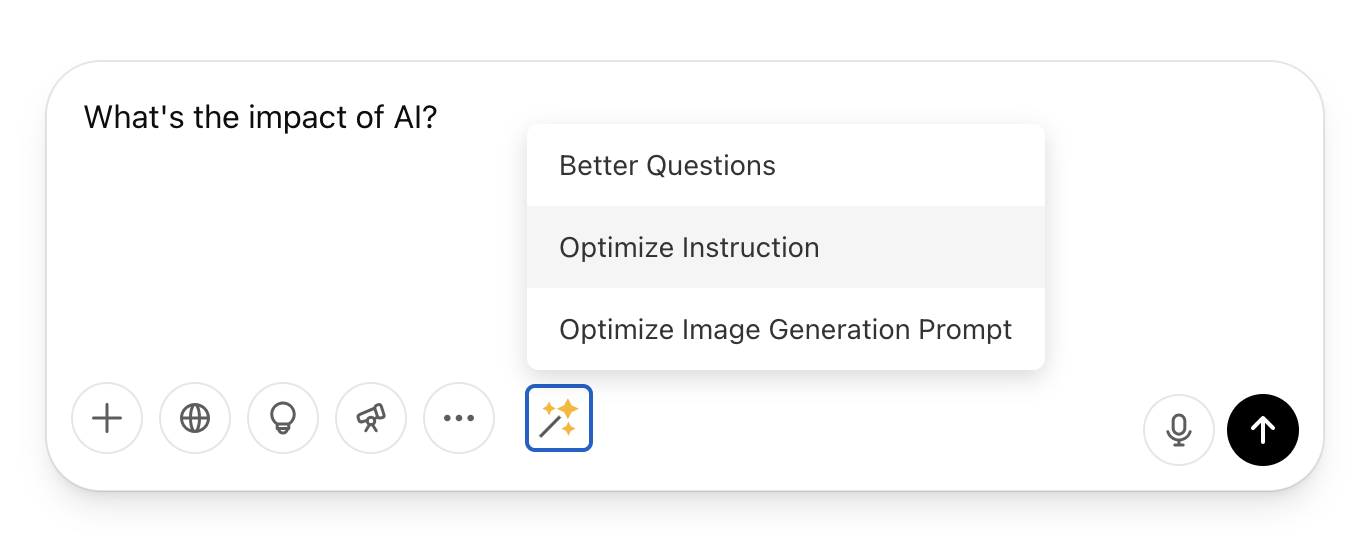
Prompt Optimizer appears below the input box in supported AI chats and helps turn rough ideas into clearer, more structured prompts you can send immediately.
- ✓Choose "Optimize Question" to generate several sharper versions of what you want to ask
- ✓Use "Optimize Instruction" when you know the task but want a clearer, more detailed prompt
- ✓Review what changed before sending so you can learn better prompt structure over time
- ✓Replace your original draft with the improved version in one click
See better ways to ask
Instead of guessing how to phrase a request, compare stronger prompt options and choose the version that best matches your goal.
- ✓Rewrite broad or messy questions into prompts that are clearer and easier for AI to answer well
- ✓Compare multiple rewritten options instead of manually editing line by line
- ✓Get better results across writing, coding, research, brainstorming, and everyday work tasks
- ✓Build intuition for better prompting by seeing strong examples every time you use the tool
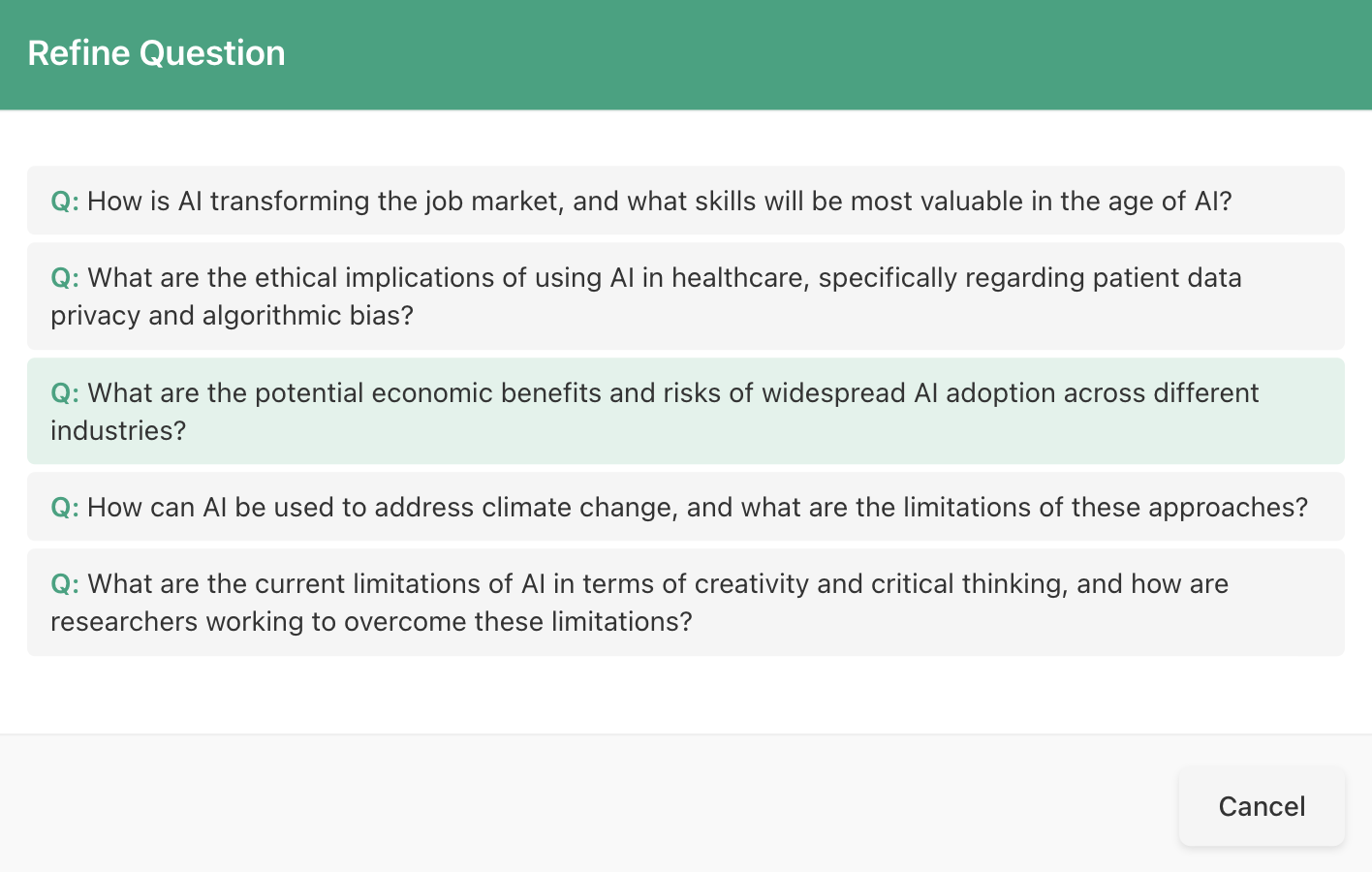
Fill in missing details before you send
When your prompt is missing context, constraints, or important requirements, Prompt Optimizer opens a simple form to help you complete it before sending.
- 📝Detect missing context, constraints, or requirements in your draft instantly
- ➡️Answer a few guided questions instead of guessing what the AI still needs
- ✅Generate a more complete prompt with the details needed for better answers
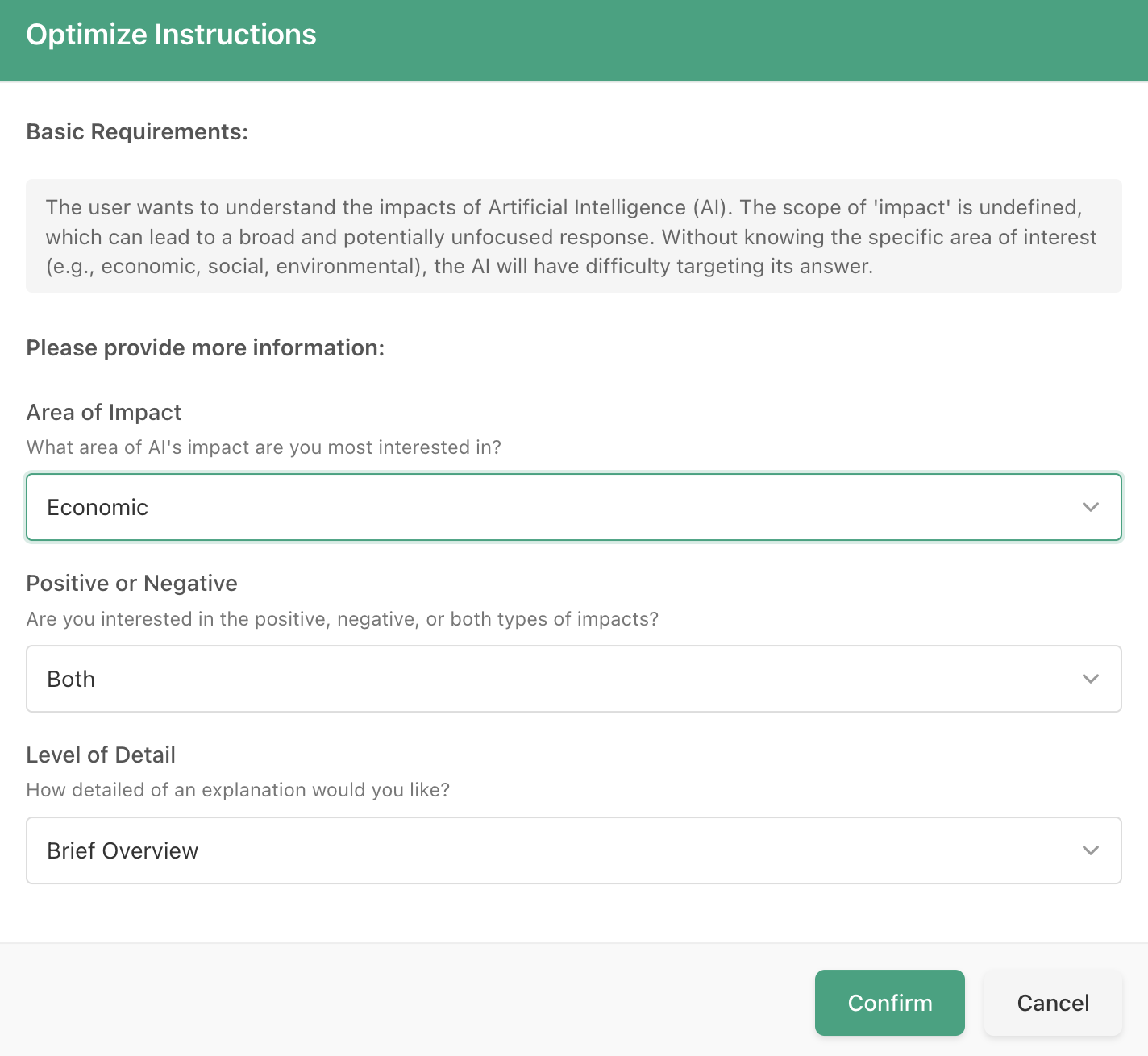
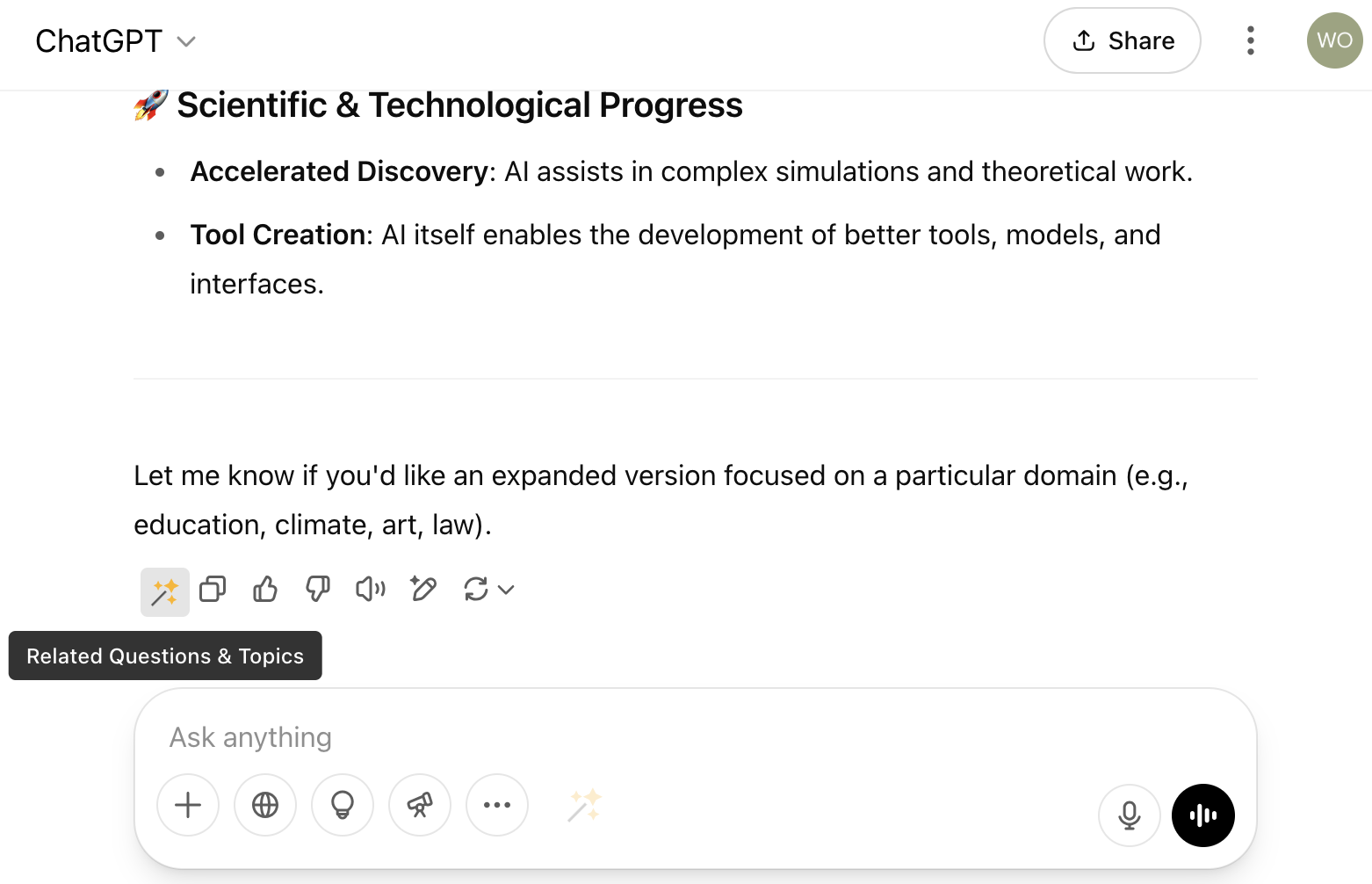
Generate related questions and next angles
When a topic deserves deeper exploration, use Prompt Optimizer to expand the conversation with relevant follow-up questions and related topics.
- 🧠Open the exploration tools directly from the toolbar on an AI response
- 🔍Generate related questions to investigate missing angles and stronger follow-up prompts
- ❓Surface adjacent topics when you want broader context, comparisons, or more research directions
- 📚Keep momentum without manually inventing every next prompt on your own
Start getting better AI answers today
Install Prompt Optimizer and improve how you work with ChatGPT, Claude, Gemini, and more—without learning prompt engineering from scratch.
Add to Chrome - FreeImprove your prompting instincts while you work
Prompt Optimizer is not just a rewrite button. By seeing stronger prompts, missing details, and follow-up angles, you gradually learn how to ask better questions yourself.
See what a stronger prompt looks like
Each rewrite gives you a concrete example of how to turn a rough idea into a clearer instruction with better structure and intent.
Notice the context you forgot to include
When the extension asks for audience, format, tone, constraints, or examples, it trains you to think in those dimensions next time.
Discover better follow-up questions
Related questions and next-angle suggestions help you explore a topic further instead of stopping at the first AI answer.
Build better AI habits over time
The more you use it, the faster you get at writing prompts with clear goals, sufficient context, and useful constraints—even before you click optimize.
Get better results now, and better prompting later
Prompt Optimizer helps in the moment, but it also teaches by example. Install it once, improve answers today, and keep sharpening how you work with AI chats.
Add to Chrome - FreeWhy Prompt Optimizer beats manual prompting
Compare Prompt Optimizer with standard AI chats, manual prompt writing, and other browser extensions.
| Feature | FunBlocks AI Prompt Optimizer | Standard ChatGPT | Manual Prompt Engineering | Other AI Extensions |
|---|---|---|---|---|
| Rewrite vague prompts in one click | ✅ | ❌ | ❌ | Limited |
| Ask for missing context before sending | ✅ | ❌ | ❌ | ❌ |
| Generate better follow-up questions | ✅ | ❌ | ❌ | Some |
| Explore more angles from the same topic | ✅ | ❌ | ❌ | Rare |
| Works across major AI chats | ✅ | ❌ | ✅ | Limited |
| Helps you learn better prompting patterns | ✅ | ❌ | ✅ | Some |
| Free daily usage to get started | ✅ | ✅ | ✅ | Varies |
Prompt Optimizer is built for people who want better answers quickly without memorizing prompt formulas or switching between tools.
See Prompt Optimizer in action
Watch how Prompt Optimizer rewrites prompts directly inside AI chats so you can get clearer, more useful answers faster.
Watch the rewrite flow
See a rough prompt become a clearer request directly inside an AI chat.
See missing context get filled in
Watch how the extension asks for the details that usually make or break answer quality.
See why it saves time
See how better prompts reduce retries and get you to a useful answer faster.
Start free, upgrade only if you need more
Install the extension and try Prompt Optimizer with free usage included. Paid FunBlocks AI plans unlock more usage and broader access when your workflow grows.
Free to start
- ✓30 free optimizations for new users
- ✓10 free optimizations every day
- ✓Rewrite prompts, fill missing context, and explore better follow-ups
No credit card required to get started
Paid plans when you need more
- ✓Included with FunBlocks AI subscription plans
- ✓More usage for heavier AI workflows
- ✓Access to more tools across the FunBlocks AI ecosystem
Compare plans if you need higher limits
What Our Users Say
Discover how FunBlocks AI is transforming the way professionals, students, and teams work, learn, and create.
David L.
Content Creator
"This extension has completely changed how I work with AI. I used to struggle getting ChatGPT to understand exactly what I needed, but now the prompt optimization feature helps me clarify my requests. The related questions feature has also helped me explore topics I wouldn't have thought of on my own."
Jennifer K.
Researcher
"As someone who uses AI tools daily for research, the ability to optimize my prompts has been invaluable. I'm getting more precise information and spending less time refining my questions. The related topics feature has also led me to discover connections I might have missed otherwise."
Robert M.
Student
"I've noticed my own questioning skills improving since I started using this extension. By seeing how it transforms my basic questions into more specific ones, I'm learning to think more critically about what I'm really trying to ask. It's like having a personal tutor for asking better questions!"
Michael T.
Software Developer
"As a developer, I rely on AI tools for documentation, debugging, and learning new frameworks. The Prompt Optimizer has dramatically improved my workflow by helping me formulate precise technical questions. The dynamic form feature is particularly useful when I need to provide code context - it ensures I include all the necessary details for accurate responses."
Sarah J.
Digital Marketer
"This extension has become essential for my content creation process. When brainstorming ideas or researching topics, the related questions feature helps me explore angles I wouldn't have considered. I'm creating more comprehensive, well-researched content in less time, and my clients are noticing the difference in quality."
Dr. Thomas L.
Healthcare Professional
"In healthcare, precision is crucial. This extension helps me formulate clear, specific queries when researching medical topics or treatment options. The ability to optimize prompts across different AI platforms is invaluable, as I can choose the model best suited for particular types of medical information while maintaining consistent, high-quality interactions."
Start getting better AI answers today
Install Prompt Optimizer for Chrome to rewrite prompts faster, fill missing context, and improve results in ChatGPT, Claude, Gemini, and more.