Enote Review: The Essential Lightweight Desktop Notes App for Instant Capture
Lightweight Desktop Notes
Published: 1/17/2026
Product Overview
Enote steps onto the crowded productivity stage with a refreshing commitment: Lightweight Desktop Notes. In an era where note-taking applications often balloon into complex project management suites, Enote carves out a crucial niche for pure speed and instantaneous capture. This application is meticulously engineered for users who need to jot down fleeting thoughts, essential links, or sudden inspiration without navigating deep menus or waiting for heavy software to load.
Targeted squarely at writers, developers, students, and knowledge workers who value efficiency above all else, Enote positions itself as the digital equivalent of grabbing a sticky note. Its core value proposition is frictionless productivity—providing a stable, always-accessible space to triage information immediately so you can return to your primary task without distraction. If your current workflow involves constantly switching tabs or minimizing a heavyweight app just to save a thought, Enote is built precisely for you.
Problem & Solution: Conquering Capture Friction
The central problem Enote solves is capture friction. Many productivity applications, while powerful, introduce minor delays—launch time, loading complex databases, or fighting through UI clutter—that kill the momentum of a quick idea. When inspiration strikes, that 10-second delay can mean the thought is gone forever.
Enote tackles this head-on by focusing on speed-first design. It doesn't try to sync across 15 devices or handle complex project hierarchies; it focuses on the immediate desktop experience. By offering global shortcuts and a floating window mode, Enote ensures that your note-taking mechanism is always one keystroke away, sitting unobtrusively above your main work area. This minimal interference separates it from competitors that often demand dedicated app time.
Key Features & Highlights
Enote shines brightest in its utility-focused feature set, prioritizing accessibility and ease of input. The design philosophy clearly favors function over form, resulting in a snappy, reliable experience.
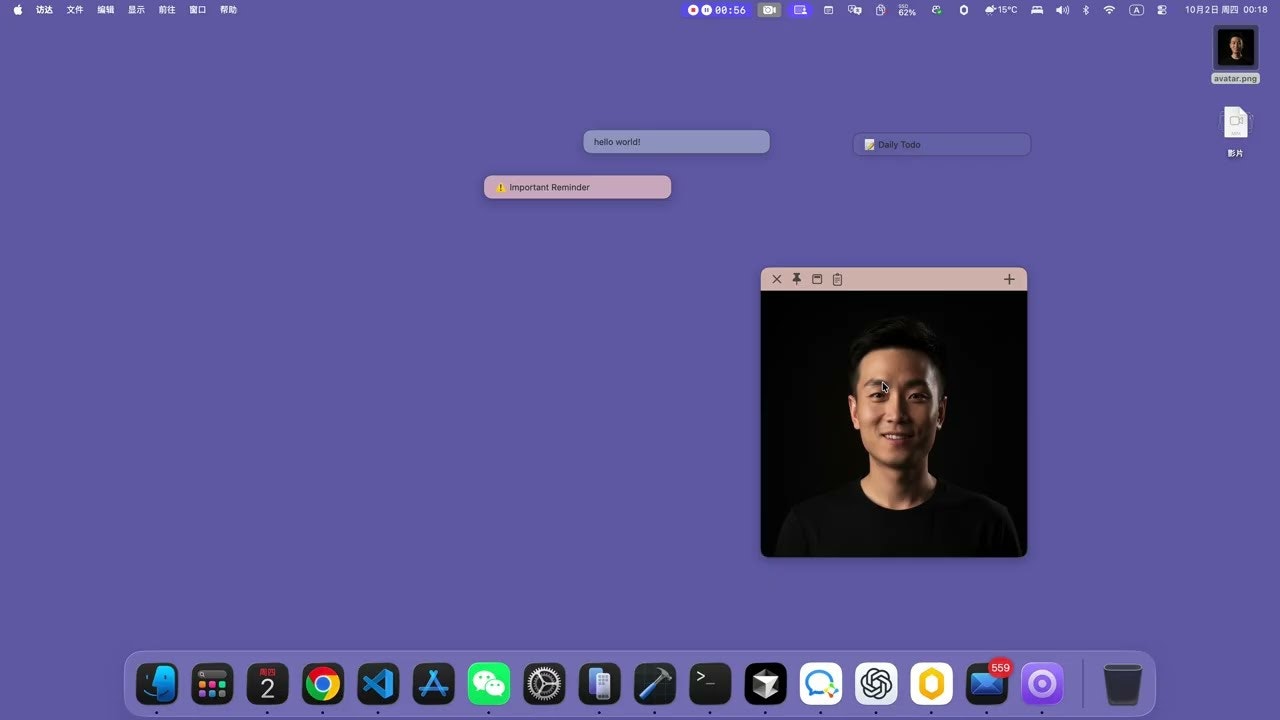
The most notable feature is undoubtedly the Global Shortcuts for instant note creation. This feature is the cornerstone of the app’s promise, allowing users to summon a new note from anywhere in their operating system instantly. Furthermore, the ability to handle multimedia input through simple image notes via drag, drop, or paste is a significant boost for visual thinkers or designers needing to quickly archive a screenshot or graphic.
For users who need constant context, the Floating Window mode is a lifesaver, allowing critical reminders or to-do lists to remain visible without obscuring the application underneath. Coupled with the introduction of Markdown support, Enote manages to offer basic formatting capabilities without compromising its lightweight nature. The Sidebar for managing notes and templates provides just enough organizational structure to keep related thoughts accessible, preventing the app from devolving into a single, chaotic scratchpad.
Potential Drawbacks & Areas for Improvement
While Enote excels at being lightweight, this inherent limitation also presents areas for constructive feedback. For power users, the current feature set might feel slightly too minimal.
Currently, synchronization appears to be a secondary concern, which is fine for desktop-only capture, but in 2024, cross-platform persistence is often non-negotiable. A suggestion for enhancement would be the introduction of optional, lightweight cloud backup integration (even a simple Dropbox or iCloud connection) to safeguard these crucial quick notes against local machine failure. Additionally, while Markdown is present, expanding basic rich text editing options—perhaps simple bold/italic via keyboard shortcuts without needing full Markdown syntax—could improve usability for less technically inclined users. Deeper integration with system-level features, such as native macOS Quick Actions or Windows Snap Assist integration, would further cement Enote's place in the desktop ecosystem.
Bottom Line & Recommendation
Enote is an outstanding utility for anyone whose workflow is frequently interrupted by the need to capture a passing thought quickly. If you are tired of bloated note applications and need a reliable, lightning-fast digital sticky note pad that honors your time, Enote is highly recommended. It successfully occupies the market gap between simple text files and feature-heavy knowledge bases. Give Enote a try if your primary goal is to minimize input friction and maximize the speed at which you save and review short-form information on your desktop.
Featured AI Applications
Discover powerful tools to enhance your productivity
MindMax
New Way to Interact with AI
Beyond AI chat, transforming conversations into an infinite canvas. Combining brainstorming, mind mapping, critical and creative thinking tools to help you visualize ideas, solve problems efficiently, and accelerate learning.
AI Slides
AI Slides with Markdown
Revolutionary slide creation fusing AI intelligence with Markdown flexibility - edit anywhere, optimize anytime, iterate easily. Turn every idea into a professional presentation instantly.
AI Markdown Editor
Write Immediately
Extremely efficient writing experience: AI assistant, slash commands, minimalist interface. Open and write, easy writing. ✍️ Markdown simplicity + 🤖 AI power + ⚡ Slash commands = Perfect writing experience.
Chrome AI Extension
AI Assistant Anywhere
Transform your browsing experience with FunBlocks AI Assistant. Your intelligent companion supporting AI-driven reading, writing, brainstorming, and critical thinking across the web.