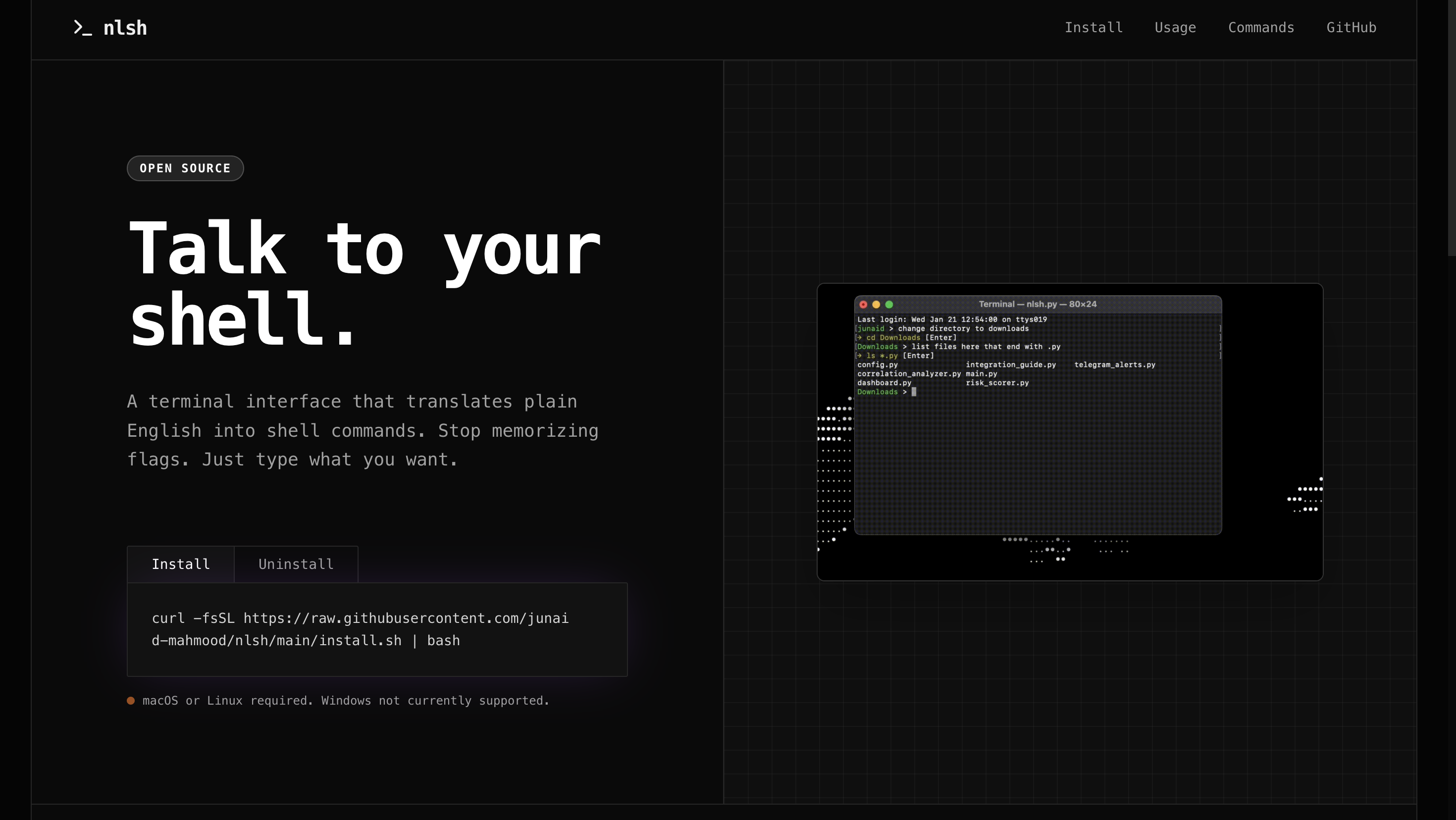
nlsh Review: Revolutionizing Command Line Interaction with Natural Language
talk to your terminal in natural language
Published: 1/23/2026
Product Overview
nlsh bursts onto the developer scene with a bold promise: to let you talk to your terminal in natural language. This innovative tool positions itself as an intelligent interface layer that translates plain English requests directly into functional shell commands. For anyone who has spent frustrating minutes searching for the correct grep flag, the precise syntax for a complex find command, or the exact parameters for a Docker operation, nlsh aims to eliminate that cognitive overhead entirely. It seeks to bridge the gap between intent and execution within the command-line environment.
The primary audience for nlsh is vast, encompassing everyone from junior developers and data scientists new to Linux environments, to seasoned sysadmins who occasionally need a quick reminder on obscure command syntax. Use cases range from simple file manipulation ("delete all .log files older than 7 days") to complex scripting needs ("list all running processes consuming over 1GB of RAM"). The core value proposition of nlsh is dramatically accelerating workflow and democratizing complex terminal usage by making it accessible through intuitive language rather than rigid syntax memorization.
Problem & Solution: Breaking the Syntax Barrier
The persistent hurdle in command-line productivity is the reliance on perfect syntax. Even expert users frequently forget subtle flags or the correct order of arguments for powerful utilities like awk, sed, or cloud CLIs. This constant context-switching—leaving the task to search documentation or Stack Overflow—destroys flow state and slows down development cycles. This is the specific problem nlsh targets: the friction caused by mandatory memorization of complex shell syntax.
nlsh solves this by leveraging underlying AI or sophisticated language processing to interpret user intent. Instead of needing to recall that the flag for recursive deletion is -rf or knowing the specifics of piping commands, a user simply states their objective. This approach doesn't just offer a faster alternative; it fundamentally changes the interaction model from machine-centric command input to human-centric instruction, effectively filling the market gap for a truly intuitive command-line assistant that prioritizes intent over structure.
Key Features & Highlights
The standout feature of nlsh is its core translation engine. The ability to input commands like "copy all .js files from the source directory to the build folder" and receive a verified, executable shell script is a game-changer for rapid scripting. This functionality significantly lowers the barrier to entry for scripting and automating tasks previously reserved for those deeply familiar with bash or zsh structures.
The visual representation provided in the product imagery suggests a clean, interactive terminal experience. Users likely type their English prompt, and nlsh presents the generated command for review before execution. This safety feature—the explicit review step—is crucial, ensuring that users maintain control and can spot any misinterpretations by the AI before irreversible actions are taken. The effectiveness of nlsh hinges on its accuracy and breadth of supported utilities, ideally covering core OS commands, Git operations, and popular developer tools.
Key highlights include:
- Natural Language Input: Direct translation of English intentions into shell commands.
- Reduced Cognitive Load: Eliminates the need to memorize complex command flags and parameters.
- Safety Review Mechanism: Allows users to verify the generated command before execution.
- Workflow Acceleration: Speeds up routine tasks by removing documentation lookups.
Potential Drawbacks & Areas for Improvement
While the concept behind nlsh is brilliant, the execution will face immediate scrutiny regarding accuracy and context understanding. A significant potential drawback is how well nlsh handles ambiguity or complex piping sequences involving multiple utilities. If the system frequently generates incorrect commands or requires overly specific phrasing to achieve the desired result, it negates the ease-of-use benefit.
For improvement, the developers should focus heavily on robustness across different operating systems (Linux, macOS, potentially Windows/WSL) and the breadth of supported tooling. Furthermore, while reviewing the generated command is vital, adding an "Explain This Command" feature where nlsh breaks down why it chose those specific flags in response to a natural language prompt would dramatically increase user trust and learning—turning the tool into an active learning platform, not just a translator. Integrating context awareness, such as knowing the current working directory or recent Git branch, would also enhance command precision.
Bottom Line & Recommendation
nlsh is an exciting and potentially essential utility for modern developers and system administrators looking to reclaim lost productivity minutes previously spent wrestling with arcane command structures. If you frequently feel like you are fighting your terminal or are tired of constantly Googling syntax for common utilities, nlsh is a must-try product. Its success hinges on achieving near-perfect translation accuracy, but even as a productivity boost today, this tool represents a compelling step forward in human-computer interaction within the command line. We highly recommend giving nlsh a spot in your daily tool stack.
Featured AI Applications
Discover powerful tools to enhance your productivity
MindMax
New Way to Interact with AI
Beyond AI chat, transforming conversations into an infinite canvas. Combining brainstorming, mind mapping, critical and creative thinking tools to help you visualize ideas, solve problems efficiently, and accelerate learning.
AI Slides
AI Slides with Markdown
Revolutionary slide creation fusing AI intelligence with Markdown flexibility - edit anywhere, optimize anytime, iterate easily. Turn every idea into a professional presentation instantly.
AI Markdown Editor
Write Immediately
Extremely efficient writing experience: AI assistant, slash commands, minimalist interface. Open and write, easy writing. ✍️ Markdown simplicity + 🤖 AI power + ⚡ Slash commands = Perfect writing experience.
Chrome AI Extension
AI Assistant Anywhere
Transform your browsing experience with FunBlocks AI Assistant. Your intelligent companion supporting AI-driven reading, writing, brainstorming, and critical thinking across the web.