Pulldog Review: The Native macOS Client Revolutionizing Focused Code Review Management
A Mac application to keep your code reviews organized!
Published: 3/8/2026
Pulldog arrives on Product Hunt promising a significant quality-of-life improvement for developers entrenched in the GitHub and GitLab ecosystems. In an era where context switching kills productivity, this native macOS application aims to centralize, organize, and streamline the often-chaotic world of pull request (PR) review. For Mac power users, the promise of cutting through the noise and keeping PRs organized directly on the desktop is immensely appealing.
Product Overview: Your Unified PR Inbox
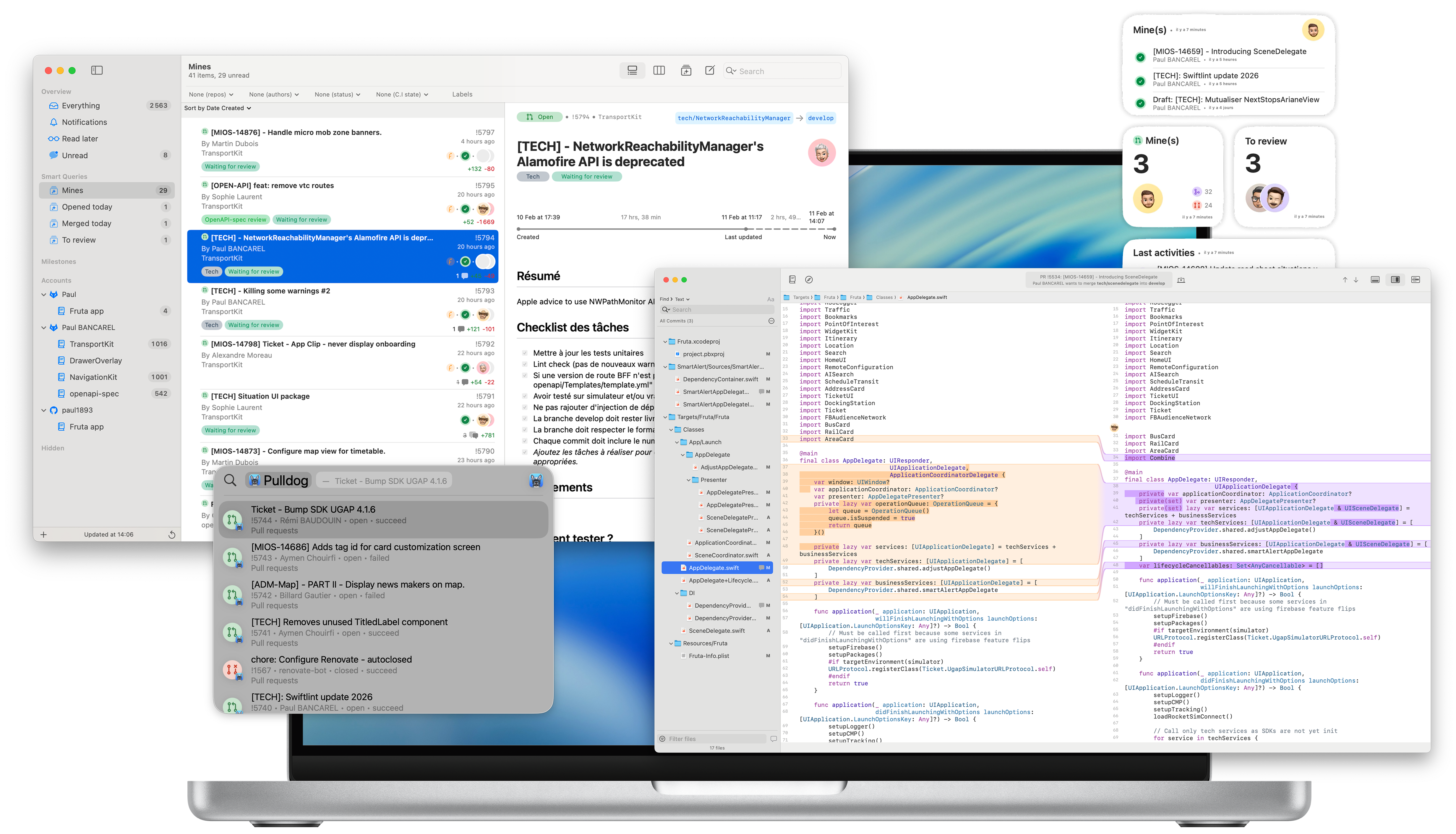
Pulldog is specifically engineered as a dedicated, native macOS client designed to manage code reviews from both GitHub and GitLab simultaneously. Its core function is to serve as a single, aggregated inbox where developers can track all pending pull requests across multiple repositories and accounts without resorting to endless browser tabs. By prioritizing a deep integration with the macOS environment—leveraging features like Spotlight and Widgets—Pulldog positions itself as a focused productivity tool rather than just another web wrapper.
This application is clearly targeted at professional software engineers, engineering managers, and anyone whose daily workflow demands frequent context switching between different repositories or organizations hosted on the two largest Git platforms. The primary value proposition of Pulldog is the shift from a reactive, tab-heavy review process to a proactive, integrated desktop experience that respects developer focus time.
The Problem: PR Overload and Context Switching Fatigue
The modern developer struggles with PR fatigue. Managing reviews often means juggling dozens of open tabs across various dashboards, constantly checking notifications, and losing flow state every time a new PR lands. Existing solutions are either platform-specific (GitHub's native interface or GitLab's UI) or browser extensions that don't offer true desktop integration. The market gap Pulldog seeks to fill is the lack of a dedicated, high-performance, truly native desktop aggregator that understands the rhythm of macOS users.
Pulldog solves this by centralizing this essential workflow element. Instead of bouncing between two different web domains, developers get one seamless interface tuned for speed and discoverability on macOS. This aggregation capability is critical for developers working across multiple teams or contributing to open-source projects alongside company work.
Key Features & Native Integration Highlights
What sets Pulldog apart is its commitment to native performance and deep system integration. This isn't just a list view; it’s built to feel like a core part of the operating system.
The standout features include:
- Multi-Account Aggregation: Seamlessly pull in PRs from disparate GitHub and GitLab accounts into one unified stream.
- Smart Queries: Users can create custom filters to drastically reduce the noise, ensuring only the most relevant PRs requiring immediate attention are surfaced. This customizable filtering system is key to achieving focused work.
- Spotlight Integration: Review actions directly from the macOS Spotlight search, offering an incredibly fast way to triage or jump into a specific PR without opening the full application.
- Widgets: Desktop widgets allow for at-a-glance status updates on pending reviews, turning the desktop background into a passive monitoring tool.
- Apple Intelligence Readiness: The mention of on-device Apple Intelligence suggests future capabilities focused on summarizing or suggesting review actions, hinting at high-level AI assistance tailored for privacy and speed.
The user experience (UX) appears clean, prioritizing rapid navigation and minimal visual clutter—a necessity for any tool designed to enhance focus.
Potential Drawbacks and Areas for Improvement
While Pulldog presents an exciting vision, every v1 product has room to grow. A potential drawback for some enterprise users might be the reliance on specific authentication methods or any limitations in handling complex organization-level settings common in large corporate environments. While it supports both GitHub and GitLab, the depth of integration for niche features within each platform (e.g., advanced merge checks or specific project boards) will need to be robust to truly replace web dashboards entirely.
For future iterations, the makers of Pulldog could consider:
- In-App Commenting/Drafting: While viewing is key, the ability to draft or submit simple comments directly within the native client (perhaps syncing back to the platform API) would significantly boost utility.
- Cross-Platform Consistency: Although advertised as a Mac app, support or web previews that maintain the native look and feel on other platforms might be beneficial for reviewers who occasionally use Windows or Linux machines.
- Advanced Analytics: Basic reporting on review turnaround times, even at a personal level, could be a powerful addition for personal performance tracking.
Bottom Line & Recommendation
Pulldog is a highly recommended utility for any developer using a Mac who feels buried under a mountain of browser tabs dedicated to code review. If you frequently jump between GitHub and GitLab projects and value context preservation above all else, this application delivers a refreshingly native and focused experience.
It successfully leverages the best aspects of the macOS platform—Spotlight, Widgets, and native speed—to solve a pervasive developer pain point. Pulldog isn't just another aggregator; it’s a productivity multiplier for the modern software engineer. Give it a spin; your browser tabs will thank you.
Featured AI Applications
Discover powerful tools to enhance your productivity
MindMax
New Way to Interact with AI
Beyond AI chat, transforming conversations into an infinite canvas. Combining brainstorming, mind mapping, critical and creative thinking tools to help you visualize ideas, solve problems efficiently, and accelerate learning.
AI Slides
AI Slides with Markdown
Revolutionary slide creation fusing AI intelligence with Markdown flexibility - edit anywhere, optimize anytime, iterate easily. Turn every idea into a professional presentation instantly.
AI Markdown Editor
Write Immediately
Extremely efficient writing experience: AI assistant, slash commands, minimalist interface. Open and write, easy writing. ✍️ Markdown simplicity + 🤖 AI power + ⚡ Slash commands = Perfect writing experience.
Chrome AI Extension
AI Assistant Anywhere
Transform your browsing experience with FunBlocks AI Assistant. Your intelligent companion supporting AI-driven reading, writing, brainstorming, and critical thinking across the web.