Affinity by Canva: Professional Design, Now Free for Everyone
Free creative software for vector, pixel, and print.=
Published: 11/15/2025
Canva has made a significant splash in the creative software landscape by making its professional design suite, Affinity, completely free for macOS and Windows users. This move unifies the previously separate Affinity Photo, Affinity Designer, and Affinity Publisher into a single, powerful application. This is a bold strategic play that positions Affinity as a direct, no-cost alternative to industry giants like Adobe Creative Cloud.
Affinity by Canva is an all-in-one design solution catering to a broad spectrum of creative professionals, including graphic designers, photographers, illustrators, and layout artists. Its core value proposition lies in offering professional-grade tools for vector illustration, pixel-based photo editing, and robust page layout, all within a single, integrated application, and crucially, at no cost. This eliminates the financial barrier often associated with high-end creative software, making advanced design capabilities accessible to students, freelancers, and small businesses alike.
Problem & Solution
For years, professional designers have been limited in their choices for powerful creative software, often facing expensive subscription models that can be a significant financial burden, especially for independent creatives and startups. Adobe's Creative Cloud, while powerful, comes with a recurring monthly cost that can add up over time. The previous Affinity suite offered a compelling alternative with a one-time purchase model, but still required an upfront investment for each application.
Affinity by Canva directly addresses this problem by offering a comprehensive, professional-grade suite for free. This move disrupts the traditional subscription-based model prevalent in the industry, making advanced design tools universally accessible. By integrating the functionalities of its three previous applications into one, Affinity streamlines workflows and removes the need to switch between different programs for various design tasks. This unified approach, combined with its zero-cost entry, fills a significant market gap for users seeking powerful, uninhibited creative freedom without the recurring financial commitment.
Key Features & Highlights
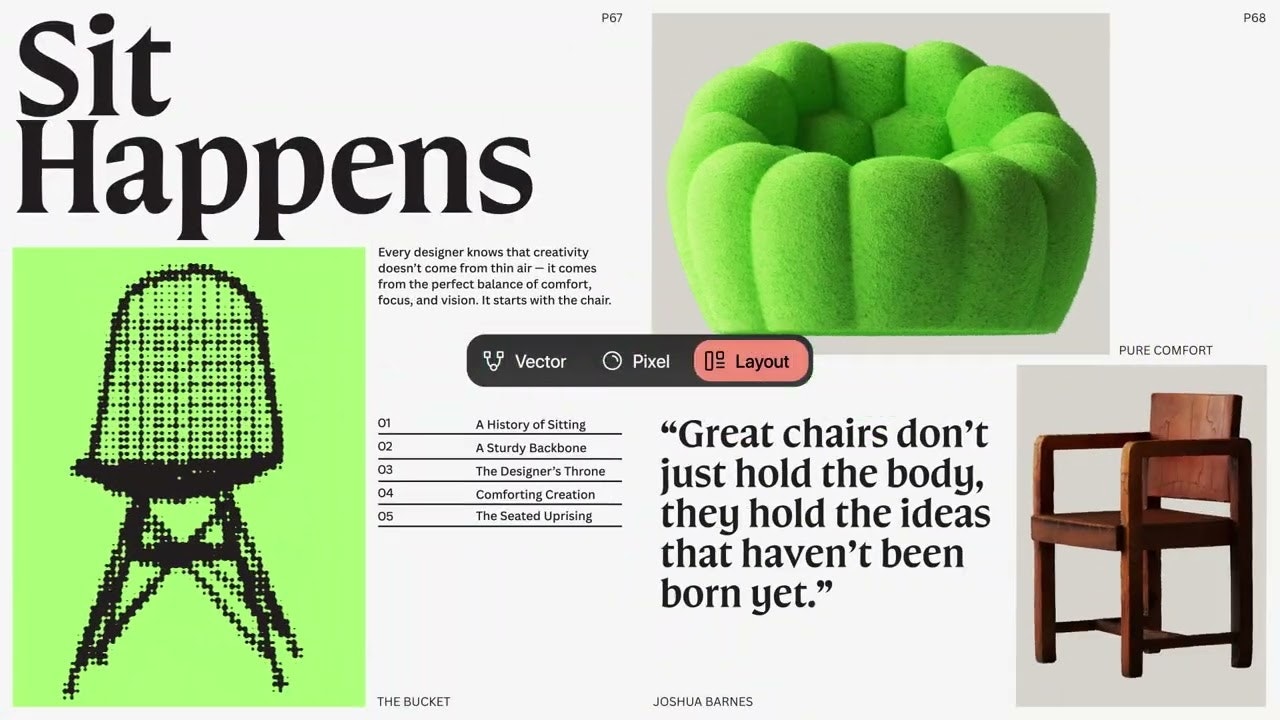
The "all-new" Affinity by Canva combines the best of its predecessors into a single, high-performance application. Users can seamlessly transition between vector, pixel, and layout workspaces, providing a fluid creative experience.
- Unified Creative Environment: This is perhaps the most significant highlight. Instead of separate apps for photo editing (Affinity Photo), vector design (Affinity Designer), and desktop publishing (Affinity Publisher), all these capabilities are now housed within one application. This allows for a truly integrated workflow, enabling designers to handle complex projects from concept to publication without leaving the app.
- Professional-Grade Tools: Affinity maintains its reputation for offering a robust set of tools that rival industry standards. This includes advanced photo editing features like non-destructive RAW editing, image composites, retouching, and HDR merge. For vector design, it provides precision tools for lines, curves, and grids, suitable for everything from logo design to UI systems. The layout capabilities support multi-page documents, master pages, and advanced typographic controls for brochures, books, and reports.
- Real-time Performance: Built on a high-performance engine, Affinity ensures that every adjustment, filter, and layer effect updates live, even with thousands of layers or at extreme zoom levels. This ultra-fast and super-smooth experience is crucial for professional workflows.
- Customizable Workspace: Users can personalize their workspace by rearranging panels, mixing and matching tools, and saving custom "studios" to adapt the software to their specific workflow needs.
- Extensive File Compatibility: Affinity supports importing various popular file formats, including PSD, AI, PDF, SVG, and IDML, ensuring compatibility with existing projects and collaboration across different platforms. It also offers one-click presets or custom slice-based output for export, with quick export options directly to Canva.
- Canva AI Studio Integration (Premium Feature): While the core application is free, users with a Canva Premium plan can unlock powerful AI tools directly within Affinity. These include features like Generative Fill, Expand & Edit, and Background Removal, which can significantly speed up repetitive tasks. It's important to note that Affinity ensures user content is not used to train AI features.
Potential Drawbacks & Areas for Improvement
While the "free forever" model of Affinity by Canva is incredibly appealing, there are a few considerations and areas for potential improvement:
- AI Feature Paywall: The most notable "catch" for some users is that while the core design tools are free, advanced AI-powered features like Generative Fill are exclusively available to Canva Premium subscribers. This could be a drawback for professionals heavily reliant on AI functionalities who are looking for a completely free solution.
- No Image Cataloguing: Affinity lacks a built-in image cataloging feature, meaning users will need external software to manage their photo libraries. This might narrow its appeal for photographers who prefer an all-in-one solution for both editing and organization.
- Learning Curve for Beginners: Although powerful, Affinity is a professional-grade tool. New users, especially those accustomed to simpler, template-based platforms like the core Canva, might find the learning curve steeper. While it offers extensive features, it doesn't provide the same level of one-click presets or creative inspiration that some beginners might seek.
- Long-Term Strategy Concerns: Some long-time Affinity users have expressed concerns about the future direction of the product under Canva's ownership, particularly regarding potential shifts towards a subscription model for more features or a dilution of its professional focus in favor of a broader, more casual user base. While Canva has stated a commitment to keeping Affinity free, the dynamic nature of the software industry means these concerns linger for some.
Bottom Line & Recommendation
Affinity by Canva represents a monumental shift in the creative software landscape, offering an incredibly powerful and feature-rich design suite completely free for macOS and Windows. It is an ideal choice for:
- Students and aspiring designers: Who need professional tools but are constrained by budget.
- Freelancers and small businesses: Seeking a cost-effective alternative to expensive subscription-based software.
- Experienced professionals: Who value precision, speed, and control in their design process and are comfortable without integrated AI or image cataloguing features, or are willing to invest in a Canva Premium plan for AI capabilities.
Overall, Affinity by Canva is a highly recommended product. Its unified platform, robust feature set, and unmatched price point make it a game-changer for the creative community. While the AI features being behind a paywall and the lack of image cataloguing are minor drawbacks, the sheer value offered by a free, professional-grade creative suite is undeniable. It's a fantastic opportunity for anyone looking to elevate their design work without breaking the bank.
Featured AI Applications
Discover powerful tools to enhance your productivity
MindMax
New Way to Interact with AI
Beyond AI chat, transforming conversations into an infinite canvas. Combining brainstorming, mind mapping, critical and creative thinking tools to help you visualize ideas, solve problems efficiently, and accelerate learning.
AI Slides
AI Slides with Markdown
Revolutionary slide creation fusing AI intelligence with Markdown flexibility - edit anywhere, optimize anytime, iterate easily. Turn every idea into a professional presentation instantly.
AI Markdown Editor
Write Immediately
Extremely efficient writing experience: AI assistant, slash commands, minimalist interface. Open and write, easy writing. ✍️ Markdown simplicity + 🤖 AI power + ⚡ Slash commands = Perfect writing experience.
Chrome AI Extension
AI Assistant Anywhere
Transform your browsing experience with FunBlocks AI Assistant. Your intelligent companion supporting AI-driven reading, writing, brainstorming, and critical thinking across the web.