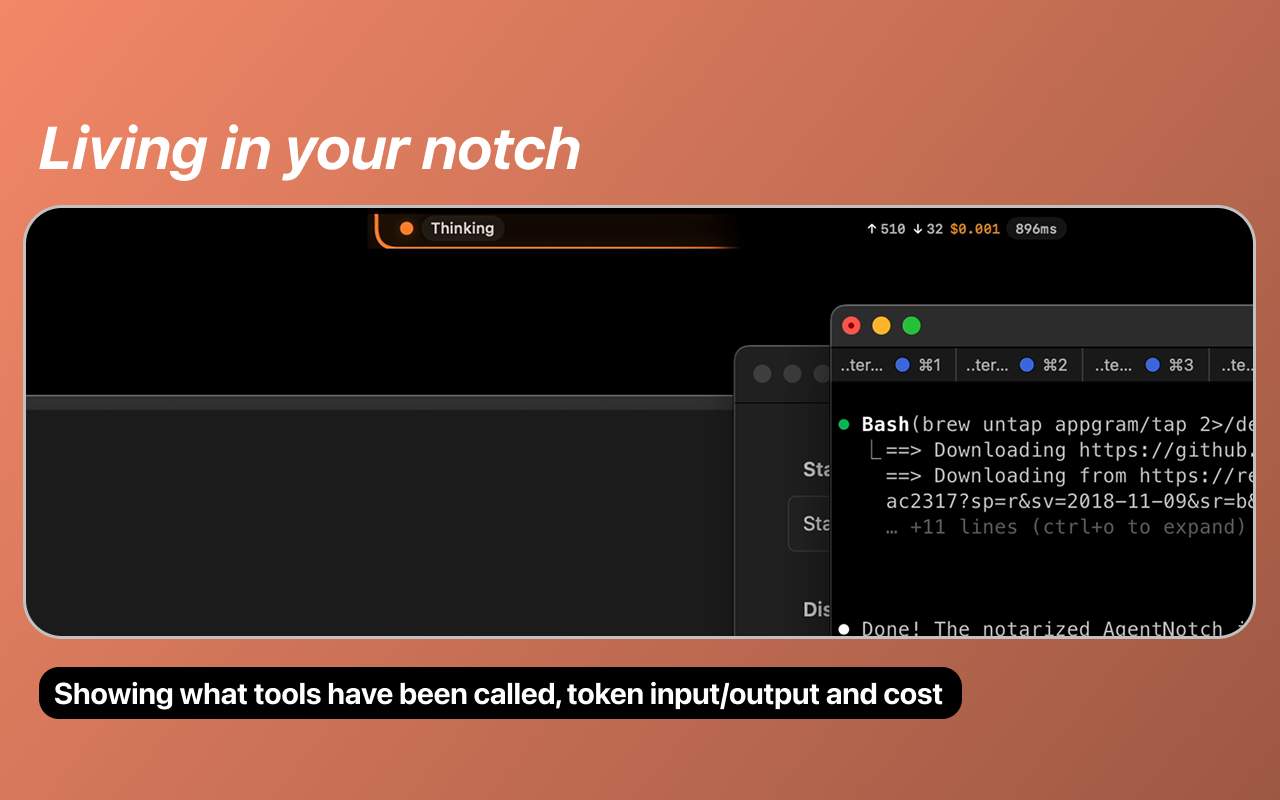
AgentNotch: Real-Time AI Coding Assistant Telemetry—Right in Your Mac's Notch
Real-time AI coding assistant telemetry in your Mac's notch
Published: 1/7/2026
Product Overview: Bringing AI Activity to the Foreground
AgentNotch is a fascinating and innovative macOS utility that directly addresses a growing pain point for developers heavily reliant on generative AI coding assistants: the lack of immediate, visual feedback on what those assistants are actually doing. This application cleverly repurposes the often-unused space around the modern Mac's TrueDepth camera cutout (the "notch") into a subtle, real-time dashboard for your AI tools.
Specifically, AgentNotch provides live telemetry for popular models like Claude Code and OpenAI Codex. Instead of toggling back and forth between your IDE, terminal, and AI chat windows to see if your assistant is "thinking," "reading files," or "executing tools," AgentNotch visualizes this activity right in the menu bar. It’s designed for power users—software developers, data scientists, and technical writers—who integrate large language models (LLMs) deeply into their daily workflows and need to maintain context switching efficiency.
The core value proposition of AgentNotch is providing passive, non-intrusive observability. It ensures that while you are context-switching to check documentation or switch applications, you always have a silent guardian monitoring the heavy lifting being done by your AI partners in the background.
Problem & Solution: Solving AI Visibility Blind Spots
The problem AgentNotch tackles is the "black box" nature of modern AI workflows. When you prompt an LLM integration (especially one that involves file system access or external tool execution), the interaction often becomes asynchronous. You send the request and then wait, unsure if the context window is loading, if the tool execution failed silently, or if the model is just taking a long time to generate a complex response. This uncertainty leads to unnecessary context switching, interrupting developer flow state.
AgentNotch solves this by establishing a direct, visual telemetry stream. By tapping into the application activity (likely via system logs or specific integration hooks, though the implementation details remain behind the scenes), it displays concise indicators in the notch area. This differs fundamentally from browser-based extension notifications or terminal output. It is a persistent, system-level status update, allowing developers to focus on adjacent tasks knowing that a glance at the notch will confirm if their coding assistant is still actively processing their request. It effectively fills the market gap for dedicated, minimalist, AI workflow observability on macOS.
Key Features & Highlights: Maximizing Menu Bar Real Estate
AgentNotch’s genius lies in its minimalist implementation. The focus is purely on actionable visual cues, leveraging the unique hardware design of newer Macs.
Key features include:
- Real-Time Indicator Display: Visual cues showing whether Claude Code or OpenAI Codex are actively reading files, processing thoughts, or preparing tool execution.
- Non-Intrusive Design: Integration directly into the Mac notch ensures it uses space that is otherwise wasted, keeping the main menu bar free for essential application status icons.
- Simple Installation: Accessibility is prioritized, offering installation via Homebrew (
brew install --cask agentnotch), aligning with standard developer tooling practices. - Focus Preservation: By showing activity status externally, it drastically reduces the need to bring the AI chat window or IDE to the foreground just to check progress, protecting the developer's concentration.
The user experience is clean; once set up (following the necessary GitHub guide for telemetry configuration), the application fades into the background, only demanding attention when a status change occurs—a true example of ambient computing for developers.
Potential Drawbacks & Areas for Improvement
While AgentNotch is a brilliant concept, its current form presents a few natural limitations based on its scope. The primary dependency is the setup process, which currently requires users to configure telemetry hooks for both Claude Code and Codex manually via GitHub instructions. This adds friction to onboarding that a more integrated solution might avoid.
For future iterations, several enhancements could significantly boost its utility:
- Broader LLM Support: Expanding support beyond Codex and Claude to include popular open-source models or other cloud providers (e.g., GitHub Copilot activity, Google Gemini integrations) would increase its reach across the developer ecosystem.
- Configurable Thresholds/Alerts: Allowing users to customize what triggers a visual highlight or perhaps even small accompanying sounds for critical statuses (like "Tool Execution Failed") could enhance usability for users who are away from their screens briefly.
- Status Detail Hover: Currently, the display seems to be purely symbolic. Implementing a hover state that displays a brief text summary (e.g., "Codex: Analyzing main.py (3 files)") would provide instant, deeper context without needing to open a configuration panel.
Bottom Line & Recommendation
AgentNotch is a must-have utility for the modern macOS developer who actively leverages generative AI coding assistants. If you find yourself constantly checking the status bar or switching windows just to confirm your AI agent is still working, this application provides an elegant, hardware-specific solution to reclaim focus and improve workflow efficiency. It’s a smart piece of developer productivity software that truly understands the value of ambient feedback. Highly recommended for anyone looking to minimize context switching while integrating tools like Claude and Codex into their daily grind.
Featured AI Applications
Discover powerful tools to enhance your productivity
MindMax
New Way to Interact with AI
Beyond AI chat, transforming conversations into an infinite canvas. Combining brainstorming, mind mapping, critical and creative thinking tools to help you visualize ideas, solve problems efficiently, and accelerate learning.
AI Slides
AI Slides with Markdown
Revolutionary slide creation fusing AI intelligence with Markdown flexibility - edit anywhere, optimize anytime, iterate easily. Turn every idea into a professional presentation instantly.
AI Markdown Editor
Write Immediately
Extremely efficient writing experience: AI assistant, slash commands, minimalist interface. Open and write, easy writing. ✍️ Markdown simplicity + 🤖 AI power + ⚡ Slash commands = Perfect writing experience.
Chrome AI Extension
AI Assistant Anywhere
Transform your browsing experience with FunBlocks AI Assistant. Your intelligent companion supporting AI-driven reading, writing, brainstorming, and critical thinking across the web.