Camzy Review: The Essential Tool for Effortless Tesla Dashcam Video Management
Export Tesla dashcam video with driving data overlaid
Published: 2/4/2026
Product Overview: Taking Control of Your TeslaCam Footage
Camzy enters the burgeoning market of EV utility software with a highly specific and desperately needed focus: enhancing the review, management, and export of Tesla dashcam video. For Tesla owners, the standard built-in viewer offers basic functionality, but when it comes to detailed review—especially for insurance purposes, post-incident analysis, or simply curating memories—it falls short. Camzy directly addresses this gap, transforming the cumbersome process of reviewing raw Sentry Mode and Dashcam footage into an organized, data-rich experience.
This application is tailored specifically for Tesla owners who value efficiency and data integrity. Whether you’re a daily commuter worried about potential accidents, an enthusiast documenting unique road trips, or someone who needs reliable, verifiable evidence for claims, Camzy positions itself as the indispensable software layer between your car's storage device and your desktop. Its core value proposition lies in integrating critical driving telemetry directly onto the video playback, something the native system simply cannot do.
Problem & Solution: Moving Beyond Basic Playback
The central problem Camzy solves is the fragmentation and lack of context inherent in reviewing raw TeslaCam files. When an event occurs, the driver is left with isolated video files that lack critical accompanying data like speed, precise location, or synchronized multi-camera views. Sifting through hundreds of clips to find the exact moment of impact or a specific point on a journey is a manual, time-consuming chore.
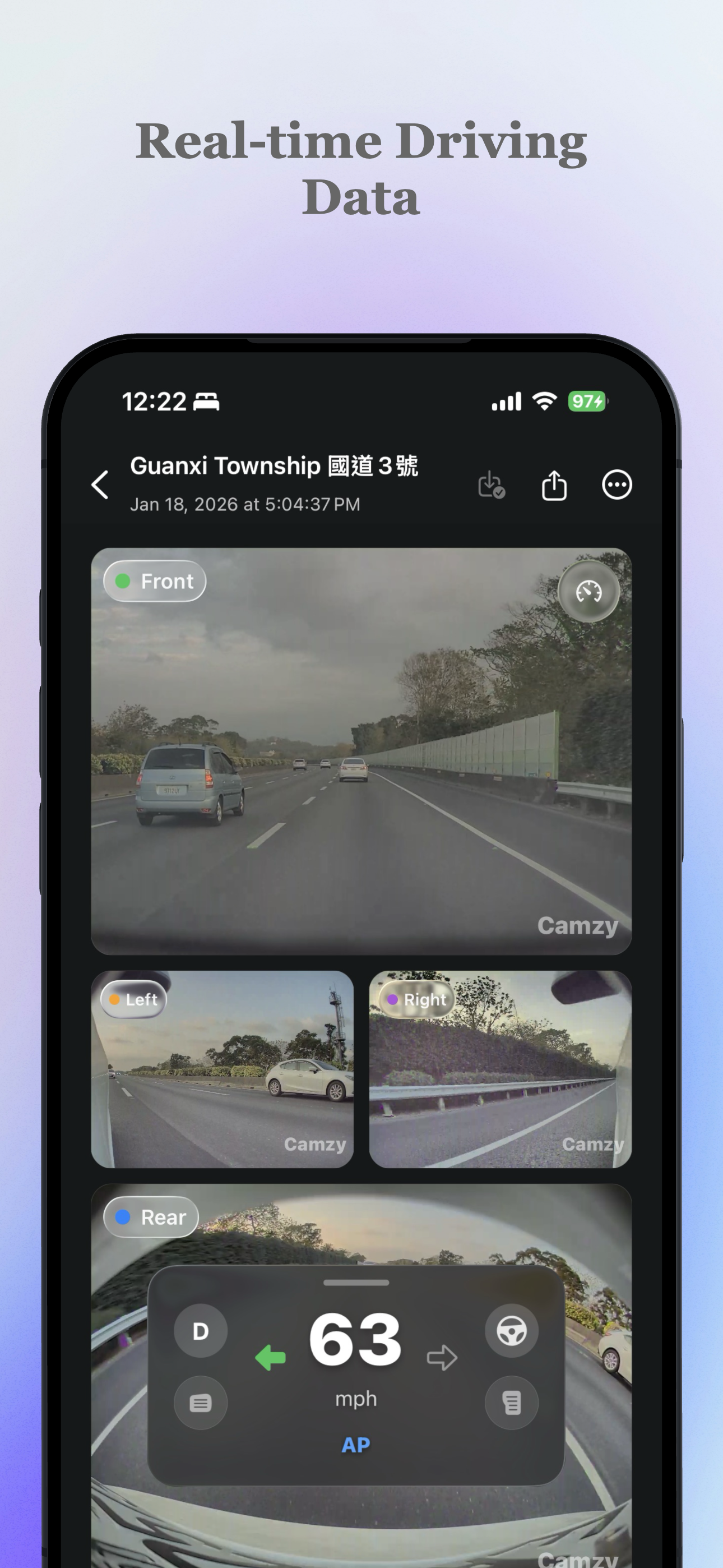
Camzy solves this by acting as a sophisticated video indexing and overlay engine. It intelligently syncs the six camera feeds (front, rear, sides, and interior) into a single, synchronized playback window. Crucially, it overlays essential driving data—speed, precise timestamps, and location maps—directly onto the video stream. This elevates the footage from mere visual evidence to a comprehensive data package, instantly filling the gap left by the standard Tesla media player.
Key Features & Highlights: Data-Rich, User-Centric Design
The features packed into Camzy demonstrate a deep understanding of the power user's needs. The ability to view 6-camera synced playback simultaneously is a massive upgrade, providing holistic situational awareness that single-feed viewing obscures. For incident reconstruction, this multi-angle view synchronized with real-time speed data is invaluable.
The navigational features are perhaps the most exciting aspect for day-to-day use:
- Map-Based Browsing: Instead of scrolling through file dates, users can visually pinpoint moments on a map, making location-specific review instantaneous.
- Smart Jumps: Quickly navigate between recorded Sentry Mode events and standard Dashcam clips, eliminating frustrating dead time between relevant footage.
- Clean Exports: The final product is a polished, professional export featuring clear timestamp and speed overlays, ready for sharing with insurance adjusters or simply archiving memories beautifully. Furthermore, the Batch backup and deletion functionality streamlines ongoing storage management, a frequent headache for users with high-capacity drives.
The user experience, judging by the design cues, appears clean and focused, ensuring that powerful functionality doesn't result in a cluttered interface, maintaining that essential "effortless" feeling promised in the tagline.
Potential Drawbacks & Areas for Improvement
While Camzy offers significant utility, there are always areas where specialized software can expand its reach. A primary consideration for potential users will be platform compatibility; currently, it seems to be a desktop application (implied by "batch backup"), but confirmation on Mac/Windows support would be beneficial.
For future iterations, I’d suggest focusing on deeper integration or metadata handling:
- Cloud Sync Integration: Allowing users to export directly to cloud storage services (like Google Drive or Dropbox) alongside local backup would streamline the archival process further.
- Automated Event Tagging: While Smart Jumps are excellent, introducing AI-based tagging for specific events (e.g., hard braking detection, pedestrian proximity alerts) could automate the already powerful navigation tools.
- Mobile Companion App (Stretch Goal): While desktop processing is necessary for large files, a lightweight mobile app for quick on-the-go review of recent Sentry events would complete the ecosystem.
Bottom Line & Recommendation
Camzy is not just another Tesla accessory; it is a crucial utility upgrade for anyone serious about documenting their driving. If you frequently deal with your TeslaCam footage for legitimate reasons—be it insurance, safety analysis, or preserving memories with maximum context—this tool offers unparalleled efficiency and data fidelity.
Who should try Camzy? Any current Tesla owner utilizing Sentry Mode and Dashcam features who finds the native review system too basic. Camzy successfully converts complex, raw vehicle data into actionable, easily digestible video evidence, making it a highly recommended purchase for maximizing the investment in your Tesla's safety features.
Featured AI Applications
Discover powerful tools to enhance your productivity
MindMax
New Way to Interact with AI
Beyond AI chat, transforming conversations into an infinite canvas. Combining brainstorming, mind mapping, critical and creative thinking tools to help you visualize ideas, solve problems efficiently, and accelerate learning.
AI Slides
AI Slides with Markdown
Revolutionary slide creation fusing AI intelligence with Markdown flexibility - edit anywhere, optimize anytime, iterate easily. Turn every idea into a professional presentation instantly.
AI Markdown Editor
Write Immediately
Extremely efficient writing experience: AI assistant, slash commands, minimalist interface. Open and write, easy writing. ✍️ Markdown simplicity + 🤖 AI power + ⚡ Slash commands = Perfect writing experience.
Chrome AI Extension
AI Assistant Anywhere
Transform your browsing experience with FunBlocks AI Assistant. Your intelligent companion supporting AI-driven reading, writing, brainstorming, and critical thinking across the web.