Canva’s Creative Operating System: The All-in-One AI-Powered Visual Suite
Visual Suite to edit vids, emails, sites + docs in a canvas
Published: 11/15/2025
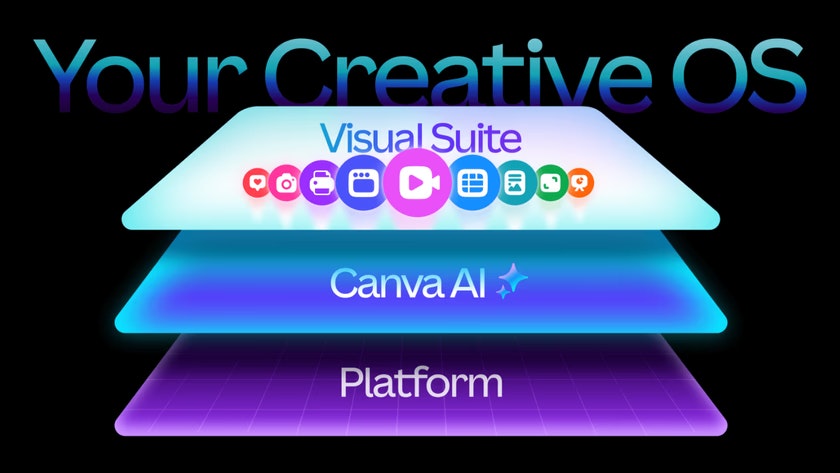
Canva has launched its "Creative Operating System," a significant evolution for the widely-used visual communication platform. This comprehensive update integrates a supercharged Visual Suite with "world-first design AI" and robust tools for business growth and brand scaling. More than just a collection of new features, it's presented as a unified ecosystem designed to streamline creative workflows, making it easier for individuals and teams to produce high-quality visual content across various formats. It essentially aims to bring together the functionalities of disparate tools for design, video editing, presentations, documents, and even marketing analytics into one intuitive platform.
The target audience for Canva’s Creative Operating System is broad, encompassing individual creators, small businesses, marketing teams, and large enterprises. Use cases range from creating engaging social media graphics and videos to developing comprehensive marketing campaigns, designing interactive websites, and managing brand consistency at scale. The core value proposition lies in its ability to democratize design and productivity, making advanced creative and business functionalities accessible to users regardless of their design expertise, and enabling seamless collaboration within a single environment.
Problem & Solution
Historically, creators and businesses often contend with "app sprawl," needing to switch between multiple software solutions for different creative tasks – one for presentations, another for video editing, a separate tool for spreadsheets, and so on. This fragmentation leads to inefficiencies, inconsistent branding, and a steeper learning curve.
Canva’s Creative Operating System directly addresses this by offering a unified workspace. It provides an all-in-one platform where users can create, collaborate, and manage various content types, from documents and presentations to videos, websites, and even email campaigns, all within a single design file. This integrated approach eliminates the need to constantly switch between applications, ensuring consistency across designs and streamlining workflows from ideation to delivery. The differentiating factor is its emphasis on "design AI" – an AI model specifically trained to understand design principles, enabling it to generate not just static images but fully editable designs.
Key Features & Highlights
The Creative Operating System introduces a suite of powerful features, many of which are enhanced by AI:
- Supercharged Visual Suite: This is the core creative workspace, now allowing users to work on diverse content types like webpages, documents, presentations, and videos within a single design. The revamped Video 2.0 offers a faster, more intuitive video editing experience with professional-grade tools and AI-powered features like Magic Video, which can turn text prompts into polished videos. Canva Email Design streamlines the creation of branded email campaigns with templates and AI integration for copy and image generation. Interactive elements can also be added through Canva Forms.
- World-First Design AI (Canva AI / Magic Studio): This is a standout feature, powered by a new AI model trained to understand design complexity, including structure, layering, hierarchy, and branding. This enables AI to generate complete, editable designs from text prompts. Key AI tools include:
- Canva AI (Chatbot): A conversational AI assistant that can generate text, slides, and tweak design elements via text or voice.
- Magic Media: AI-powered image and video creation from text or spoken prompts.
- AI-Powered Image Editing: Features like background removal, object replacement, and AI-generated backgrounds that match lighting and composition.
- Magic Design: Generates entire presentation outlines, slides, and content from a single text prompt.
- Canva Code: Allows users to create interactive elements like calculators or flashcards without coding knowledge, using conversational text prompts.
- Powerful Ways to Grow Your Business and Scale Your Brand:
- Canva Sheets: An innovative spreadsheet tool that integrates text, data, and graphic components, allowing users to create dynamic charts, reports, and infographics. It includes Magic Insights for automated data analysis and Data Connectors to import data from platforms like HubSpot and Google Analytics.
- Brand System (Canva Brand / Brand Kit): This feature allows businesses to organize logos, templates, colors, and guidelines in a flexible, visual space. It ensures brand consistency by surfacing tips and approved assets directly within the editor, and Canva AI can generate designs that automatically reflect brand guidelines.
- Canva Grow: A marketing engine that allows teams to create ads, publish them directly to platforms like Meta, and track performance, all within Canva.
The user experience is designed for simplicity and accessibility, maintaining Canva's reputation for ease of use while introducing advanced functionalities.
Potential Drawbacks & Areas for Improvement
While the Creative Operating System is a significant leap, there are a few considerations:
- Feature Accessibility: Many of the most advanced AI features, Brand Kits, and the Canva Grow service are primarily available with a Canva Pro or higher plan. Free users have limited access to some AI features and usage caps, which might lead to frustration for those accustomed to free access for basic design tools. Clearer demarcation of free vs. paid features upfront could manage expectations.
- AI Output Refinement: While AI generation is impressive, the initial outputs might still require human refinement to perfectly match specific creative visions or nuanced brand messaging. Continued improvement in AI's understanding of complex briefs will be crucial.
- Integration Depth: While Data Connectors are present, deeper, more seamless integrations with a wider array of third-party marketing, CRM, and analytics platforms could further enhance the "operating system" aspect, making it a true hub for business operations beyond just creative output.
- Performance with Complex Projects: As users leverage the "one design" approach for entire campaigns with multiple formats and AI-generated elements, ensuring the platform remains performant and doesn't experience slowdowns with very large or complex projects will be important.
Bottom Line & Recommendation
Canva’s Creative Operating System is a monumental release that solidifies Canva's position as a comprehensive visual communication and productivity platform. It's an ideal solution for anyone looking to consolidate their creative toolkit, enhance their design capabilities with powerful AI, and streamline workflows for individuals and teams. Small businesses and marketing teams, in particular, will find immense value in the integrated marketing features, brand management tools, and the ability to scale content creation efficiently.
If you're an existing Canva user looking to elevate your creative output and productivity, or a business struggling with fragmented design and marketing tools, Canva's Creative Operating System is highly recommended. It represents a significant step towards a future where creativity and productivity are seamlessly intertwined, making advanced design and business functions accessible to a much wider audience.
Featured AI Applications
Discover powerful tools to enhance your productivity
MindMax
New Way to Interact with AI
Beyond AI chat, transforming conversations into an infinite canvas. Combining brainstorming, mind mapping, critical and creative thinking tools to help you visualize ideas, solve problems efficiently, and accelerate learning.
AI Slides
AI Slides with Markdown
Revolutionary slide creation fusing AI intelligence with Markdown flexibility - edit anywhere, optimize anytime, iterate easily. Turn every idea into a professional presentation instantly.
AI Markdown Editor
Write Immediately
Extremely efficient writing experience: AI assistant, slash commands, minimalist interface. Open and write, easy writing. ✍️ Markdown simplicity + 🤖 AI power + ⚡ Slash commands = Perfect writing experience.
Chrome AI Extension
AI Assistant Anywhere
Transform your browsing experience with FunBlocks AI Assistant. Your intelligent companion supporting AI-driven reading, writing, brainstorming, and critical thinking across the web.