CapslockMute Review: The Frictionless Future of Video Call Muting
The fastest way to mute yourself on video calls
Published: 1/27/2026
Product Overview
CapslockMute is a deceptively simple, yet profoundly useful, Mac utility designed to eliminate the small, constant frictions of modern remote work. Billed as "The fastest way to mute yourself on video calls," this application achieves its goal by repurposing the often-ignored Caps Lock key. In an era where video conferencing (Zoom, Teams, Google Meet) dominates professional communication, the speed and reliability of the mute button are critical for maintaining focus and professionalism. CapslockMute transforms this essential function into pure muscle memory.
This utility specifically targets Mac users who spend significant portions of their day hopping in and out of virtual meetings. The core value proposition lies in efficiency: rather than relying on awkward mouse clicks or cumbersome keyboard shortcuts (like Cmd+Shift+A or the standard PTT configurations), CapslockMute assigns the mute/unmute toggle directly to the large, centrally located Caps Lock key. For anyone participating in fast-paced virtual environments, from quick stand-ups to intense client presentations, this shift in control flow is a game-changer for audio management.
Problem & Solution
The fundamental problem CapslockMute addresses is the cognitive load and physical delay associated with standard muting protocols. Whether you need to cough, take a private phone call, or seamlessly jump into an impromptu side conversation, fumbling for the right key combination or tracking the cursor to click the on-screen microphone icon wastes precious milliseconds. This delay often leads to moments where you accidentally speak while muted, or worse, speak while unmuted during sensitive moments.
CapslockMute solves this by leveraging the accessibility of the Caps Lock key. Since the key is large and naturally positioned under the pinky finger, mapping the mute function to it creates an instantaneous, tactile trigger. It fills a significant market gap by providing a universal, application-agnostic (or at least, multi-platform aware) solution that works across the most popular communication tools—specifically Zoom, Microsoft Teams, and Tandem. Alternatives often require complex third-party macro software or custom scripting, whereas CapslockMute offers a dedicated, lightweight solution right out of the box.
Key Features & Highlights
The strength of CapslockMute lies in its focused simplicity. It doesn't try to be a full productivity suite; it focuses laser-like on one task and executes it perfectly.
Key features include:
- Direct Remapping: The utility seamlessly remaps the physical Caps Lock key to trigger the native mute/unmute command for supported applications.
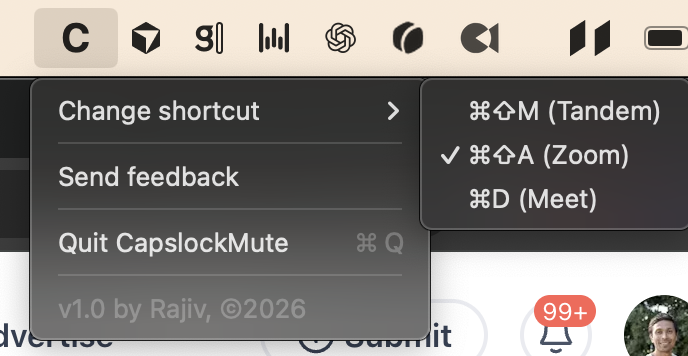
- Broad Application Support: Essential compatibility with the giants of video conferencing: Zoom, Teams, and Tandem are explicitly supported, covering the vast majority of professional users.
- Muscle Memory Integration: As noted by the makers, the goal is to make muting/unmuting an automatic reflex, significantly reducing reaction time compared to visual confirmation or complex key combinations.
- Lightweight Performance: As a dedicated Mac utility, CapslockMute promises minimal system overhead, ensuring it runs smoothly in the background without interfering with high-demand tasks like screen sharing or recording.
The user experience is exceptionally streamlined. Installation is quick, and once configured, the utility works silently. The beauty of this implementation is that it respects the visual indicator within each application; when you press Caps Lock, the corresponding microphone icon in Zoom or Teams visually confirms the state change, marrying physical input with digital feedback flawlessly.
Potential Drawbacks & Areas for Improvement
While highly effective in its core function, CapslockMute, in its current iteration, presents a few areas ripe for future development.
The most noticeable limitation is the inherent trade-off of using the Caps Lock key: it completely disables the standard Caps Lock function. For users who occasionally need true all-caps input (e.g., writing acronyms or emphasis), this requires toggling the utility off or using a more complex modifier key setup, which negates the speed advantage.
To enhance value, the makers could consider:
- Toggle Functionality: Introducing a secondary key combination (e.g., Fn + Caps Lock) that temporarily disables the mute mapping and re-enables standard Caps Lock functionality without quitting the app.
- Extended App Support: While Zoom and Teams are vital, expanding support for other key players like Google Meet or specialized industry tools would broaden its appeal dramatically.
- Visual Confirmation: While the in-app icons confirm the status, a small, persistent, but unobtrusive on-screen indicator showing the current mute status (especially when switching focus between windows) could prevent accidental unmuting in high-stakes scenarios.
Bottom Line & Recommendation
CapslockMute is an essential download for any Mac professional whose workflow revolves around constant video communication. It’s a prime example of solving a modern, specific pain point with elegant, focused engineering. If you are tired of fumbling for your mute button during daily stand-ups or client calls, this utility offers an immediate, frictionless upgrade to your audio workflow.
Recommendation: Highly Recommended for remote workers, developers, sales professionals, and anyone prioritizing audio efficiency on macOS. It’s a tiny utility that delivers massive quality-of-life improvements, making it a must-try feature on Product Hunt this week.
Featured AI Applications
Discover powerful tools to enhance your productivity
MindMax
New Way to Interact with AI
Beyond AI chat, transforming conversations into an infinite canvas. Combining brainstorming, mind mapping, critical and creative thinking tools to help you visualize ideas, solve problems efficiently, and accelerate learning.
AI Slides
AI Slides with Markdown
Revolutionary slide creation fusing AI intelligence with Markdown flexibility - edit anywhere, optimize anytime, iterate easily. Turn every idea into a professional presentation instantly.
AI Markdown Editor
Write Immediately
Extremely efficient writing experience: AI assistant, slash commands, minimalist interface. Open and write, easy writing. ✍️ Markdown simplicity + 🤖 AI power + ⚡ Slash commands = Perfect writing experience.
Chrome AI Extension
AI Assistant Anywhere
Transform your browsing experience with FunBlocks AI Assistant. Your intelligent companion supporting AI-driven reading, writing, brainstorming, and critical thinking across the web.