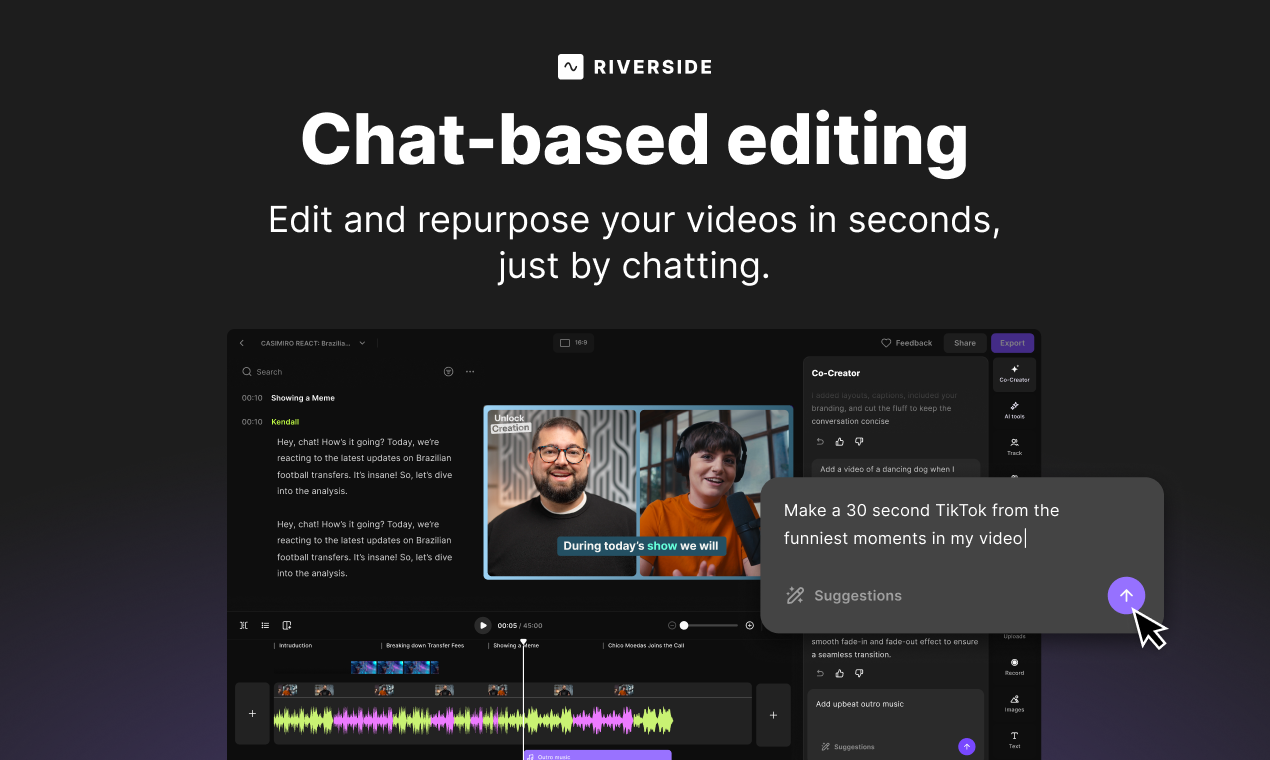
Chat-Based Editing by Riverside: Your AI Co-Pilot for Video and Podcast Perfection
Edit your videos and podcasts, just by chatting.
Published: 11/15/2025
Riverside's Chat-Based Editing introduces a groundbreaking approach to video and podcast post-production, transforming what can often be a tedious process into an intuitive, conversational experience. This innovative feature, powered by an integrated AI agent called "Co-Creator," aims to democratize professional-grade editing, making it accessible to creators of all skill levels. By allowing users to interact with their content through natural language prompts, Riverside streamlines workflows and significantly reduces the time and effort typically associated with editing.
The product targets a broad audience, from independent podcasters and YouTubers to businesses and marketing teams, essentially anyone who regularly produces video and audio content and seeks to optimize their post-production. Use cases range from quickly polishing talking-head videos and generating social media clips to enhancing overall audio quality and adding visual elements like B-roll footage. The core value proposition lies in its ability to empower creators to focus more on content creation and less on the technical complexities of editing, promising a faster, more enjoyable, and ultimately more efficient process.
Problem & Solution
Traditional video and podcast editing can be a significant bottleneck for creators. It often requires specialized software, a steep learning curve, and a considerable time commitment to achieve polished results. Tasks like removing filler words, cutting silences, adding captions, or incorporating B-roll can be time-consuming and manual. Many creators find the editing phase to be less enjoyable than the actual recording.
Riverside's Chat-Based Editing directly addresses these pain points by offering an AI-powered solution that simplifies complex editing tasks into conversational prompts. Instead of navigating intricate timelines and menus, users can simply "chat" with the Co-Creator AI, telling it what changes they want to make. This approach differs significantly from many alternatives that offer AI transcription for text-based editing, but still require manual selection and deletion of text to make cuts. Riverside's chat interface takes this a step further, allowing for more abstract commands like "make this video ready to share" or "improve the sound quality," with the AI intelligently executing a series of edits. This fills a crucial market gap for creators who desire professional results without becoming editing experts themselves.
Key Features & Highlights
Riverside's Chat-Based Editing, driven by the Co-Creator AI, boasts several notable features that streamline the editing process:
- Natural Language Interaction: The most prominent highlight is the ability to edit videos and podcasts using conversational prompts. Users can instruct the AI to perform various tasks, from simple trims to more complex enhancements, simply by typing their requests.
- Automated Editing Tasks: The AI agent can automatically handle common editing chores such as removing unnecessary parts, fluff, pauses, and filler words, significantly speeding up the cleanup process.
- Content Enhancement: Co-Creator can instantly improve sound quality, enhance layouts, and make videos "look better" with minimal effort from the user. It also features "Magic Audio" for AI-powered audio enhancement, removing background noise and echo.
- Visual and Audio Additions: Users can request the AI to add B-roll footage, background music, captions, logos, and custom branding, which the AI automatically formats and places appropriately within the video.
- Content Repurposing: A powerful feature is the AI's ability to repurpose content for different platforms. It can create social media-optimized clips (like 30-second Instagram reels), YouTube tutorials, or testimonial videos. It can also generate AI show notes and even help with generating content like newsletters based on the recording.
- Text-Based Editing Integration: While emphasizing chat, Riverside also provides a robust text-based editor. It transcribes recordings with high accuracy (up to 99% in over 100 languages), allowing users to edit video and audio by simply editing the transcript. Deleting text automatically removes the corresponding video and audio segments.
- Intuitive User Experience: The platform offers a user-friendly interface with features like a color-coded timeline for speakers and automatic chapter divisions, making navigation and traditional editing (for those who prefer more control) straightforward.
Potential Drawbacks & Areas for Improvement
While Chat-Based Editing by Riverside offers a revolutionary approach, there are a few potential considerations and areas for future enhancement:
- Reliance on AI Interpretation: While the natural language processing is a significant strength, there might be instances where the AI's interpretation of a complex or nuanced editing request doesn't perfectly align with the user's vision. More precise control or advanced customization options for AI-generated edits could be beneficial.
- Learning Curve for Advanced AI Prompts: While basic commands are intuitive, users might need some experimentation to discover the full range of capabilities and craft optimal prompts for desired results. Tutorials or an in-depth prompt library could help users leverage the AI more effectively.
- Export Speed: Some existing Riverside users have reported occasional slowness during file exports, which could be an area for optimization, especially when dealing with high-resolution video and complex AI edits.
- Offline Functionality: As a cloud-based platform, an internet connection is essential. While recordings are local to ensure quality, the editing process itself is online. Offline editing capabilities, even limited ones, could add flexibility for users on the go.
Bottom Line & Recommendation
Chat-Based Editing by Riverside is a significant leap forward in video and podcast post-production, offering an incredibly intuitive and powerful way to edit content. For content creators who find traditional editing software daunting or time-consuming, this feature is a game-changer. It's particularly well-suited for podcasters, interviewers, educators, and marketers who frequently produce spoken-word content and desire a streamlined, AI-assisted workflow.
Riverside already excels at high-quality remote recording, and the addition of chat-based editing further solidifies its position as a comprehensive, end-to-end platform for content creation. If you're looking to save hours on post-production, enhance your content effortlessly, and focus more on your message rather than the mechanics of editing, Chat-Based Editing by Riverside is highly recommended. It democratizes professional editing, making it accessible and enjoyable for a broader range of creators.
Featured AI Applications
Discover powerful tools to enhance your productivity
MindMax
New Way to Interact with AI
Beyond AI chat, transforming conversations into an infinite canvas. Combining brainstorming, mind mapping, critical and creative thinking tools to help you visualize ideas, solve problems efficiently, and accelerate learning.
AI Slides
AI Slides with Markdown
Revolutionary slide creation fusing AI intelligence with Markdown flexibility - edit anywhere, optimize anytime, iterate easily. Turn every idea into a professional presentation instantly.
AI Markdown Editor
Write Immediately
Extremely efficient writing experience: AI assistant, slash commands, minimalist interface. Open and write, easy writing. ✍️ Markdown simplicity + 🤖 AI power + ⚡ Slash commands = Perfect writing experience.
Chrome AI Extension
AI Assistant Anywhere
Transform your browsing experience with FunBlocks AI Assistant. Your intelligent companion supporting AI-driven reading, writing, brainstorming, and critical thinking across the web.