ChatGPT for Excel: Revolutionizing Spreadsheet Workflows with AI Power
Build and update spreadsheets with ChatGPT in real time
Published: 3/6/2026
Product Overview
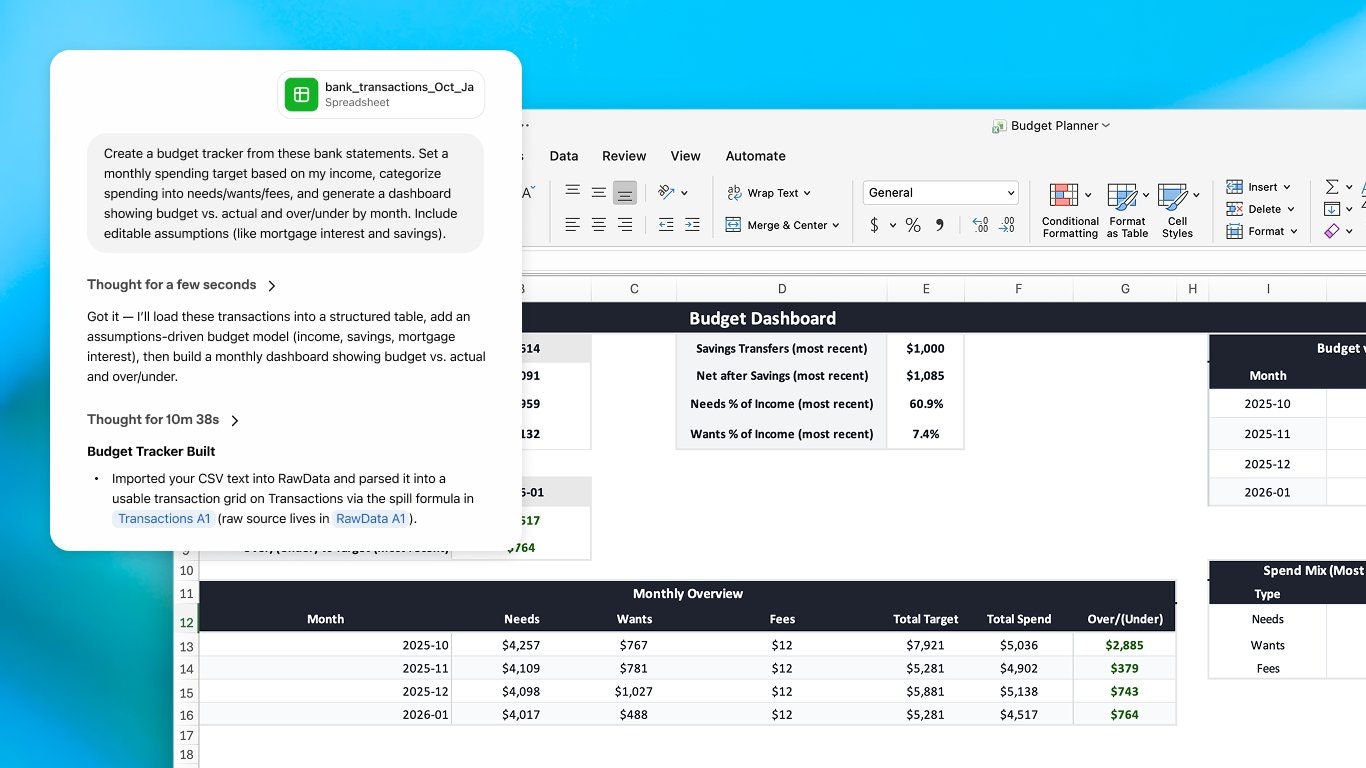
ChatGPT for Excel is an ambitious new productivity tool designed to bridge the gap between natural language instructions and complex spreadsheet operations within Microsoft Excel. As the name suggests, this integration brings the power of large language models (LLMs) directly into your existing Excel environment, transforming how users interact with data analysis and manipulation. Instead of painstakingly crafting intricate formulas or navigating confusing menus, users can now describe what they want to achieve—whether it’s data aggregation, error correction, or complex modeling—and watch ChatGPT for Excel execute it in real time.
This tool is clearly aimed at anyone who spends significant time wrestling with data in Excel: financial analysts, marketers performing campaign tracking, data entry specialists, and business professionals relying on reports. The core value proposition of ChatGPT for Excel is extreme efficiency and accessibility. It promises to democratize advanced spreadsheet capabilities, allowing users with minimal formula knowledge to achieve expert-level results instantly, all while maintaining the familiar structure and security of their native Excel workbook.
Problem & Solution
The fundamental problem ChatGPT for Excel seeks to solve is the cognitive load and time sink associated with manual spreadsheet management. For the average Excel user, troubleshooting a VLOOKUP, debugging a nested IF statement, or simply knowing the right function for a specific analytical task can halt productivity. Current generative AI solutions often require users to copy data out, paste it into an external AI chat interface, receive a formula, and then manually paste it back into Excel—a cumbersome, insecure, and error-prone process.
ChatGPT for Excel solves this by embedding the AI directly within the application environment. It acts as an intelligent copilot that understands context across multiple tabs and existing formulas. Its ability to explain every change and ask for confirmation before editing addresses the critical need for transparency and control, which is often lacking in automated tools. This seamless, in-situ approach fills a massive market gap for truly integrated, trustworthy AI assistants within the world’s dominant spreadsheet software.
Key Features & Highlights
The standout capability of ChatGPT for Excel is its real-time spreadsheet generation and modification based on plain language prompts. This moves far beyond simple formula suggestions; the tool can build entire data structures and perform complex analyses on command.
Key highlights that set ChatGPT for Excel apart include:
- Real-Time Workbook Updates: Directly alter cell values, formulas, and formatting based on natural language input.
- Cross-Tab Analysis: The AI can analyze and synthesize data residing across different worksheets within the same workbook.
- Explainability and Confirmation: Crucially, every proposed change is explained and requires user consent before execution, fostering trust and learning.
- Error Fixing and Pattern Spotting: Use the AI to quickly diagnose and resolve common spreadsheet errors or identify trends hidden within raw data sets.
The user experience seems centered around reducing friction. By keeping the user "in the spreadsheet," ChatGPT for Excel minimizes context switching, allowing users to rapidly iterate on their data models and gain insights faster than ever before.
Potential Drawbacks & Areas for Improvement
While the vision of ChatGPT for Excel is compelling, there are inherent risks and potential limitations common to LLM integrations that users should consider. The primary concern will always be data security and privacy, especially for users handling sensitive corporate information. Although the description implies integration, clarity on how user data is handled—whether it leaves the local machine for processing—is paramount for enterprise adoption.
From a functional standpoint, the tool’s performance with extremely large datasets (millions of rows) will need rigorous testing. Furthermore, while the AI explains its actions, truly complex, multi-step analytical projects might still require a human expert to break down the request effectively for the AI to execute flawlessly across dependencies. Future enhancements could include:
- Template Library: Saving successful prompt-to-structure generations as reusable templates.
- Version Control Integration: Better linking AI changes with native Excel undo/redo or version history.
- Security Certifications: Clear communication on enterprise-grade data handling protocols.
Bottom Line & Recommendation
ChatGPT for Excel is a potentially transformative utility for the modern data worker. If you frequently find yourself struggling with advanced Excel functions, debugging formulas, or transforming unstructured input into structured reports, this tool offers an unparalleled pathway to immediate productivity gains. It successfully positions itself as the "Smarter Workflow" for the ubiquitous spreadsheet.
I highly recommend that data analysts, finance professionals, and power users exploring AI in productivity give ChatGPT for Excel a serious look. It promises to automate the tedious, formula-heavy grunt work, allowing users to focus purely on interpreting the resulting data insights. This could easily become an essential add-in for anyone looking to maximize their Excel investment.
Featured AI Applications
Discover powerful tools to enhance your productivity
MindMax
New Way to Interact with AI
Beyond AI chat, transforming conversations into an infinite canvas. Combining brainstorming, mind mapping, critical and creative thinking tools to help you visualize ideas, solve problems efficiently, and accelerate learning.
AI Slides
AI Slides with Markdown
Revolutionary slide creation fusing AI intelligence with Markdown flexibility - edit anywhere, optimize anytime, iterate easily. Turn every idea into a professional presentation instantly.
AI Markdown Editor
Write Immediately
Extremely efficient writing experience: AI assistant, slash commands, minimalist interface. Open and write, easy writing. ✍️ Markdown simplicity + 🤖 AI power + ⚡ Slash commands = Perfect writing experience.
Chrome AI Extension
AI Assistant Anywhere
Transform your browsing experience with FunBlocks AI Assistant. Your intelligent companion supporting AI-driven reading, writing, brainstorming, and critical thinking across the web.