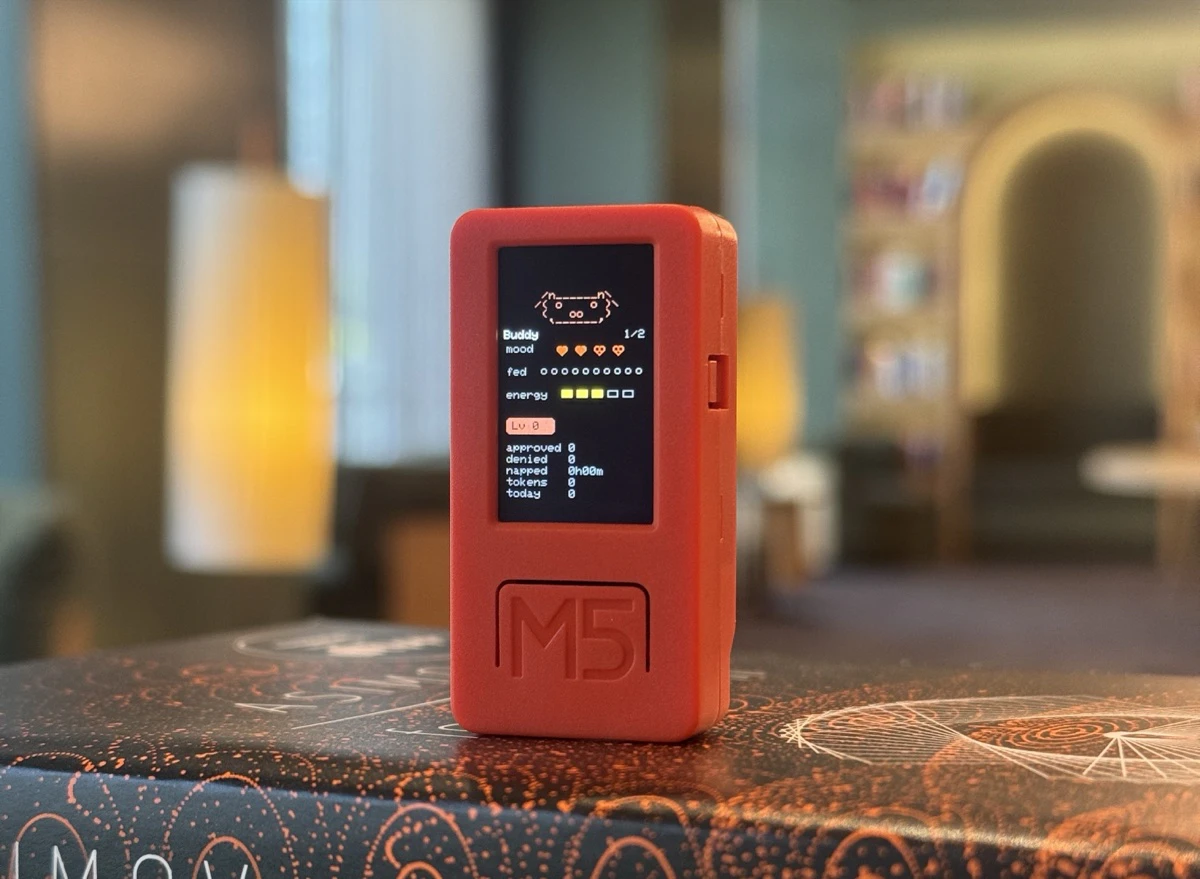
Claude Desktop Buddy: Bridging the Gap Between AI and Hardware
Bring Claude into the physical world with maker hardware
Published: 4/20/2026
For power users of Anthropic’s Claude, the AI experience has largely remained confined to the screen—a digital oracle living in a browser tab or a desktop window. Claude Desktop Buddy changes that paradigm entirely. By acting as a bridge between the Claude desktop application and the physical world, this tool allows makers to bring AI agency out of the software layer and into tangible, physical hardware.
At its core, Claude Desktop Buddy exposes a lightweight Bluetooth Low Energy (BLE) API directly from the Claude desktop app. This API is designed to communicate with microcontrollers, such as the ubiquitous ESP32, allowing the AI to interact with external sensors, status lights, mechanical switches, or specialized displays. Whether you are building a physical indicator for Claude’s current task status or creating a tactile interface for AI-driven workflows, this tool provides the necessary hooks to turn your desk into an interactive AI workspace.
Bridging the Digital-Physical Divide
The primary problem facing developers and hardware enthusiasts today is the "silo effect" of AI. While Claude Code and Claude Cowork have become incredibly powerful tools for software development, they lack a physical presence. If Claude is running a long script or waiting for a permission prompt, you generally need to keep the window in focus to stay updated.
Claude Desktop Buddy solves this by externalizing those digital states. Instead of relying on a screen notification that can easily be buried behind other applications, you can trigger a physical light, sound, or mechanical movement via a microcontroller the moment Claude needs your attention. It fills a significant market gap by providing an "Internet of Things" (IoT) bridge for an LLM, effectively turning your AI assistant into a proactive hardware agent.
Key Features and Highlights
The power of Claude Desktop Buddy lies in its simplicity and versatility. By utilizing a standard BLE API, the developers have ensured that the barrier to entry for makers is incredibly low.
- BLE API Integration: Seamless communication between the Claude desktop environment and standard microcontrollers like ESP32 or Arduino.
- Physical State Monitoring: Easily map Claude’s internal states—such as “Thinking,” “Idle,” or “Requires Authorization”—to physical hardware like LEDs or status displays.
- Permission Prompt Handling: You can set up your hardware to alert you physically when Claude reaches a step that requires human verification, significantly speeding up human-in-the-loop workflows.
- Maker-Friendly Ecosystem: Because it uses standard hardware protocols, the possibilities are limited only by the user’s imagination. Whether you want a desk lamp that changes color based on AI sentiment or a dedicated e-ink display for Claude’s code output, the integration is straightforward.
The user experience is surprisingly frictionless. By exposing a clear API, the makers have allowed for rapid prototyping, meaning you can move from an idea to a working physical implementation in a matter of hours.
Potential Drawbacks and Room for Growth
While Claude Desktop Buddy is a dream for the maker community, it does have a learning curve. Because it relies on hardware interfacing, users must have at least a baseline understanding of electronics and microcontroller coding. It is not a "plug-and-play" consumer product for the general public, but rather a robust toolset for the technical enthusiast.
To improve the product, I would love to see a community repository of ready-made firmware snippets for common microcontrollers. Additionally, expanding the documentation to include more advanced use cases—such as how to trigger physical macros or automate hardware peripherals directly through Claude Code—would provide immense value to developers who want to push the boundaries of AI agency.
Bottom Line and Recommendation
Claude Desktop Buddy is an essential utility for developers, makers, and AI enthusiasts who want to break the "screen-bound" limitations of modern LLMs. If you are already building with Claude Code or Claude Cowork and want to add a physical dimension to your development environment, this is exactly the tool you need. It is a highly creative project that proves the future of AI isn't just on your monitor—it’s on your desk.
Final Verdict: Highly recommended for anyone comfortable with an ESP32 and a desire to turn their workspace into a high-tech, AI-integrated command center.
Featured AI Applications
Discover powerful tools to enhance your productivity
MindMax
New Way to Interact with AI
Beyond AI chat, transforming conversations into an infinite canvas. Combining brainstorming, mind mapping, critical and creative thinking tools to help you visualize ideas, solve problems efficiently, and accelerate learning.
AI Slides
AI Slides with Markdown
Revolutionary slide creation fusing AI intelligence with Markdown flexibility - edit anywhere, optimize anytime, iterate easily. Turn every idea into a professional presentation instantly.
AI Markdown Editor
Write Immediately
Extremely efficient writing experience: AI assistant, slash commands, minimalist interface. Open and write, easy writing. ✍️ Markdown simplicity + 🤖 AI power + ⚡ Slash commands = Perfect writing experience.
Chrome AI Extension
AI Assistant Anywhere
Transform your browsing experience with FunBlocks AI Assistant. Your intelligent companion supporting AI-driven reading, writing, brainstorming, and critical thinking across the web.