ClawApp Review: The Essential Desktop Companion for Seamless OpenClaw Automation
The easiest way to automate tasks with OpenClaw
Published: 2/6/2026
Product Overview: Simplifying Local AI Agent Management
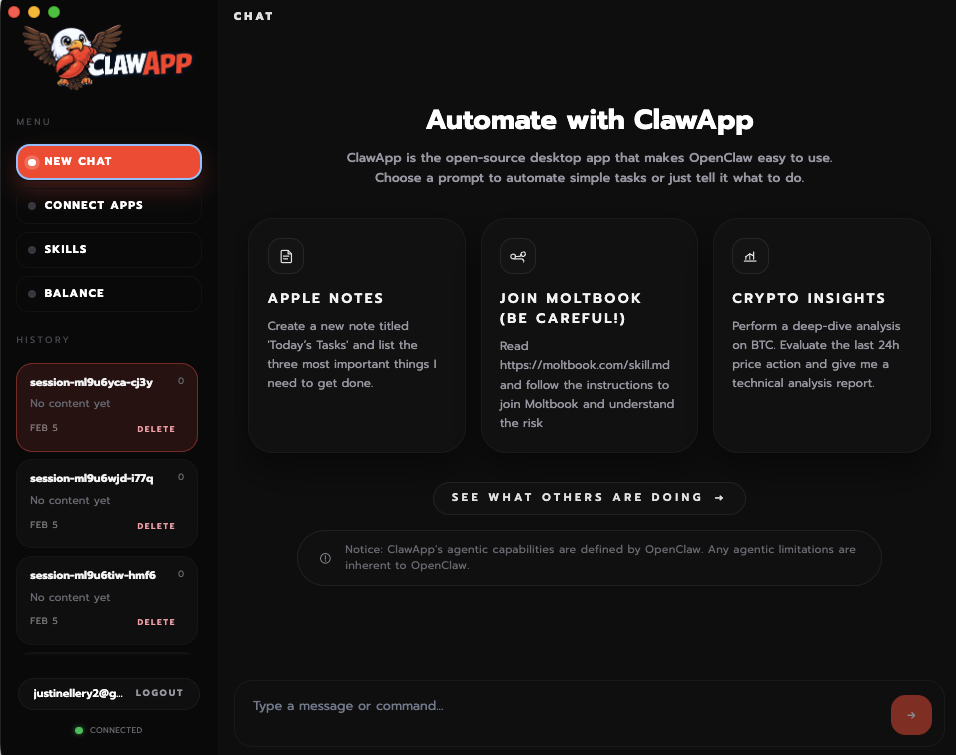
ClawApp enters the scene as a dedicated macOS desktop application built specifically to streamline the often complex process of deploying and managing OpenClaw automation agents. For those unfamiliar, OpenClaw is emerging as a key framework for building powerful, localized software agents, yet deploying these agents typically involves fiddling with command lines, dependency management, and intricate configuration files—a major hurdle for non-expert users or even seasoned developers looking for quick iteration.
ClawApp aims to be the definitive, all-in-one platform for this ecosystem. It abstracts away the technical complexity, focusing instead on providing a guided, user-friendly interface. Its primary function is to allow users to install, manage, and execute local OpenClaw agents with unprecedented ease. This positions ClawApp not just as a utility, but as the foundational management layer for local AI automation workflows on macOS.
The core value proposition here is speed and simplicity. ClawApp targets developers, hobbyists, and power users who want to leverage the capabilities of OpenClaw for tasks like automated workflows, data processing, or specialized scripting, but who don't want to spend valuable time wrestling with environment setups.
Problem & Solution: Bridging the Deployment Gap
The primary problem ClawApp solves is the significant friction associated with setting up and maintaining local agent infrastructure. Traditional methods for running open-source agent frameworks often require deep familiarity with terminal commands, dependency resolution (like Python libraries or system-level tools), and ensuring environmental variables are correctly set. This steep learning curve acts as a massive barrier to entry.
ClawApp directly addresses this by packaging the entire setup process into a guided, intuitive desktop experience. Instead of piecing together various tools, users interact with a centralized application. It acts as an intelligent installer and manager, ensuring that the necessary components for running OpenClaw agents are correctly configured and available instantly. This shift from fragmented tooling to a unified interface is what sets ClawApp apart in the nascent local agent management space.
Key Features & Highlights: Clarity and Control in One Window
ClawApp delivers on its promise of clarity and speed through several well-executed features designed around the OpenClaw workflow.
The standout feature is the one-click agent installation. Users can select the specific OpenClaw bot or agent configuration they wish to run, and ClawApp handles all the backend provisioning automatically. This eliminates the common frustration of dependency conflicts and broken paths.
Key highlights include:
- Centralized Agent Management: A dashboard view for monitoring currently running agents and easily stopping or restarting them.
- Simplified Configuration: Replacing manual YAML/CLI configuration with straightforward in-app settings adjustments.
- Rapid Deployment: The promise of getting a local OpenClaw agent operational in minutes, significantly boosting productivity for iterative development.
- macOS Native Experience: Being a desktop app, it integrates smoothly with the operating system, offering a familiar and responsive user experience compared to pure command-line tools.
For users deeply invested in local, customizable automation, the ability to manage these powerful software agents without constant terminal intervention is a major productivity win.
Potential Drawbacks & Areas for Improvement
While ClawApp excels at simplifying the initial setup, there are natural considerations for refinement in future iterations. As a specialized tool targeting a specific framework (OpenClaw), its utility is inherently limited to users already engaged with that ecosystem.
One area for constructive criticism centers on advanced customization and debugging. While the simplification is excellent for beginners, power users might eventually require direct access to logs or the ability to manually inject specific command-line arguments that the simplified interface might currently hide. Offering an optional "Advanced Mode" or integrated log viewer that shows the underlying command execution would greatly benefit experienced developers.
Furthermore, while it focuses on macOS, expanding compatibility (even through virtualization layers) or clearly defining future cross-platform support would broaden its appeal. For now, ClawApp is strictly a macOS solution, which is a limitation for multi-platform teams.
Bottom Line & Recommendation
ClawApp is an excellent piece of engineering that effectively solves a genuine bottleneck in the world of local AI agent deployment. If you are a developer or power user leveraging OpenClaw on macOS and are tired of fighting dependency hell or configuration files just to start a new bot, ClawApp is an immediate must-try. It delivers significant time savings and provides a professional, streamlined management layer for this exciting automation technology. This tool solidifies itself as the essential desktop companion for anyone serious about running OpenClaw agents efficiently.
Featured AI Applications
Discover powerful tools to enhance your productivity
MindMax
New Way to Interact with AI
Beyond AI chat, transforming conversations into an infinite canvas. Combining brainstorming, mind mapping, critical and creative thinking tools to help you visualize ideas, solve problems efficiently, and accelerate learning.
AI Slides
AI Slides with Markdown
Revolutionary slide creation fusing AI intelligence with Markdown flexibility - edit anywhere, optimize anytime, iterate easily. Turn every idea into a professional presentation instantly.
AI Markdown Editor
Write Immediately
Extremely efficient writing experience: AI assistant, slash commands, minimalist interface. Open and write, easy writing. ✍️ Markdown simplicity + 🤖 AI power + ⚡ Slash commands = Perfect writing experience.
Chrome AI Extension
AI Assistant Anywhere
Transform your browsing experience with FunBlocks AI Assistant. Your intelligent companion supporting AI-driven reading, writing, brainstorming, and critical thinking across the web.