Clear for Slack Review: Write Messages That Actually Get Results
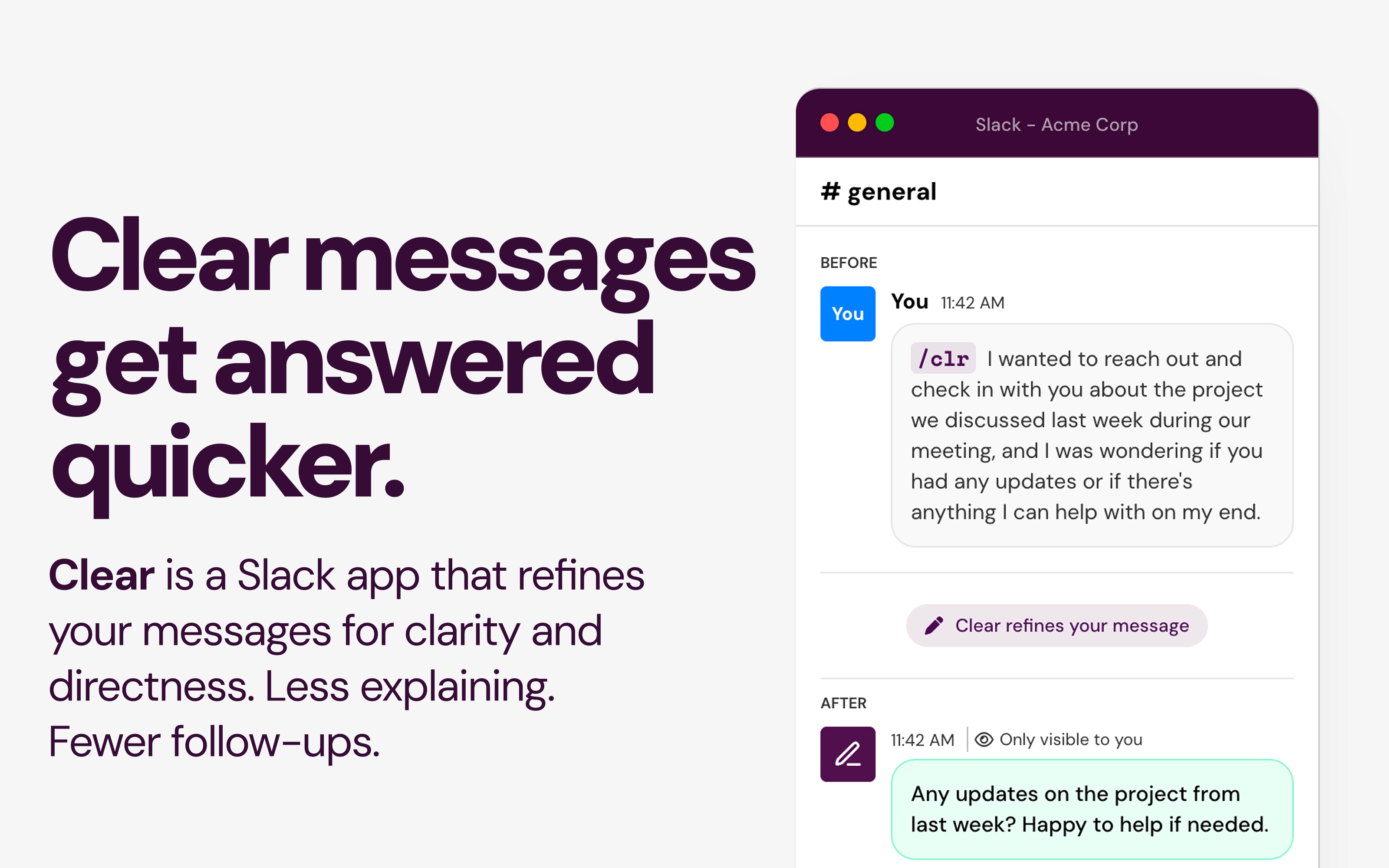
Clear messages get answered quicker
Published: 1/2/2026
Product Overview
Clear for Slack enters the productivity software space with a focused mission: to declutter our digital conversations and ensure workplace communication is effective, not obstructive. In the modern, asynchronous work environment, Slack has become the central nervous system for many organizations, but this hyper-connectivity often leads to message fatigue, ambiguity, and slow response times. Clear for Slack directly tackles this by acting as an on-the-fly writing coach integrated seamlessly into the platform where work actually happens.
This privacy-focused application targets anyone who spends significant time communicating on Slack—from individual contributors struggling to get buy-in, to team leads managing high volumes of requests, and even executive assistants crafting critical announcements. Its primary function is simple yet profound: analyze your drafted message before you hit send and offer actionable coaching to make it clearer, more direct, and less likely to be ignored.
The core value proposition of Clear for Slack is efficiency driven by clarity. By reducing the cognitive load required for recipients to decipher your intent, the tool promises to accelerate decision-making, minimize unnecessary follow-up questions, and ultimately boost team throughput.
Problem & Solution: Cutting Through the Noise
The fundamental problem Clear for Slack addresses is the 'clarity deficit' endemic to instant messaging platforms. Messages often suffer from being too passive, containing too much preamble, lacking a clear Call to Action (CTA), or burying the main point under layers of context. This results in messages that are either ignored, misunderstood, or require extensive back-and-forth clarification, wasting valuable time for everyone involved.
While many tools focus on grammar or tone (like Grammarly), Clear for Slack zeroes in specifically on directness and actionability within a workplace context. It doesn't just check for spelling; it assesses whether your request is obvious. It solves this by injecting micro-coaching directly into the composer window. Instead of forcing users to exit Slack to read an article on writing better emails, the solution provides immediate, contextual guidance, filling a significant market gap for real-time, specialized communication improvement within high-velocity chat tools.
Key Features & Highlights
Clear for Slack excels by keeping its feature set lean and hyper-relevant to its core purpose. The visual integration, as suggested by its presence within the composer, ensures minimal disruption to workflow.
- Real-Time Clarity Coaching: The application analyzes the drafted text and surfaces suggestions on how to restructure sentences or focus the core message. This is the engine of the app, driving immediate improvement.
- Focus on Actionability: A key strength is its ability to pinpoint missing or weak CTAs. If a message is merely informational when it should be directive, Clear will likely flag it.
- Privacy-First Architecture: Crucially for modern enterprises, the tagline explicitly mentions "no message storage." This commitment to user privacy makes adoption easier in compliance-heavy environments, distinguishing it from tools that require comprehensive data access.
- Iterative Improvement: The promise of "built-in coaching to help you improve over time" suggests a feedback loop where users learn the principles of clear communication through repeated use, turning a simple utility into a long-term professional development aid.
Potential Drawbacks & Areas for Improvement
While the concept behind Clear for Slack is excellent, its success hinges entirely on the sophistication of its underlying AI or linguistic model. If the suggestions are too generic or frequently misinterpret context (e.g., flagging necessary nuance as 'unclear'), users will quickly start ignoring the prompts.
Constructive criticism would center on the depth of customization and integration:
- Tone vs. Clarity Trade-off: Workplace communication isn't always purely direct; sometimes diplomacy requires softening a request. Clear needs to offer nuanced guidance that accounts for various tones (urgent, sensitive, formal) without sacrificing the core goal of clarity.
- Customizable Feedback Thresholds: For power users who already write clearly, the constant nudges might become annoying. An option for users to set their own "clarity score" threshold before receiving coaching would enhance the experience.
- Integration Depth: Does Clear for Slack integrate with thread replies, or only top-level messages? Ensuring comprehensive coverage across all Slack interaction points is vital for widespread adoption.
Bottom Line & Recommendation
Clear for Slack is a promising utility that taps directly into a pain point experienced daily by knowledge workers worldwide: the battle against message overload. If your team struggles with slow turnarounds because requests are consistently vague, or if you personally find yourself spending too much time drafting messages only to receive confused replies, this app is absolutely worth investigating.
It serves best as a lightweight, privacy-respecting communication accelerator. I recommend Clear for Slack for any organization prioritizing asynchronous efficiency and looking for a simple, embedded tool to professionalize their daily instant messaging habits. It’s not just about sending messages; it’s about ensuring those messages trigger the right outcomes quickly.
Featured AI Applications
Discover powerful tools to enhance your productivity
MindMax
New Way to Interact with AI
Beyond AI chat, transforming conversations into an infinite canvas. Combining brainstorming, mind mapping, critical and creative thinking tools to help you visualize ideas, solve problems efficiently, and accelerate learning.
AI Slides
AI Slides with Markdown
Revolutionary slide creation fusing AI intelligence with Markdown flexibility - edit anywhere, optimize anytime, iterate easily. Turn every idea into a professional presentation instantly.
AI Markdown Editor
Write Immediately
Extremely efficient writing experience: AI assistant, slash commands, minimalist interface. Open and write, easy writing. ✍️ Markdown simplicity + 🤖 AI power + ⚡ Slash commands = Perfect writing experience.
Chrome AI Extension
AI Assistant Anywhere
Transform your browsing experience with FunBlocks AI Assistant. Your intelligent companion supporting AI-driven reading, writing, brainstorming, and critical thinking across the web.