Clik - Cursor for Video: Revolutionizing Video Editing with Conversation
We turn video editing into a conversation.
Published: 11/15/2025
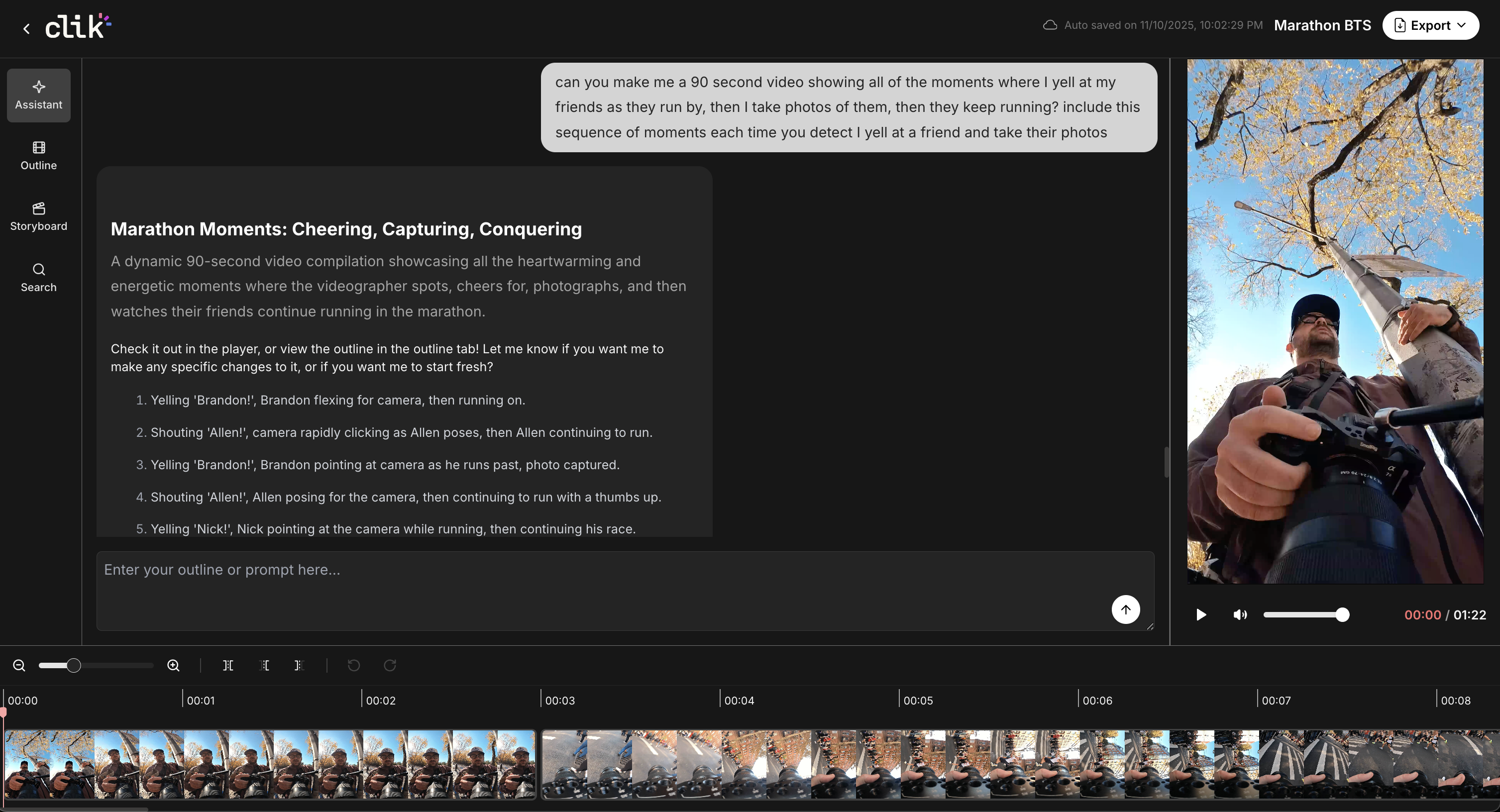
Clik - Cursor for Video is an innovative AI-powered tool designed to transform the often tedious process of video editing into a conversational experience. Aimed at both individual creators and seasoned video professionals, Clik's core value proposition lies in significantly reducing the time and effort typically spent on initial edits and scrubbing through footage.
This product targets anyone who deals with a large volume of raw video footage and has a clear idea of the story they want to tell but is bogged down by the manual labor of editing. From YouTubers and social media content creators to marketers and educational content producers, Clik promises to streamline the workflow by allowing users to simply describe their desired outcome and receive a video edit in seconds.
The Problem of Tedious Editing, Solved Conversationally
Traditional video editing often involves hours of sifting through footage, identifying key moments, and painstakingly arranging them on a timeline. This "scrubbing" process can be a major bottleneck, draining creative energy and time.
Clik directly addresses this pain point by introducing a conversational editing paradigm. Instead of manual manipulation, users upload their footage and communicate their vision using natural language prompts. The AI then processes these instructions to generate an initial video edit, drastically cutting down the time spent on rough cuts and ideation. While other AI video editors exist, many focus on automating specific tasks like captioning or B-roll generation, or offer template-driven creation. Clik differentiates itself by putting the "story" at the forefront, allowing users to articulate their narrative and have the AI translate that into a visual sequence. This fills a market gap for a more intuitive, narrative-driven AI editing assistant.
Key Features and Highlights
Clik boasts several standout features that enhance the video editing workflow:
- Conversational Editing: The most notable feature, enabling users to create and refine edits using natural language instructions. This is a game-changer for those who find traditional timelines daunting or time-consuming.
- Rapid Auto-Edits: After uploading footage and describing the desired story, users receive a draft edit back in seconds, allowing for quick iteration and concept testing.
- AI-Powered Storyboard: Clik offers an AI-generated storyboard that helps visualize the edit plan, guiding sequencing and pacing. This can be particularly useful for structuring narratives effectively.
- Hybrid Editing Approach: Recognizing that AI isn't always perfect, Clik seamlessly integrates traditional timeline editing and AI search capabilities. This means users can get a head start with AI and then make fine-tuned, frame-level adjustments manually, offering the best of both worlds.
- Multiple Format Support: The tool is designed to support a wide range of video formats, catering to both short-form content like social clips and longer-form content such as vlogs and tutorials. This flexibility makes it adaptable for diverse content creation needs.
Potential Drawbacks and Areas for Improvement
While Clik presents a compelling vision for the future of video editing, there are some areas that warrant consideration. Early feedback suggests that the output quality can sometimes be inconsistent, with instances of "awkward jump cuts and imperfect captions" reported. As an early-release product, the polish and reliability of its features are likely to evolve over time, and users should expect iterative improvements.
Furthermore, the product's terms currently grant "broad usage rights over uploaded content," which could raise privacy and ownership concerns for users dealing with sensitive or confidential footage. Clearer policies and more granular control over content usage would be beneficial, especially for professional users or teams. The ability to add background music, summarize, or create funny remixes through the conversational agent also seems to be an area for enhancement, according to some user feedback. Incorporating multi-cam syncing for long-form footage could also be a valuable addition for certain professional workflows.
Bottom Line and Recommendation
Clik - Cursor for Video is a promising tool that stands out in the increasingly crowded AI video editing landscape by prioritizing conversational input and narrative generation. It's an excellent solution for solo creators, social media producers, and editors who need to produce fast rough cuts and are comfortable iterating on AI-generated drafts.
For those looking to dramatically reduce the initial time spent assembling clips and prototyping video ideas, Clik offers a user-friendly and innovative approach. While it may not yet be ready for final, publish-ready output without some manual cleanup, its potential to accelerate the early stages of video production is significant. Users dealing with sensitive material should carefully review the content-use terms. Overall, Clik is a valuable tool for anyone seeking to inject efficiency and a fresh, conversational dynamic into their video editing process.
Featured AI Applications
Discover powerful tools to enhance your productivity
MindMax
New Way to Interact with AI
Beyond AI chat, transforming conversations into an infinite canvas. Combining brainstorming, mind mapping, critical and creative thinking tools to help you visualize ideas, solve problems efficiently, and accelerate learning.
AI Slides
AI Slides with Markdown
Revolutionary slide creation fusing AI intelligence with Markdown flexibility - edit anywhere, optimize anytime, iterate easily. Turn every idea into a professional presentation instantly.
AI Markdown Editor
Write Immediately
Extremely efficient writing experience: AI assistant, slash commands, minimalist interface. Open and write, easy writing. ✍️ Markdown simplicity + 🤖 AI power + ⚡ Slash commands = Perfect writing experience.
Chrome AI Extension
AI Assistant Anywhere
Transform your browsing experience with FunBlocks AI Assistant. Your intelligent companion supporting AI-driven reading, writing, brainstorming, and critical thinking across the web.