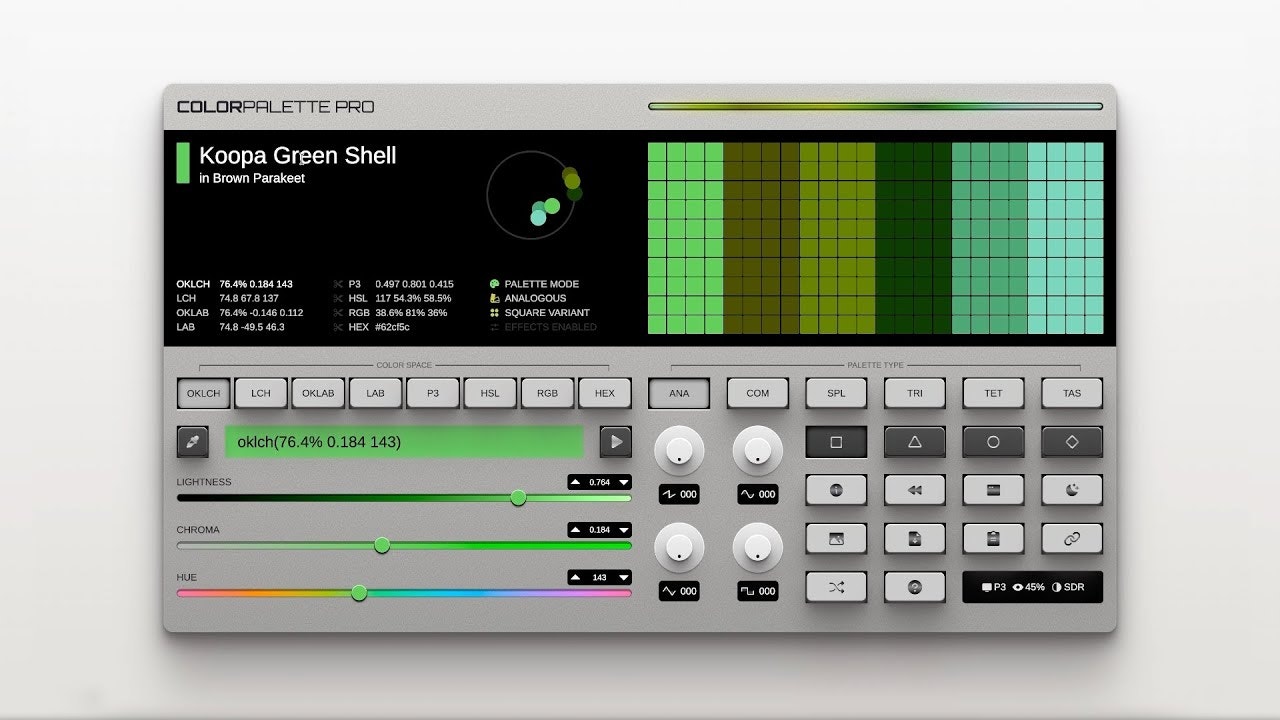
Color Palette Pro: A Synthesizer for Colors
A synthesizer for colours
Published: 11/20/2025
Color Palette Pro aims to revolutionize how designers interact with color by offering a sophisticated yet playful "synthesizer for colors." It's a design tool that empowers users to generate customizable color palettes in advanced color spaces, which can then be easily shared, downloaded, or exported. This product positions itself not just as a generator, but as an interactive experience, making the often-tedious task of palette creation feel more like a game and less of a chore. It caters to a broad audience, from UI/UX professionals and web designers to graphic designers and artists, who seek to streamline their color workflow and elevate their design process.
The core value proposition of Color Palette Pro lies in its ability to move beyond basic color generation. It promises to deliver harmonious and consistent color schemes, even allowing for the creation of palettes suitable for UI design, including automatic dark mode variations. This focus on advanced functionality within an intuitive interface sets it apart, offering a powerful tool for those who understand the impact of color on mood, emotion, and brand identity.
Problem & Solution: Beyond Basic Color Grids
Many existing color palette generators can be limited, often providing generic or "shitty" palettes, lacking robust customization, and offering restricted export options. Designers frequently struggle with creating palettes that have clear roles for colors (hero, accent, neutral), ensuring consistent harmony, and addressing accessibility blind spots like sufficient contrast. The challenge lies in translating a dreamy mood board into a functional palette that works across various applications, from websites to social media posts.
Color Palette Pro tackles these frustrations by offering a "synthesizer-like interface" that encourages experimentation while providing programmatic generation. It moves beyond simple HSL modifications, which can lead to clashing colors and inconsistent luminosity, by incorporating deeper color theory and perceptual adjustments. This allows for the creation of palettes that are not only aesthetically pleasing but also functional for real-world design scenarios, including UI applications. The tool aims to simplify the creative process, making color exploration more engaging and efficient for professionals.
Key Features & Highlights: A Harmonic Blend of Functionality
Color Palette Pro boasts a range of features designed to enhance the color creation process:
- Advanced Color Space Generation: Users can generate palettes in advanced color spaces like LAB and RGB, offering greater control and precision. This allows for more nuanced and sophisticated color combinations.
- Customizable Palettes: The tool provides significant customization options, enabling users to generate palettes based on a chosen base color and various algorithmic modulations (Square, Triangle, Circle, Diamond) that adjust for lightness, chroma, and hue.
- Intuitive "Synthesizer" Interface: The playful and interactive interface makes color exploration an enjoyable experience, transforming what can be a tedious task into a creative one.
- UI Mode with Dark Mode Integration: A standout feature is the UI mode, which generates palettes specifically tailored for user interfaces. Crucially, it can automatically create a corresponding dark mode palette when enabled, addressing a common design challenge.
- Easy Sharing, Downloading, and Exporting: Palettes can be readily shared, downloaded, or exported, facilitating seamless integration into existing design workflows. The ability to drag a generated palette image directly into tools like Figma for eyedropper use is a practical touch.
- Palette Variations and Color Theory: Beyond basic generation, Color Palette Pro offers variations like Analogous, Complementary, Split Complementary, Triadic, Tetradic, and Tints & Shades, providing a comprehensive approach to color harmony.
- "Color Buddy" Integration (Upcoming): The developers aim for integration with their "Color Buddy" Chrome extension, allowing users to store color codes directly in their browser and manage multiple client profiles.
Potential Drawbacks & Areas for Improvement
While Color Palette Pro presents a compelling offering, there are a few areas that could be further developed:
- Lack of Direct Integration with Major Design Software: While exporting to image and then eyedropping into Figma is a workaround, direct plugin or API integrations with popular design tools like Adobe Creative Suite (Photoshop, Illustrator) or Figma would significantly enhance workflow efficiency. Many competitors, like Adobe Color and Coolors, already offer robust integrations.
- Image-to-Palette Extraction: While the product description hints at generating palettes, the input mechanism for extracting palettes from uploaded images isn't explicitly detailed. Tools like Coolors and ColorKit excel in this area, allowing users to upload mood boards and extract color schemes directly. This is a highly valued feature for designers working with inspiration imagery.
- Accessibility Testing: Although reviews mention meeting contrast guidelines, built-in, comprehensive accessibility testing with features like WCAG AA compliance checks (4.5:1 contrast ratio minimum) would be a strong addition, similar to what some advanced tools offer.
- AI-powered Naming: Some competitors are incorporating AI for generating memorable color names, which could be a useful creative aid.
- Learning Curve for Advanced Features: While the interface is described as playful, the concept of "advanced color spaces" and "algorithmic modulations" might require a slight learning curve for novice designers. Clearer in-app guidance or tutorials for these advanced functions would be beneficial.
Bottom Line & Recommendation
Color Palette Pro is an exciting and innovative tool for designers seeking a more dynamic and intuitive approach to color palette generation. Its "synthesizer for colors" tagline accurately reflects its unique interactive experience, making color exploration genuinely enjoyable. The focus on advanced color spaces, UI-specific palettes, and automatic dark mode generation addresses key pain points for modern designers.
This product is highly recommended for UI/UX designers, web developers, graphic designers, and anyone who frequently works with digital color and seeks to push beyond basic palette generation. If you appreciate a playful yet powerful interface and are looking for a tool that encourages experimentation while delivering functionally sound color schemes, Color Palette Pro is definitely worth trying. While some integrations and advanced accessibility features could be enhanced, its current offering provides a fresh and valuable perspective on color creation.
Featured AI Applications
Discover powerful tools to enhance your productivity
MindMax
New Way to Interact with AI
Beyond AI chat, transforming conversations into an infinite canvas. Combining brainstorming, mind mapping, critical and creative thinking tools to help you visualize ideas, solve problems efficiently, and accelerate learning.
AI Slides
AI Slides with Markdown
Revolutionary slide creation fusing AI intelligence with Markdown flexibility - edit anywhere, optimize anytime, iterate easily. Turn every idea into a professional presentation instantly.
AI Markdown Editor
Write Immediately
Extremely efficient writing experience: AI assistant, slash commands, minimalist interface. Open and write, easy writing. ✍️ Markdown simplicity + 🤖 AI power + ⚡ Slash commands = Perfect writing experience.
Chrome AI Extension
AI Assistant Anywhere
Transform your browsing experience with FunBlocks AI Assistant. Your intelligent companion supporting AI-driven reading, writing, brainstorming, and critical thinking across the web.