Dashly Review: Turning Your New Tab into a Focused, Private Productivity Command Center
Turn your new tab into a dashboard.
Published: 1/5/2026
Product Overview: Reclaiming the New Tab Page
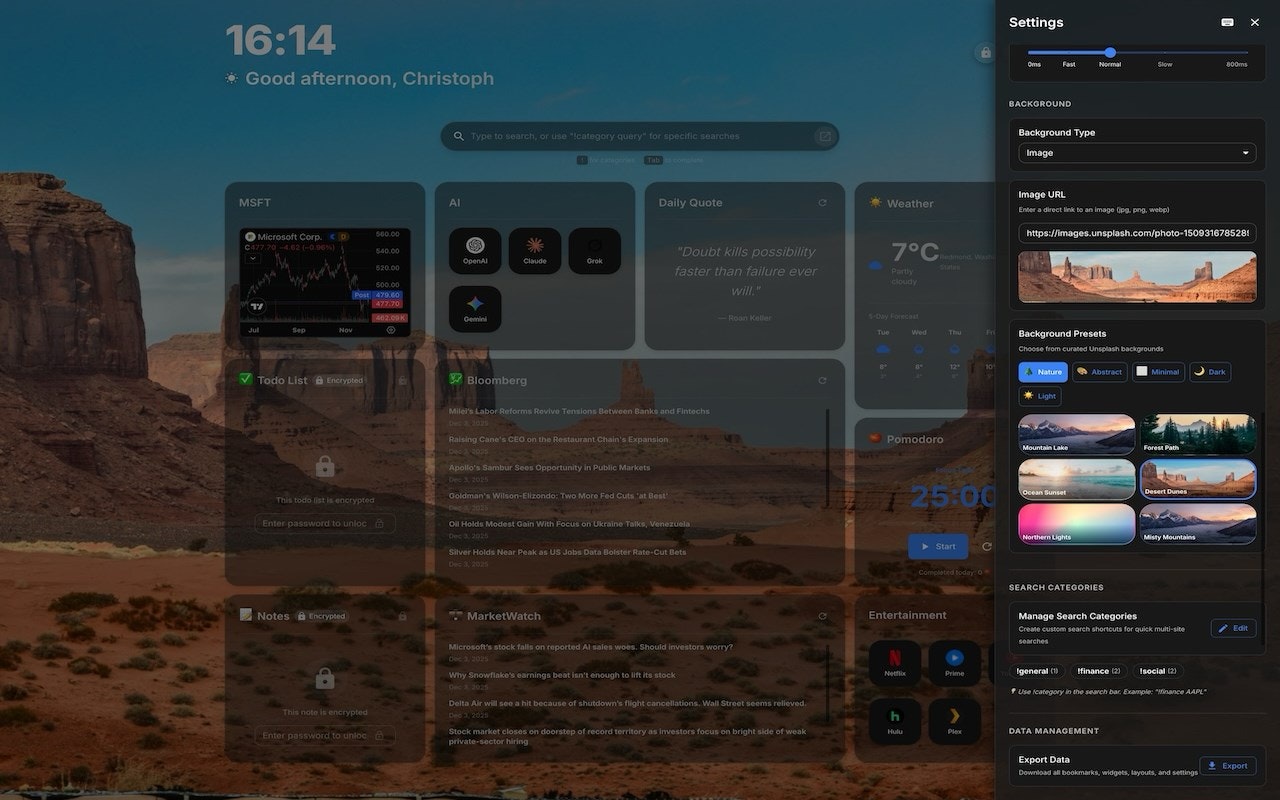
Dashly promises to revolutionize one of the most frequently visited interfaces on the web: the new tab page. Far from the standard browser landing page filled with sponsored links or distracting recommendations, Dashly transforms this space into a highly personalized, actionable productivity dashboard. It functions as a centralized hub where users can immediately access essential tools and information without needing to navigate away from their current context.
This tool is specifically designed for power users, digital nomads, students, and anyone deeply invested in focused work sessions who values privacy. By consolidating crucial elements like to-do lists, market data, news feeds, and focus timers into one screen, Dashly drastically reduces context switching—a major killer of deep work. The core value proposition of Dashly lies in delivering necessary functionality right where you need it, wrapped in a customizable, widget-based interface.
Problem & Solution: The Clutter of Context Switching
The modern browser workflow is often fragmented. A user needs to check their tasks (in one app), review stock movements (on a separate site), catch up on industry news (via RSS), and manage their time (using a separate extension or clock). This constant jumping between tabs and applications severely impacts cognitive flow and efficiency.
Dashly solves this by aggregating these disparate functions into a single, immediately accessible screen upon opening a new tab. Crucially, it addresses the growing unease around data privacy in browser extensions. Unlike many cloud-reliant productivity tools, Dashly emphasizes local storage: "No cloud, no data sharing." This dedication to local operation and data ownership is a significant differentiator in the crowded dashboard market, offering peace of mind alongside enhanced workflow management.
Key Features & Highlights: Focus Meets Flexibility
Dashly shines through its modular, widget-based architecture. Everything is fully draggable, allowing users to micro-manage the layout to suit their personal workflow hierarchy.
The feature set is robust for a New Tab replacement:
- Encrypted Todos & Notes: Essential task management kept private and local.
- Real-time Market Charts: Perfect for traders or market watchers who need instant data visualization.
- Customizable RSS Feeds: Tailored news consumption, blocking out algorithmic noise.
- Integrated Pomodoro Timer: A critical feature for enforcing structured, timed work sessions.
- Utility Shortcuts: Bookmark shortcuts and a world clock streamline essential navigation and time zone awareness.
The emphasis on local export and import functionality ensures users maintain complete control over their dashboard configuration and data portability—a professional touch often missing in competing browser extensions. Furthermore, robust theming support allows the dashboard to match the user’s aesthetic preferences, making the daily interaction more pleasant.
Potential Drawbacks & Areas for Improvement
While Dashly excels in privacy and feature consolidation, there are a few areas where enhancement could broaden its appeal. The primary limitation stemming from its strength (local-only data) is synchronization. Power users often work across multiple devices (desktop, laptop), and the current lack of cloud sync means the dashboard configuration and to-do lists must be manually managed or exported/imported between machines.
Secondly, while the widget selection is strong, future iterations could benefit from deeper integration hooks. For example, allowing users to link specific, simple widgets to external APIs (like a single weather forecast or a summary of unread emails from a specific provider, secured via OAuth) without storing full credentials locally could offer the best of both worlds: extended functionality without sacrificing the core privacy commitment. Expanding the built-in integration library beyond basic RSS would significantly boost its utility for the modern knowledge worker.
Bottom Line & Recommendation
Dashly is an exceptional tool for users prioritizing focused work and digital sovereignty. If you are tired of browser extensions that demand constant cloud access or use your new tab page for unnecessary distractions, Dashly provides a clean, functional, and private alternative.
Recommendation: Highly recommended for developers, meticulous planners, and privacy-conscious professionals looking to transform their browser’s entry point into a truly functional, customizable command center. Give Dashly a try if minimizing context switching while maximizing data control is paramount to your daily routine.
Featured AI Applications
Discover powerful tools to enhance your productivity
MindMax
New Way to Interact with AI
Beyond AI chat, transforming conversations into an infinite canvas. Combining brainstorming, mind mapping, critical and creative thinking tools to help you visualize ideas, solve problems efficiently, and accelerate learning.
AI Slides
AI Slides with Markdown
Revolutionary slide creation fusing AI intelligence with Markdown flexibility - edit anywhere, optimize anytime, iterate easily. Turn every idea into a professional presentation instantly.
AI Markdown Editor
Write Immediately
Extremely efficient writing experience: AI assistant, slash commands, minimalist interface. Open and write, easy writing. ✍️ Markdown simplicity + 🤖 AI power + ⚡ Slash commands = Perfect writing experience.
Chrome AI Extension
AI Assistant Anywhere
Transform your browsing experience with FunBlocks AI Assistant. Your intelligent companion supporting AI-driven reading, writing, brainstorming, and critical thinking across the web.