DemoMe Review: Instantly Transform Your Screen Recordings into Polished Product Demos
Turn screen recordings into polished demo videos instantly
Published: 2/25/2026
Product Overview: The Speedy Demo Video Creator
DemoMe is a specialized video creation tool designed to solve a pervasive headache for product builders: quickly turning raw screen recordings and screenshots into professional, engaging demonstration videos. In today’s competitive digital landscape, a compelling video demo is non-negotiable for successful product launches, whether on the App Store, Product Hunt, or a company landing page. DemoMe addresses this need by offering an incredibly streamlined, purpose-built solution, moving away from the complexity of traditional video editing suites.
The core value proposition of DemoMe centers on speed, consistency, and beautiful defaults. It’s not trying to be a full-featured editor; instead, it focuses solely on the specific workflow of product showcasing. This focus makes it an essential utility for indie developers, bootstrappers, and small marketing teams who prioritize shipping product updates quickly over spending hours fine-tuning video assets.
The target audience is clear: anyone who needs to communicate their software's value visually with minimal friction. Think about the process: capture the screen, trim the fluff, add context, and export. DemoMe aims to collapse this process into seconds, ensuring your marketing collateral reflects the quality of your product without demanding a steep learning curve in video production.
Problem & Solution: Cutting Through Video Editing Clutter
The specific problem DemoMe tackles is the friction in creating product demos. Traditional video editors are powerful but slow, offering countless features irrelevant to a simple screen-capture highlight reel. This overhead leads to delays, inconsistency in branding/framing across multiple videos, and often, poorly polished final outputs that don't do justice to the underlying software.
DemoMe solves this by being purpose-built for product demos. It automates or simplifies repetitive tasks like framing, adding device mockups, and ensuring consistent pacing. By focusing solely on the demo use case, it fills a significant market gap between simple screen recorders and professional, time-consuming video production software. Its on-device processing is a crucial differentiator, promising immediate results without the security and bandwidth concerns associated with cloud uploads.
Key Features & Highlights: Speed Meets Polish
The standout appeal of DemoMe lies in how effectively it combines raw speed with professional aesthetics. The commitment to keeping everything fully on-device is a massive win for privacy-conscious users and those working with limited connectivity, providing near-instantaneous results.
Key highlights that users will immediately appreciate include:
- Instant Polishing: The tool likely applies smart defaults for transitions, titles, and framing, removing the guesswork from achieving a clean look.
- Product Hunt & App Store Ready: By focusing on standard formats and dimensions required for these major platforms, DemoMe ensures compliance and optimal viewing right out of the gate.
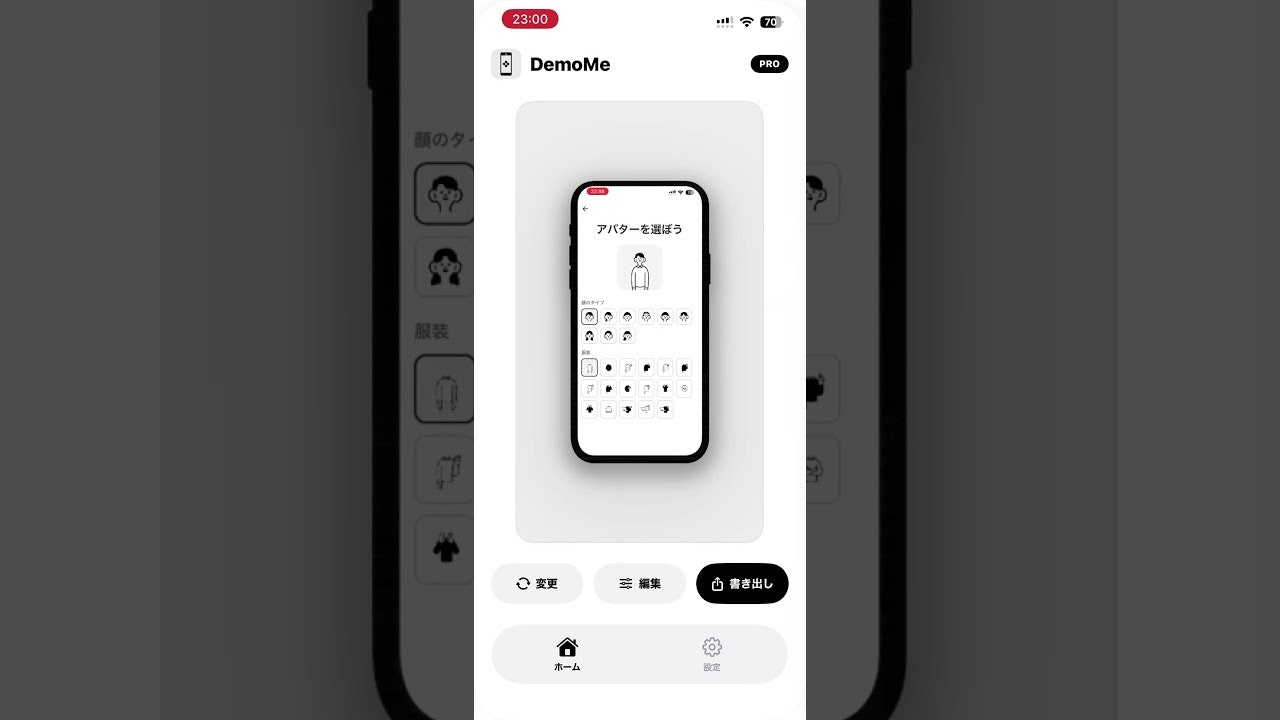
- Device Mockup Integration: For mobile or desktop apps, automatically placing the screen recording within a realistic device frame (as suggested by the visual context) elevates the perceived production value significantly.
- Workflow Optimization: The entire experience is designed around "recording to export" in the shortest time possible, making iteration on marketing materials far less painful.
The user experience seems centered around intuitive controls, allowing users to focus on what they are showing rather than how they are showing it.
Potential Drawbacks & Areas for Improvement
While DemoMe shines in its specialized niche, its very specialization could be its limitation. Users needing more granular control—such as complex keyframe animations, custom music scoring integration beyond simple background tracks, or advanced color grading—will likely find the tool too constrained.
Constructive suggestions for enhancement could include:
- Template Customization: While "beautiful defaults" are great, offering a few more styles or deeper customization of the default template elements (e.g., title card fonts, color palettes) would cater to broader branding needs without sacrificing core speed.
- Annotation Tools: While framing is handled, adding subtle, easy-to-apply on-screen pointers, highlights, or simple text callouts within the demo flow would further solidify its role as a dedicated demo tool.
- Input Flexibility: Exploring options to easily stitch in static screenshots between video clips would make it a true all-in-one visual story creator for product updates.
For those needing to create narrative-heavy tutorials or promotional videos requiring voiceovers or dynamic scene changes, DemoMe might serve as a first-step formatter rather than a final destination.
Bottom Line & Recommendation
DemoMe is a highly recommended utility for indie developers and SaaS founders who understand that high-quality visual representation drives conversions but lack the time or budget for professional video editing. If your goal is to quickly generate crisp, on-brand video assets for your next launch, landing page update, or social media blast, this tool is an absolute must-try. It delivers exactly what the tagline promises: turning raw screen captures into polished demo videos instantly. Its on-device architecture makes it a uniquely fast and secure choice in the crowded product marketing tech stack.
Featured AI Applications
Discover powerful tools to enhance your productivity
MindMax
New Way to Interact with AI
Beyond AI chat, transforming conversations into an infinite canvas. Combining brainstorming, mind mapping, critical and creative thinking tools to help you visualize ideas, solve problems efficiently, and accelerate learning.
AI Slides
AI Slides with Markdown
Revolutionary slide creation fusing AI intelligence with Markdown flexibility - edit anywhere, optimize anytime, iterate easily. Turn every idea into a professional presentation instantly.
AI Markdown Editor
Write Immediately
Extremely efficient writing experience: AI assistant, slash commands, minimalist interface. Open and write, easy writing. ✍️ Markdown simplicity + 🤖 AI power + ⚡ Slash commands = Perfect writing experience.
Chrome AI Extension
AI Assistant Anywhere
Transform your browsing experience with FunBlocks AI Assistant. Your intelligent companion supporting AI-driven reading, writing, brainstorming, and critical thinking across the web.