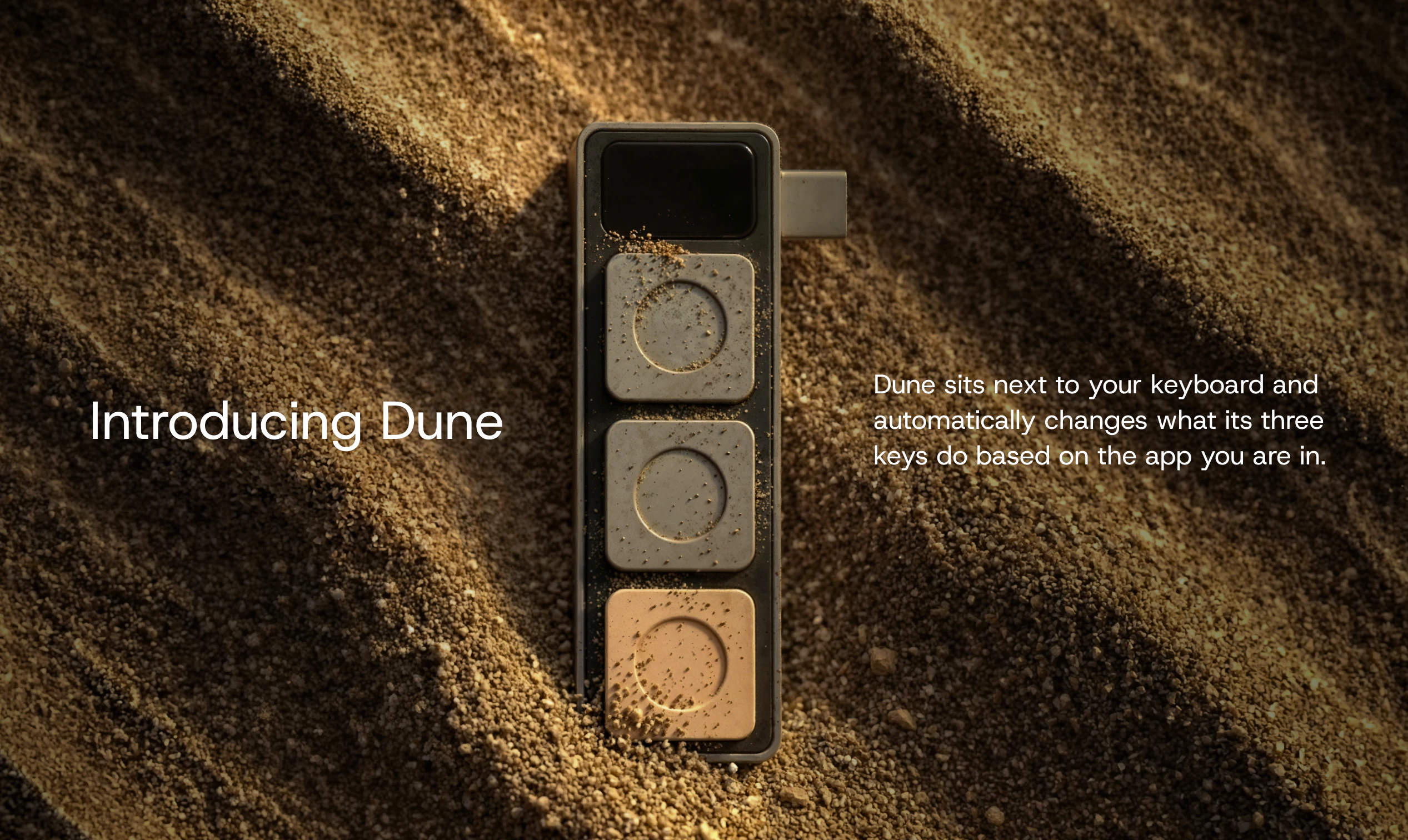
Dune: The Context-Aware Mac Keypad That Reclaims Your Workflow
Context-aware Mac keypad to automate workflows + meetings
Published: 4/20/2026
In the era of AI-driven development and non-stop remote collaboration, "context switching" is the silent productivity killer. Every time you toggle between VS Code, a browser-based AI agent like Claude, and a video conferencing app, you lose momentum. Dune enters the hardware scene as a clever, context-aware keypad designed specifically for Mac users who want to regain that lost time.
At its core, Dune is a sleek, three-button hardware peripheral that sits unobtrusively next to your primary keyboard. Unlike standard macro pads that require manual layer switching, Dune is intelligent. It senses which application is in the foreground and automatically updates its key assignments to match the tasks you are most likely performing in that specific environment. It is a bridge between the physical world and your digital workspace, tailored for developers, power users, and anyone tethered to back-to-back virtual meetings.
Solving the Context-Switching Crisis
The primary problem Dune solves is the friction of navigation. Professional workflows involve a dizzying array of shortcuts, toggles, and UI interactions. While many users rely on software-based macro tools, they often require memorizing complex hotkeys or manually swapping profiles.
Dune fills a significant market gap by providing a "zero-effort" interface. Because it is context-aware, you don’t have to remember to switch your keypad's state when you jump from a GitHub pull request to a Zoom call. It effectively eliminates the cognitive load of managing secondary inputs, allowing you to stay in "flow state" longer. By automating repetitive actions—like muting a mic, toggling an AI agent, or pushing code—Dune turns a fragmented workflow into a seamless experience.
Key Features & Highlights
Dune distinguishes itself through deep integration and simplicity. The device isn’t just a collection of buttons; it is a smart controller that understands the unique language of the tools you use most.
- Adaptive Context Sensitivity: The standout feature is its ability to switch profiles in real-time. Whether you are deep in VS Code, interacting with an AI agent in Openclaw, or managing participants in a Google Meet, Dune knows exactly what those buttons should do.
- Purpose-Built for Developers & Power Users: The preset mappings are optimized for high-velocity environments. For developers, this means faster navigation through repositories; for AI power users, it means instant triggers for prompting or model switching.
- Meeting Mastery: During Zoom, Teams, or Google Meet calls, the keypad acts as a dedicated control center, offering physical buttons for universal mute/unmute or camera toggling, which is far more reliable than hunting for a browser tab during a presentation.
- Minimalist Hardware Design: The aesthetic is clean and Mac-focused, ensuring it doesn't clutter your desk or clash with your existing peripherals.
Potential Drawbacks & Areas for Improvement
While the concept is brilliant, there are a few areas where Dune could evolve to reach a wider audience. Currently, the device is limited by its physical footprint—three keys are perfect for core actions, but power users might eventually crave an "expansion pack" or a larger version for more complex workflows.
Additionally, the reliance on proprietary software to manage the context-awareness means the "magic" is only as good as the app integration library. Expanding the ecosystem to allow for community-created scripts or deeper custom integrations with niche Mac utilities would significantly increase the device's longevity and utility for non-developer professionals. A more robust onboarding tutorial for creating custom "context triggers" would also help less technical users unlock the full potential of the device.
Bottom Line & Recommendation
Dune is an essential investment for the "productivity-obsessed" professional who spends their day cycling through a terminal, a browser, and a video conferencing app. If you are a developer, an AI tinkerer, or a remote team lead who feels like they are spending more time managing their tools than doing their actual work, Dune provides the tactile, intelligent relief you need.
By automating the mundane mechanics of software switching, Dune helps you maintain the focus necessary for high-quality creative and technical work. It is a polished, innovative solution that bridges the gap between hardware and software intelligence, and it comes highly recommended for anyone looking to optimize their Mac workspace.
Featured AI Applications
Discover powerful tools to enhance your productivity
MindMax
New Way to Interact with AI
Beyond AI chat, transforming conversations into an infinite canvas. Combining brainstorming, mind mapping, critical and creative thinking tools to help you visualize ideas, solve problems efficiently, and accelerate learning.
AI Slides
AI Slides with Markdown
Revolutionary slide creation fusing AI intelligence with Markdown flexibility - edit anywhere, optimize anytime, iterate easily. Turn every idea into a professional presentation instantly.
AI Markdown Editor
Write Immediately
Extremely efficient writing experience: AI assistant, slash commands, minimalist interface. Open and write, easy writing. ✍️ Markdown simplicity + 🤖 AI power + ⚡ Slash commands = Perfect writing experience.
Chrome AI Extension
AI Assistant Anywhere
Transform your browsing experience with FunBlocks AI Assistant. Your intelligent companion supporting AI-driven reading, writing, brainstorming, and critical thinking across the web.