Enhance Review: The New Tab Extension That Balances Calm and Productivity
Turn your new tab into a daily boost of calm + productivity.
Published: 10/4/2025
Product Overview
Enhance is a sleek, minimalist browser extension designed to transform your default "New Tab" page into a personalized hub for focus and productivity. It's an intentional departure from the cluttered, distracting interfaces often found on the web, offering users a daily dose of calm alongside essential tools. The core philosophy behind Enhance is simple: make the space you see most often—your new tab—an accelerator for getting things done rather than a gateway to getting distracted.
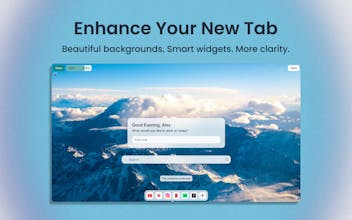
The product targets knowledge workers, students, and anyone who spends a significant amount of time in their browser and is looking for a way to subtly integrate productivity tools into their daily workflow. Enhance replaces the standard browser home page with a beautiful, clean slate featuring fresh daily backgrounds, a quick note function, a dock for essential shortcuts, and focus-friendly widgets. Its core value proposition lies in seamlessly blending aesthetic appeal with practical utility, creating a "daily boost of calm + productivity" that is genuinely distraction-free.
Problem & Solution
The maker of Enhance identified a common pain point: existing new tab extensions, while functional (like the popular Momentum), often feel visually "boring" or lack a modern, customizable aesthetic. The standard browser new tab, meanwhile, is typically a distraction magnet filled with suggested links or search history. This constant visual noise can break focus before a user even starts their task.
Enhance solves this by offering a clean, modern, and highly customizable alternative. Unlike traditional new tab replacements that can feel overwhelming or feature-heavy, Enhance prioritizes a minimal design. It fills a market gap for users who want the utility of integrated productivity features (like notes and tasks) but demand a premium, aesthetically pleasing interface. By offering diverse categories for the daily backgrounds and giving users control over the visual elements, Enhance differentiates itself through superior design and a focus on user well-being alongside task management.
Key Features & Highlights
Enhance stands out due to its thoughtful combination of design and practical functionality. Its unique selling points center on its commitment to a clean, distraction-free experience.
The most notable features include:
- Fresh Daily Backgrounds: Users can select different categories for their backgrounds, ensuring the visual experience remains fresh and appealing without becoming visually tiring.
- Quick Notes & Tasks: A simple, integrated space for jotting down fleeting thoughts or managing a small to-do list directly from the new tab. This removes the friction of opening a separate app for quick reminders.
- Shortcut Dock: A clean, minimal dock to store your most-used website shortcuts. This provides fast access to key work tools without relying on the cluttered standard bookmarks bar.
- Focus-Friendly Widgets: Integration of productivity widgets that are useful without being distracting, adhering to the core minimal design philosophy.
- Modern, Clean UI: As the maker emphasized, the user interface is a core strength. The design is modern, clean, and highly customizable, which contributes significantly to a more focused start to any browsing session.
The user experience is immediately positive. Opening a new tab presents a beautiful image and the tools you need, minimizing cognitive load and setting a positive, productive tone. The ability to customize background categories and the overall clean layout are significant highlights.
Potential Drawbacks & Areas for Improvement
While the "minimalist" approach of Enhance is a core strength, it is also its primary limitation for power users. Currently, the feature set is intentionally lean, focusing on quick notes and shortcuts. For users who rely on more complex task management or deeply integrated calendar features (like those found in extensions like Momentum, where goal setting is often prominent), Enhance might feel too basic.
Areas for constructive improvement include:
- Deeper Integration: Offering optional, deeper integrations with popular productivity apps like Google Calendar, Todoist, or Notion, perhaps as optional widgets that can be toggled on/off to maintain the minimal design.
- More Advanced Task Management: Evolving the "Tasks" feature to include simple priority levels or recurring tasks, giving users more robust list management capabilities.
- Theming/Color Customization: While the backgrounds are customizable, expanding options for overall UI theming (dark mode, accent colors) would allow even greater personalization and fit diverse user preferences.
The current version of Enhance is excellent for what it sets out to be—a beautiful, distraction-free dashboard. Future development should focus on adding optional complexity without sacrificing the core minimal aesthetic.
Bottom Line & Recommendation
Enhance is an excellent new tab extension for anyone seeking to enhance focus, reduce browser-induced distraction, and start their day with a beautiful, calm interface. It’s perfect for the user who finds other productivity extensions too cluttered or visually overwhelming. If you prioritize modern aesthetics, a clean design, and simple, built-in productivity tools like quick notes and shortcuts, Enhance is a must-try.
We highly recommend Enhance for users who feel visually bored or distracted by their current new tab page. It successfully delivers on its promise to turn your new tab into a genuine boost of calm and productivity. It's a fresh, modern take on a crowded category, proving that sometimes, less is truly more.
Featured AI Applications
Discover powerful tools to enhance your productivity
MindMax
New Way to Interact with AI
Beyond AI chat, transforming conversations into an infinite canvas. Combining brainstorming, mind mapping, critical and creative thinking tools to help you visualize ideas, solve problems efficiently, and accelerate learning.
AI Slides
AI Slides with Markdown
Revolutionary slide creation fusing AI intelligence with Markdown flexibility - edit anywhere, optimize anytime, iterate easily. Turn every idea into a professional presentation instantly.
AI Markdown Editor
Write Immediately
Extremely efficient writing experience: AI assistant, slash commands, minimalist interface. Open and write, easy writing. ✍️ Markdown simplicity + 🤖 AI power + ⚡ Slash commands = Perfect writing experience.
Chrome AI Extension
AI Assistant Anywhere
Transform your browsing experience with FunBlocks AI Assistant. Your intelligent companion supporting AI-driven reading, writing, brainstorming, and critical thinking across the web.