Flixier Generate AI Video in Timeline: Bridging the Gap Between AI Generation and Professional Editing
Extend shots, connect clips, generate from any frame
Published: 2/18/2026
Product Overview
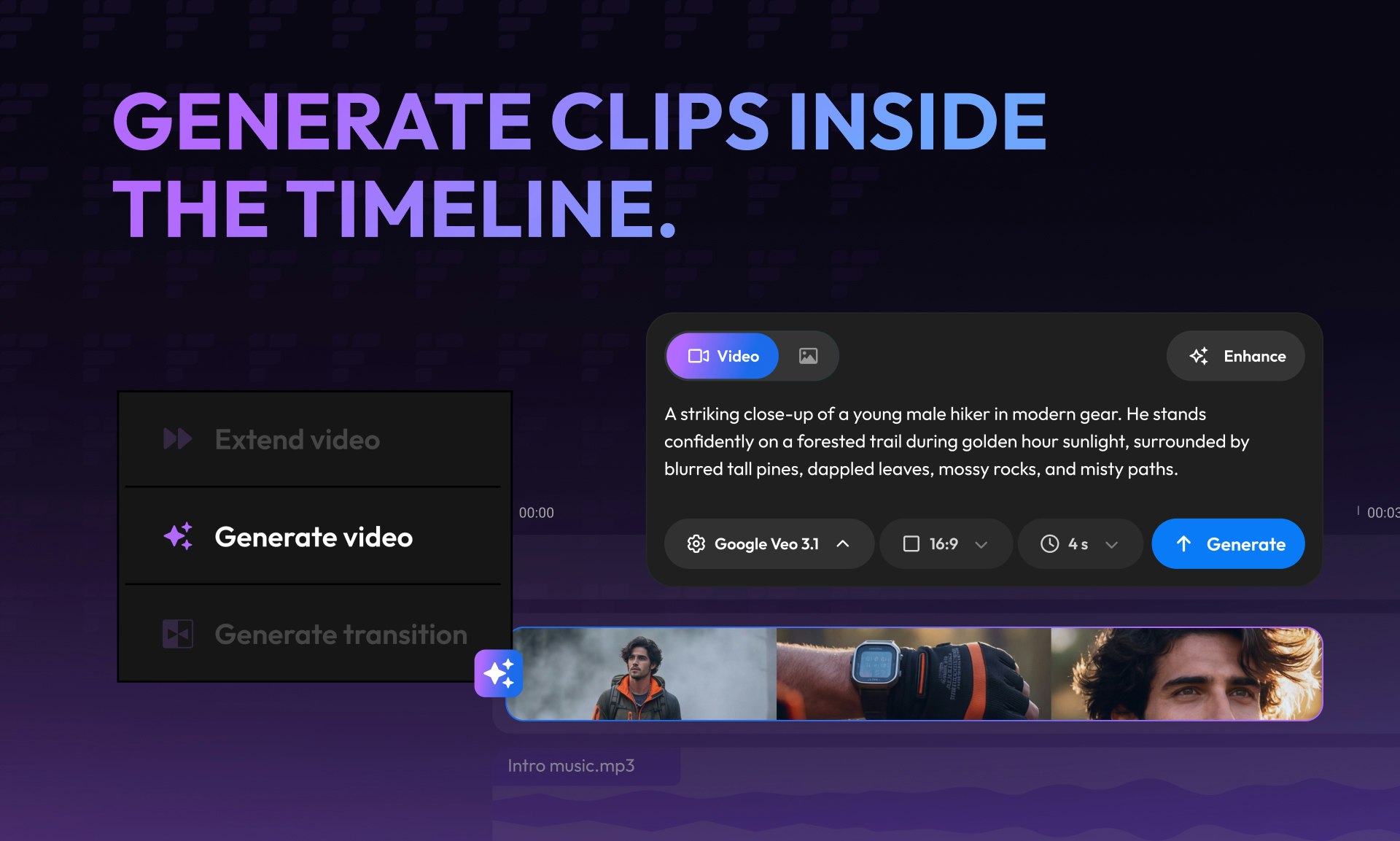
Flixier Generate AI Video in Timeline arrives on the scene promising to solve one of the most frustrating bottlenecks in modern video creation: the handoff between AI generation tools and traditional non-linear editing (NLE) software. This product isn't just another text-to-video generator; it’s an integrated solution designed to weave artificial intelligence directly into the post-production workflow. At its core, Flixier allows users to harness powerful generative AI capabilities—like extending existing shots or creating entirely new segments—right inside the familiar structure of an editing timeline.
The target audience for Flixier Generate AI Video in Timeline spans independent creators, social media managers, and small agency producers who need efficiency without sacrificing creative control. Its core value proposition is seamless integration. Instead of generating several disparate clips and then importing them into a separate NLE for sequencing, trimming, and polishing, Flixier asserts that you can do it all within their platform. This focus on continuity promises significant time savings and a less disjointed creative process for video production.
Problem & Solution: Ending the Workflow Whiplash
The current landscape of AI video creation often involves workflow whiplash. Creators use one tool to generate raw footage (often limited in duration or control), then export those clips, import them into Premiere Pro or DaVinci Resolve, and only then begin the true editing work. Any necessary adjustments, such as extending a moment or filling a gap, often require going back to the original AI tool, re-rendering, and re-exporting—a tedious cycle.
Flixier directly addresses this by embedding AI functionality into the editing timeline itself. If a shot is too short, you can select it and use the AI to extend shots instantly. If you need a transitional piece, you can generate from any frame to bridge two clips logically. This approach transforms AI from a preliminary asset generator into a flexible, on-demand editing assistant, effectively filling the market gap between dedicated generative platforms and powerful, but often complex, professional video editors.
Key Features & Highlights
The genius of Flixier Generate AI Video in Timeline lies in its commitment to an "in-timeline" experience. This is where the product truly distinguishes itself from competitors relying on siloed AI features.
The most notable capabilities center around dynamic content creation within the sequence:
- AI Shot Extension: Easily lengthen existing video clips by having the AI intelligently extrapolate the scene, saving users from having to re-prompt or re-render entirely new segments.
- In-Timeline Generation: The ability to prompt the AI to create content directly between two existing clips, enabling users to connect clips fluidly using AI-generated filler content.
- Frame-Specific Generation: Users can select any point in their existing footage and generate entirely new content stemming from that specific visual context, ensuring thematic and visual continuity.
The user experience appears streamlined for iterative editing. By keeping all generation, connection, trimming, and polishing tools in one application, Flixier minimizes context switching. This unified environment makes iterating on creative ideas fast—test an AI extension, trim the result, polish the color, and move on, all without leaving the primary interface.
Potential Drawbacks & Areas for Improvement
While the concept of merging AI generation with a timeline editor is powerful, a platform that attempts to do "everything" often struggles with depth compared to specialized tools. My primary concern for Flixier Generate AI Video in Timeline would be the sophistication of the underlying NLE features themselves.
Users accustomed to industry-leading NLEs might find the core editing toolset (advanced color grading, complex keyframing, audio mixing capabilities) less robust than dedicated professional software. Furthermore, the quality and coherence of the AI generation, especially when extending complex action sequences or maintaining character consistency across generated segments, will be the ultimate litmus test for adoption.
To enhance value, I would suggest focusing heavily on two areas:
- Advanced Control Mapping: Providing granular controls over the AI generation parameters (e.g., specific seed control, style matching from an input frame) that are accessible directly within the timeline interface.
- API Integrations: Allowing users to potentially leverage their existing high-quality assets or custom models for generation within the Flixier environment.
Bottom Line & Recommendation
Flixier Generate AI Video in Timeline represents a significant leap forward in making generative AI practical for real-world video production workflows. If you are a content creator or marketer constantly frustrated by exporting and importing between your AI text-to-video tool and your NLE, this product is absolutely worth investigating. It targets the crucial efficiency gap between creation and final polish.
Overall, Flixier successfully delivers on its promise of bringing AI generation directly to the editing timeline. I strongly recommend that social media managers and independent filmmakers looking to dramatically speed up their turnaround times try Flixier to see how seamlessly they can generate, extend, and connect clips without ever leaving the editing board.
Featured AI Applications
Discover powerful tools to enhance your productivity
MindMax
New Way to Interact with AI
Beyond AI chat, transforming conversations into an infinite canvas. Combining brainstorming, mind mapping, critical and creative thinking tools to help you visualize ideas, solve problems efficiently, and accelerate learning.
AI Slides
AI Slides with Markdown
Revolutionary slide creation fusing AI intelligence with Markdown flexibility - edit anywhere, optimize anytime, iterate easily. Turn every idea into a professional presentation instantly.
AI Markdown Editor
Write Immediately
Extremely efficient writing experience: AI assistant, slash commands, minimalist interface. Open and write, easy writing. ✍️ Markdown simplicity + 🤖 AI power + ⚡ Slash commands = Perfect writing experience.
Chrome AI Extension
AI Assistant Anywhere
Transform your browsing experience with FunBlocks AI Assistant. Your intelligent companion supporting AI-driven reading, writing, brainstorming, and critical thinking across the web.