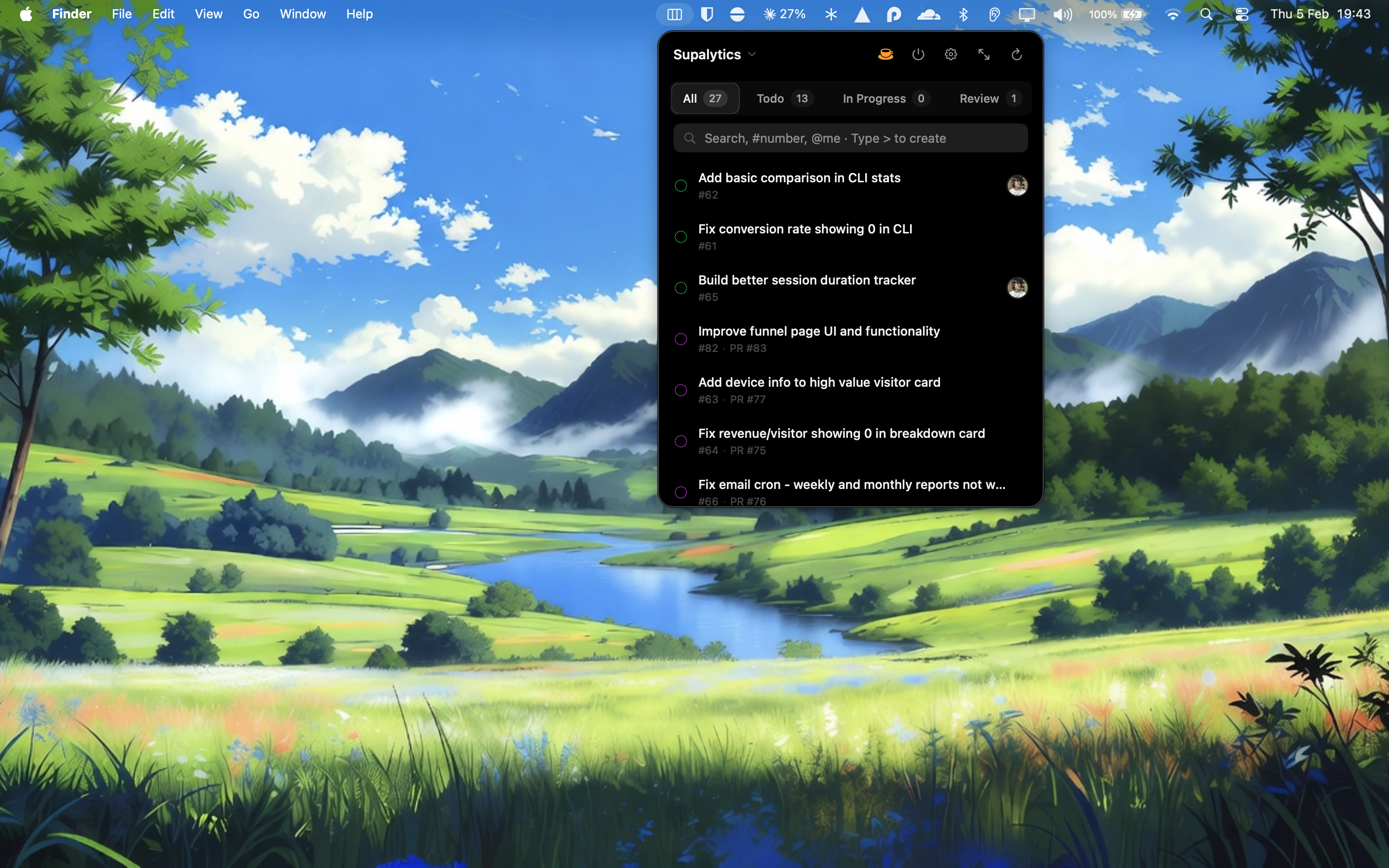
GitBoard Review: Bringing GitHub Projects to Your macOS Menubar for Seamless Workflow Management
Menubar mac app for Github Projects
Published: 2/7/2026
Product Overview
GitBoard is a polished, native macOS application designed to streamline the interaction developers and project managers have with GitHub Projects, all directly from the comfort of their menubar. In an era where context switching kills productivity, GitBoard promises to keep essential project updates and management tasks within immediate reach, without forcing users to navigate away from their coding environment or main application window.
This tool is fundamentally aimed at the dedicated GitHub user—software developers, technical leads, product owners, and anyone deeply embedded in the GitHub ecosystem who relies heavily on GitHub Projects for sprint planning, bug tracking, and overall task management. The core value proposition of GitBoard lies in minimizing friction: transforming the often multi-click, browser-heavy process of updating project statuses into a swift, localized action accessible instantly.
Problem & Solution
The primary problem GitBoard tackles is the productivity drain associated with managing asynchronous project boards within a browser tab. While GitHub Projects is powerful, accessing it requires opening a browser, navigating to the repository, and locating the specific board—a significant context switch for quick updates, status checks, or urgent task creation. This latency adds up throughout the day, especially for users managing multiple repositories or projects simultaneously.
GitBoard solves this by serving as a highly accessible, centralized command center. Unlike web-based management tools or more complex IDE integrations, GitBoard offers immediate, lightweight access. It fills a notable market gap by providing a truly native menubar experience dedicated solely to GitHub Projects, focusing on speed and glanceability rather than trying to replicate every function of the full web interface.
Key Features & Highlights
The design philosophy behind GitBoard appears to be focused on speed and essential utility. The ability to summon a full Kanban board view directly from the menubar is a major highlight. This isn't just a notification widget; it's a functional interface tailored for rapid task manipulation.
Key features that stand out for productivity enthusiasts include:
- Quick View Access: Instant access to project status without leaving the current application.
- Full Kanban Board Functionality: Users aren't limited to just viewing; they can actively manage the board.
- Granular Control: The capacity to filter by status, search existing issues, assign users, and create new issues on the fly ensures that workflow continuity is maintained.
The native macOS implementation suggests a smooth, responsive user experience that adheres to platform conventions, making interactions feel fast and intuitive, which is critical for a utility residing in the menubar.
Potential Drawbacks & Areas for Improvement
While the immediate utility of GitBoard is clear, as a menubar application focused on a specific ecosystem (GitHub Projects), potential limitations might surface around integration breadth and offline capability.
One area for constructive criticism could be around synchronization depth. If the app primarily relies on polling or shallow API calls, real-time updates across multiple devices or collaborators might experience slight delays compared to the web interface. Future enhancements could focus on:
- Deeper IDE Integration: While the menubar is great, integration extensions for popular IDEs like VS Code or JetBrains could further solidify its place in the developer workflow.
- Custom Views/Workflows: Allowing users to save specific filtered views or custom sorting orders beyond just status filtering would boost personalization.
- Offline Caching: Even basic read-only access to the current state of projects when connectivity is temporarily lost would significantly enhance reliability.
Bottom Line & Recommendation
GitBoard is an excellent utility for any Mac user whose daily workflow revolves around tracking progress within GitHub Projects. If you find yourself frequently alt-tabbing or switching tabs to update a task card or check a sprint status, the time savings offered by GitBoard are immediately apparent. It successfully carves out a niche by prioritizing immediate accessibility over feature bloat.
Recommendation: If you live and breathe GitHub Projects and value minimizing context switching on your macOS machine, GitBoard is a highly recommended download. It’s a focused tool that delivers exactly what its tagline promises: seamless GitHub Projects management, right where you need it.
Featured AI Applications
Discover powerful tools to enhance your productivity
MindMax
New Way to Interact with AI
Beyond AI chat, transforming conversations into an infinite canvas. Combining brainstorming, mind mapping, critical and creative thinking tools to help you visualize ideas, solve problems efficiently, and accelerate learning.
AI Slides
AI Slides with Markdown
Revolutionary slide creation fusing AI intelligence with Markdown flexibility - edit anywhere, optimize anytime, iterate easily. Turn every idea into a professional presentation instantly.
AI Markdown Editor
Write Immediately
Extremely efficient writing experience: AI assistant, slash commands, minimalist interface. Open and write, easy writing. ✍️ Markdown simplicity + 🤖 AI power + ⚡ Slash commands = Perfect writing experience.
Chrome AI Extension
AI Assistant Anywhere
Transform your browsing experience with FunBlocks AI Assistant. Your intelligent companion supporting AI-driven reading, writing, brainstorming, and critical thinking across the web.