GitJin Review: The Blazing Fast GitHub Dashboard Your Workflow Desperately Needs
GitHub repos, issues, and PRs in one clear dashboard
Published: 12/24/2025
Product Overview
GitJin arrives on Product Hunt with a bold, yet crucial promise: to be the fastest GitHub dashboard available. In an ecosystem where developers spend countless hours navigating repository lists, monitoring open issues, and reviewing pull requests, speed and clarity are not just nice-to-haves—they are core requirements for productivity. GitJin aims to streamline the chaotic stream of activity associated with managing multiple GitHub projects into a single, cohesive, and instantaneous interface.
This tool is squarely aimed at the modern software developer, DevOps engineer, or technical lead who manages numerous repositories, contributes across several teams, or simply suffers from GitHub's default dashboard fatigue. If you find yourself constantly hunting for that one specific PR across several different projects, GitJin positions itself as the antidote to that administrative burden. Its core value proposition rests entirely on superior performance and unparalleled simplicity in visualizing your GitHub workload.
Problem & Solution: Ending Dashboard Whiplash
The primary problem GitJin addresses is the cognitive load and sheer navigational hassle imposed by the standard GitHub interface when managing a high volume of work. For active contributors, the default dashboard can quickly become overwhelming, forcing users to constantly switch contexts, drill down into specific organizations, or rely on complex saved search queries just to see what needs attention. This fragmentation directly impacts flow state and development velocity.
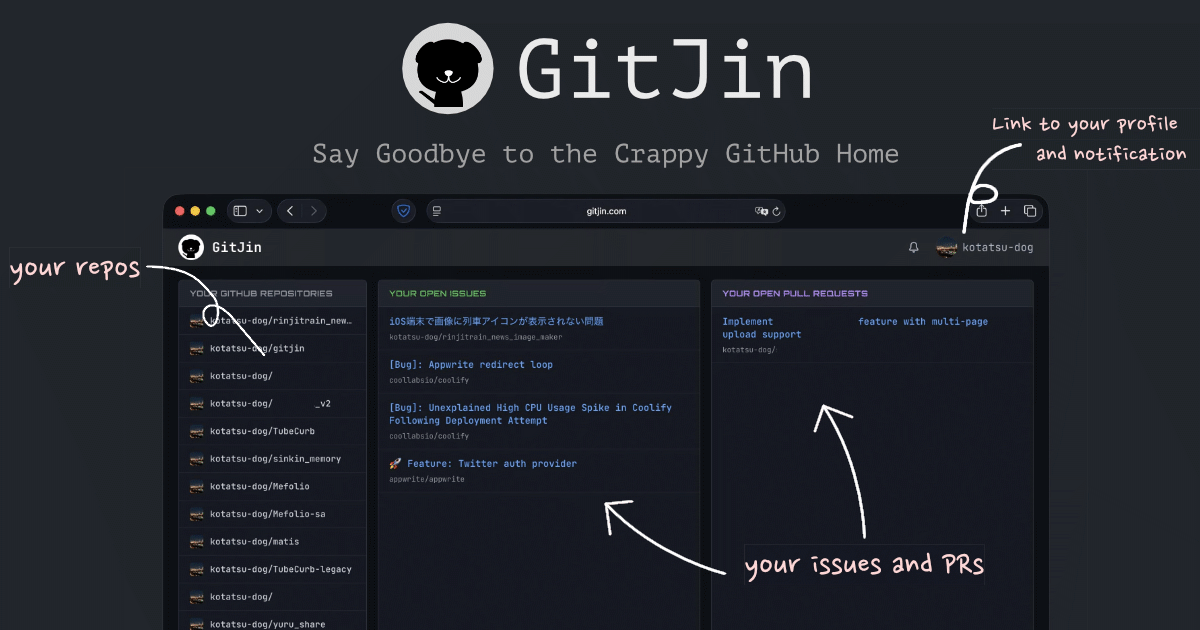
GitJin solves this by aggregating your critical data—repositories, active issues, and pending pull requests—into one centralized, lightning-fast view. Where traditional platforms often suffer from latency as they load complex queries and dynamic data feeds, GitJin emphasizes extreme speed. It promises to eliminate the "stress" associated with opening a busy GitHub page, suggesting it prioritizes immediate access to essential developer actions over extraneous visual elements. It fills a distinct market gap for developers prioritizing raw performance in their daily tooling.
Key Features & Highlights
While the feature set appears minimalist by design, the highlights of GitJin are rooted in its performance optimization and focused user experience:
- Unified View: Centralizes visibility across all your relevant GitHub assets—repos, issues, and PRs—without endless scrolling or page reloads.
- Blazing Speed: The defining feature is its claimed velocity. This is crucial for maintaining developer flow; waiting even a second for a dashboard to render can break concentration.
- Simplicity: The interface, as suggested by the tagline, is designed to be "clear." This often means eliminating clutter common in other dashboard tools, focusing only on actionable items.
The User Experience (UX) seems deliberately stripped down. By focusing intensely on speed, GitJin suggests a highly performant web application that respects the user's time. For developers accustomed to tools that feel heavy or slow, GitJin’s dedication to being "the fastest" is a significant competitive advantage, making daily triage painless.
Potential Drawbacks & Areas for Improvement
As a fast, focused dashboard, the main potential drawback of GitJin lies in the very simplicity it champions. While aggregated views are excellent for overview, developers often require deeper contextual filtering.
Constructive criticism would focus on feature depth:
- Advanced Filtering: While viewing all PRs is great, the ability to instantly filter by label, author, or repository group (e.g., "Only show PRs assigned to me from the 'Core Services' organization") would elevate its utility beyond a simple aggregator.
- Notifications Integration: Does GitJin integrate GitHub notifications seamlessly, or is it strictly focused on repository/PR/issue lists? A deeper connection to the native notification system would solidify its role as a primary command center.
- Customization: To cater to diverse workflows, offering minor layout customization or theme options (beyond just light/dark modes) could improve long-term adoption, even if the current design is intentionally barebones for speed.
If GitJin prioritizes speed above all else, it risks becoming a static list rather than a dynamic workflow tool. Enhancing filtering capabilities without sacrificing its core performance metric is the key challenge moving forward.
Bottom Line & Recommendation
GitJin is a highly recommended utility for any developer or technical manager suffering from GitHub dashboard overload. If your daily routine involves constantly checking multiple active projects and you feel that existing tooling is too slow or visually distracting, GitJin deserves an immediate trial.
For those who value efficiency and believe that microseconds saved on dashboard loading add up to hours over a year, GitJin presents itself as a must-try productivity hack. While future iterations should focus on smarter filtering, its current dedication to being the fastest point of entry into your GitHub workload makes it a standout launch on Product Hunt today.
Featured AI Applications
Discover powerful tools to enhance your productivity
MindMax
New Way to Interact with AI
Beyond AI chat, transforming conversations into an infinite canvas. Combining brainstorming, mind mapping, critical and creative thinking tools to help you visualize ideas, solve problems efficiently, and accelerate learning.
AI Slides
AI Slides with Markdown
Revolutionary slide creation fusing AI intelligence with Markdown flexibility - edit anywhere, optimize anytime, iterate easily. Turn every idea into a professional presentation instantly.
AI Markdown Editor
Write Immediately
Extremely efficient writing experience: AI assistant, slash commands, minimalist interface. Open and write, easy writing. ✍️ Markdown simplicity + 🤖 AI power + ⚡ Slash commands = Perfect writing experience.
Chrome AI Extension
AI Assistant Anywhere
Transform your browsing experience with FunBlocks AI Assistant. Your intelligent companion supporting AI-driven reading, writing, brainstorming, and critical thinking across the web.