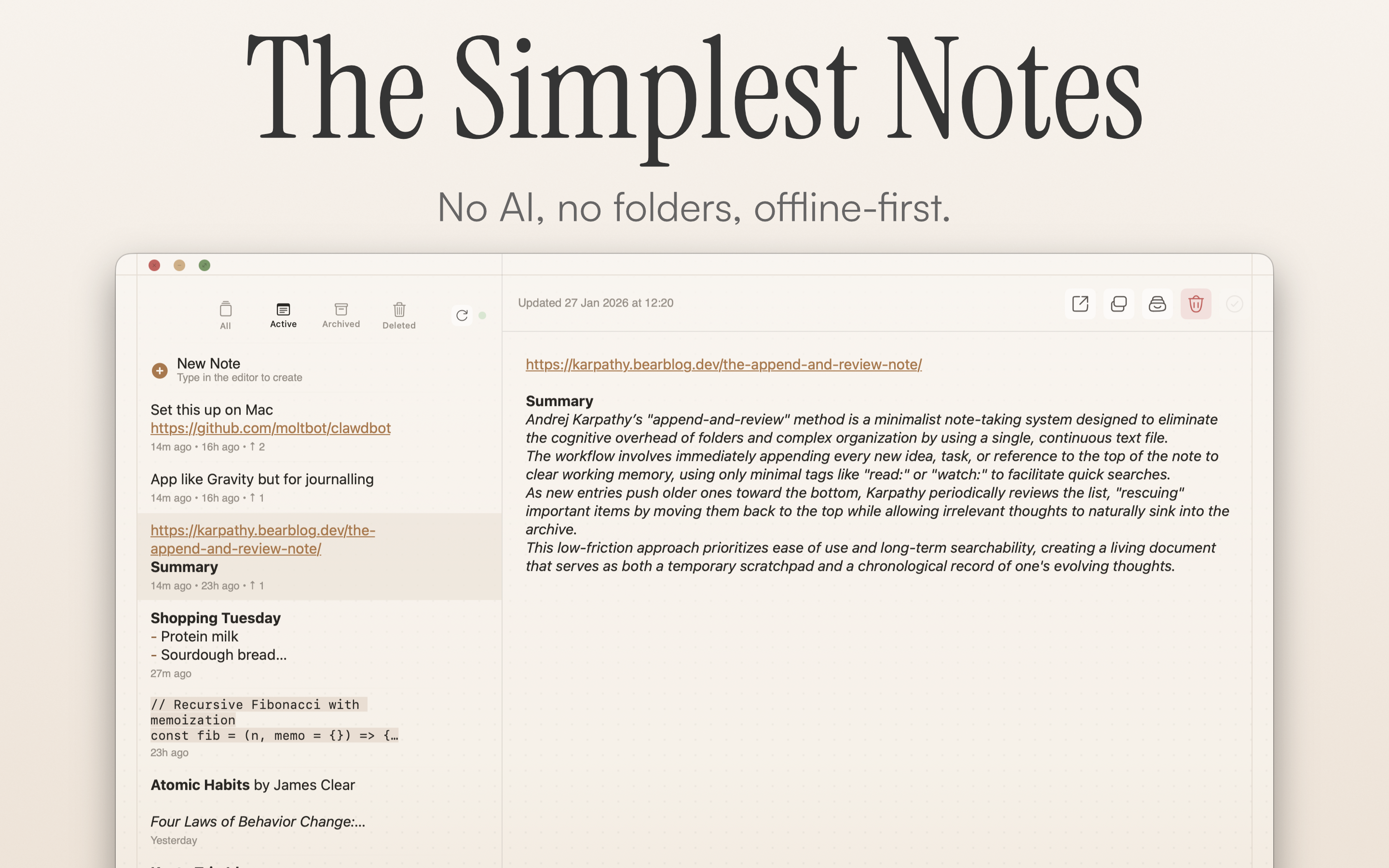
Gravity Notes For Mac: Is This the Minimalist Note-Taking App You've Been Waiting For?
Private offline notepad
Published: 2/10/2026
Product Overview
Gravity Notes For Mac enters the crowded productivity space with a refreshing, almost contrarian philosophy: stop organizing and start thinking. Tagline as a private offline notepad, Gravity positions itself as the antidote to bloated, folder-heavy note-taking systems that often end up consuming more time organizing than creating. At its core, Gravity Notes offers an ultra-fast, single-stream note-taking experience designed for immediate thought capture and prioritization.
This application is not trying to be your complex "second brain." Instead, it appeals directly to individuals—creatives, developers, writers, and busy professionals—who need a frictionless space for jotting down fleeting ideas, meeting notes, or daily tasks without the cognitive load of filing systems. The core value proposition of Gravity Notes is simplicity coupled with a unique prioritization mechanism inspired by concepts like the Karpathy method, focusing purely on relevance rather than hierarchical structure.
The underlying technology emphasizes privacy and speed. By utilizing iCloud for seamless synchronization across your Apple ecosystem without requiring external accounts, tracking, or mandatory subscriptions, Gravity Notes promises a secure and lightweight environment where your focus remains solely on your content.
Problem & Solution: Escaping Organizational Paralysis
The modern digital workspace is plagued by organizational paralysis. Users waste countless hours deciding on the right folder, applying the perfect set of tags, or migrating notes between different project silos. This friction inherently disrupts the flow state crucial for deep work. Gravity Notes For Mac directly addresses this pain point by eradicating folders and tags entirely.
The solution offered by Gravity Notes is elegant: a single, chronological stream of thought. Instead of relying on explicit organization, it uses an intuitive, proactive mechanism to surface important information. When a note is relevant right now, you "bump" it to the top. When it naturally drifts down the feed, it signifies that its immediate importance has passed, yet it remains accessible in the stream. This solves the problem of forgetting transient but important ideas by automating the prioritization decay process.
Key Features & Highlights
The standout feature of Gravity Notes is undeniably its unique "bumping" prioritization model. This mechanism transforms a static list into a dynamic, relevance-based feed.
Key capabilities that enhance the user experience include:
- Single Stream Interface: Absolute simplicity; open and begin typing immediately. No setup required.
- Instant Capture Shortcuts: Designed to keep the user in their workflow, allowing for rapid note creation without breaking concentration.
- iCloud Sync: Secure, private synchronization between your Apple devices using infrastructure you already trust, ensuring zero vendor lock-in or account overhead.
- Offline First: Being a private offline notepad, reliability is guaranteed, even without connectivity.
The user experience shines in its speed. The interface is deliberately sparse, ensuring that launching Gravity Notes For Mac results in instantaneous access to your thoughts, which is a critical differentiator in high-velocity note-taking scenarios.
Potential Drawbacks & Areas for Improvement
While the minimalist approach is Gravity Notes' greatest strength, it is also the source of its limitations. Users accustomed to robust features might find the lack of organizational tools restrictive for very large, diverse knowledge bases.
For instance, while the single stream works brilliantly for daily tasks or short-term project thoughts, managing hundreds or thousands of notes without any form of searching beyond basic text matching could eventually lead to retrieval challenges.
Suggestions for enhancement could include:
- Enhanced Search Capabilities: Implement faster, more robust full-text search or perhaps a limited, context-based tagging system that only appears upon specific invocation (e.g., a quick command palette search).
- Markdown Support: While text input is fast, introducing basic Markdown formatting would significantly enhance its utility for developers and writers without drastically compromising the "simple" ethos.
- Cross-Platform Options: Currently positioned as a Mac application, extending this concept to iOS/iPadOS beyond basic iCloud sync (or even a web wrapper) would maximize its appeal to the Apple ecosystem users.
Bottom Line & Recommendation
Gravity Notes For Mac is a powerful tool for anyone suffering from productivity tool fatigue. If you find yourself spending more time tagging notes than taking them, and you prefer a simple, private, and extremely fast entry point for your thoughts, you absolutely should try Gravity Notes. It succeeds in its mission to remove friction and encourage pure ideation. While it might not replace comprehensive knowledge management systems for complex research, for fast capture and active prioritization, this private offline notepad sets a new, beautifully simple standard. Highly recommended for those seeking digital minimalism.
Featured AI Applications
Discover powerful tools to enhance your productivity
MindMax
New Way to Interact with AI
Beyond AI chat, transforming conversations into an infinite canvas. Combining brainstorming, mind mapping, critical and creative thinking tools to help you visualize ideas, solve problems efficiently, and accelerate learning.
AI Slides
AI Slides with Markdown
Revolutionary slide creation fusing AI intelligence with Markdown flexibility - edit anywhere, optimize anytime, iterate easily. Turn every idea into a professional presentation instantly.
AI Markdown Editor
Write Immediately
Extremely efficient writing experience: AI assistant, slash commands, minimalist interface. Open and write, easy writing. ✍️ Markdown simplicity + 🤖 AI power + ⚡ Slash commands = Perfect writing experience.
Chrome AI Extension
AI Assistant Anywhere
Transform your browsing experience with FunBlocks AI Assistant. Your intelligent companion supporting AI-driven reading, writing, brainstorming, and critical thinking across the web.