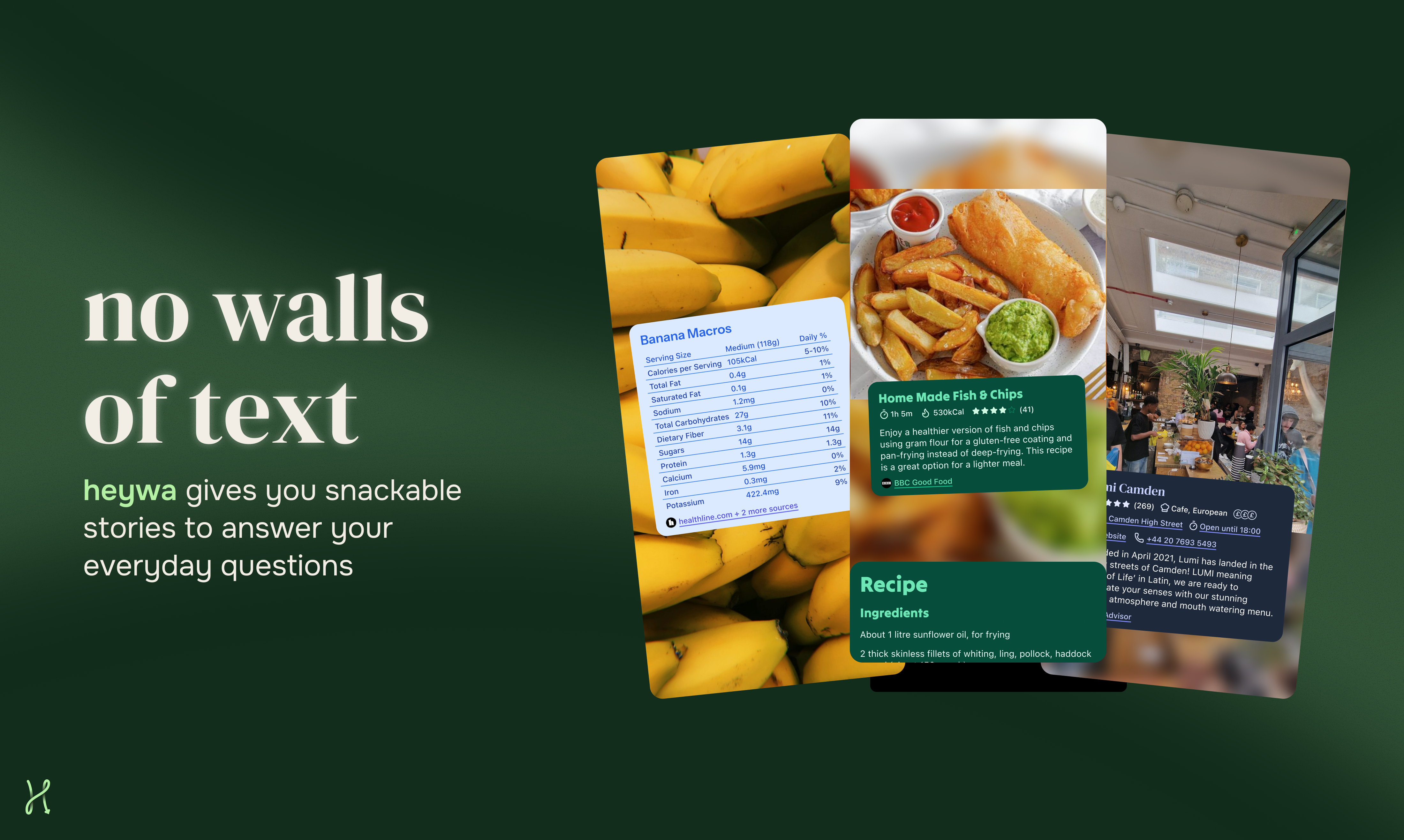
Heywa Review: Ditching Text Walls for Dynamic Visual Storytelling
Tappable visual stories instead of ChatGPT text walls
Published: 3/5/2026
Product Overview: Rethinking AI Interaction
Heywa is carving out a fascinating niche in the rapidly evolving landscape of generative AI tools. Its core mission, succinctly captured by its tagline, is to replace the monotonous, scrolling “text walls” often produced by large language models (LLMs) like ChatGPT with tappable, dynamic visual stories. In essence, Heywa takes your query and transforms the resulting information into a structured, easily digestible visual narrative format, similar to an Instagram Story or an interactive presentation.
This tool is engineered for anyone who finds traditional, dense AI chatbot outputs overwhelming or inefficient for complex research. Whether you are a student summarizing historical events, a marketer comparing competitor features, or a knowledge worker trying to grasp a new technical concept quickly, Heywa promises a more intuitive way to consume AI-generated content. The fundamental value proposition lies in efficiency: getting the right context, visually organized, without the cognitive load of parsing long paragraphs.
The Problem Heywa Solves: Information Overload in AI
The current standard for text-based AI interaction suffers from a major usability flaw: information density. When asking complex or comparative questions, models respond with verbose blocks of text. Users are then forced to mentally structure that data, often resorting to opening multiple browser tabs to cross-reference, organize, or clarify points—defeating the purpose of a single conversational AI interface.
Heywa addresses this directly by injecting structure and visual context into the generation process. Instead of simply answering, it builds an experience around the answer. It fills the market gap between pure text generation and dedicated infographic tools. By focusing on visual data representation derived instantly from the prompt, Heywa allows users to "browse, compare, and go deeper" visually, making information retrieval feel less like reading documentation and more like exploring a curated exhibit.
Key Features and User Experience Highlights
The power of Heywa resides in its ability to dynamically construct narratives. While the inputs are textual prompts, the outputs leverage visual hierarchy and sequencing. The key feature is the instant transformation of data into a multi-step, tappable format.
Imagine asking for a comparison between two competing software products. Instead of a bulleted list, Heywa might present the information across several "slides": Slide 1 introduces the topic, Slide 2 covers pricing (visualized with distinct cards), Slide 3 covers core features (using icons or simple charts), and so on. This approach significantly boosts information retention and comparison accuracy.
Key capabilities revolve around intuitive interaction:
- Dynamic Story Building: Content is automatically segmented and arranged for optimal visual flow.
- Tappable Navigation: Users move through the response linearly or jump between related topics seamlessly.
- Focus on Comparison: The visual structure naturally aids in contrasting different data points or concepts derived from the prompt.
The user experience is designed to feel familiar to anyone accustomed to modern mobile consumption habits, translating complex AI output into a highly accessible, interactive medium.
Potential Drawbacks and Areas for Improvement
As a newer concept aiming to disrupt traditional AI output, Heywa likely faces scaling challenges related to visual complexity and customization. While dynamic visualization is the core strength, one potential drawback could be the limitations on fine-tuning the visual output. If a user requires a specific type of chart or visual metaphor that the dynamic engine doesn't currently support, they might be forced back into text editing mode.
Furthermore, the quality of the visual story is entirely dependent on the AI model’s ability to correctly structure the information for visual segmentation. For highly abstract or nuanced philosophical questions, forcing a visual structure might sometimes oversimplify the nuance. Future improvements could include:
- Granular Visual Controls: Allowing users to slightly tweak the layout or select preferred visualization styles (e.g., "Use bar charts for this section").
- Deeper Integration for Data Sources: If Heywa can pull from more real-time or specific databases, the resulting visual stories become even more authoritative.
Bottom Line and Recommendation
Heywa represents an exciting step forward in making generative AI output actionable and digestible. It’s an innovative tool that directly tackles the growing pain point of AI-induced information fatigue. If you frequently use ChatGPT or similar tools for research, comparison, or learning new concepts, and you find yourself constantly wishing the answers were better organized visually, you need to try Heywa.
It is highly recommended for researchers, knowledge workers, and busy professionals who value speed and clarity over pure textual depth. Heywa isn't just another AI interface; it’s a novel way to experience AI-generated knowledge. Give it a spin and see how much faster you can grasp complex topics when they are served as an interactive visual story rather than a dense paragraph.
Featured AI Applications
Discover powerful tools to enhance your productivity
MindMax
New Way to Interact with AI
Beyond AI chat, transforming conversations into an infinite canvas. Combining brainstorming, mind mapping, critical and creative thinking tools to help you visualize ideas, solve problems efficiently, and accelerate learning.
AI Slides
AI Slides with Markdown
Revolutionary slide creation fusing AI intelligence with Markdown flexibility - edit anywhere, optimize anytime, iterate easily. Turn every idea into a professional presentation instantly.
AI Markdown Editor
Write Immediately
Extremely efficient writing experience: AI assistant, slash commands, minimalist interface. Open and write, easy writing. ✍️ Markdown simplicity + 🤖 AI power + ⚡ Slash commands = Perfect writing experience.
Chrome AI Extension
AI Assistant Anywhere
Transform your browsing experience with FunBlocks AI Assistant. Your intelligent companion supporting AI-driven reading, writing, brainstorming, and critical thinking across the web.