HighlightGPT Review: Transforming ChatGPT into a True Reading & Thinking Workspace
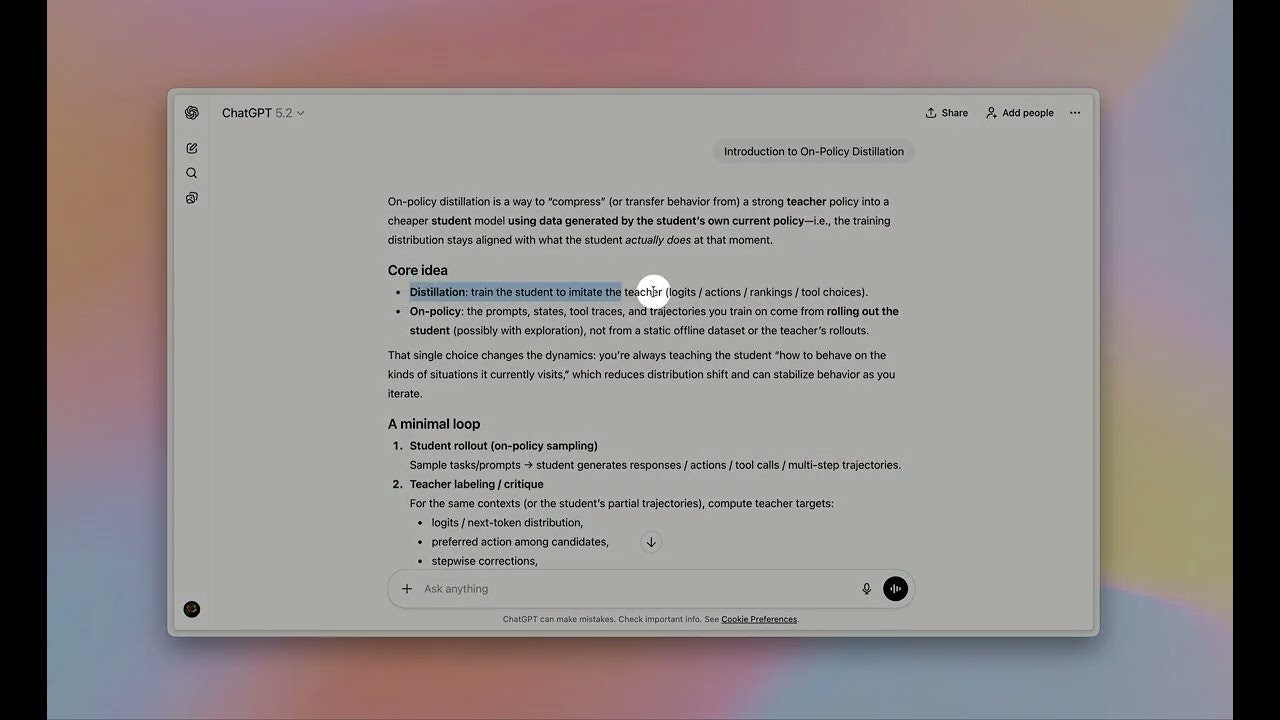
Highlight in ChatGPT, ask GPT in a side panel
Published: 1/29/2026
Product Overview: Streamlining Your AI Interaction Workflow
HighlightGPT is a clever Chrome extension designed to bridge the gap between consuming AI-generated content within the ChatGPT interface and actively interacting with that content. In essence, HighlightGPT takes the standard, linear conversational format of ChatGPT and imbues it with contextual awareness, transforming it from a simple chat window into a more robust reading and analysis workspace. By integrating seamlessly with the browser, the extension allows users to instantly select any piece of text generated by or pasted into ChatGPT and trigger a dedicated side panel for immediate follow-up actions.
This tool is specifically targeted at power users, researchers, students, writers, and knowledge workers who frequently rely on ChatGPT for complex tasks like summarizing large outputs, extracting key data points, or translating specific segments of text. The core value proposition of HighlightGPT lies in its efficiency: eliminating the need to copy, paste, open a new tab, or interrupt the main flow of conversation just to refine or explore a single sentence or paragraph.
Problem & Solution: Ending the Copy-Paste Loop
The primary friction point for dedicated ChatGPT users is the constant context switching required when dealing with lengthy or detailed outputs. If ChatGPT provides a five-paragraph explanation, and you only need clarification on the third sentence, the traditional workflow forces you to copy that sentence, switch context (either by moving back to the main chat window or opening a new prompt), and then paste it in with a request like, "Explain this better." This repetitive action breaks concentration and significantly slows down analytical workflows.
HighlightGPT solves this by providing instant, localized context querying. When you highlight text, the side panel automatically appears, ready for your command—be it to explain, summarize, translate, or even save that specific snippet for later review. This targeted approach means users interact with the AI output in situ, drastically reducing friction and making iterative refinement much smoother than any native browser or existing AI tool allows currently. It fills a significant market gap for integrated context management within the dominant LLM interfaces.
Key Features & Highlights: Contextual Command Execution
The strength of HighlightGPT lies in its simplicity and focus. It successfully upgrades the user experience by introducing micro-interactions that have a macro impact on productivity. The most notable features center around the immediate utility of the side panel:
- Instant Contextual Querying: The core functionality allows users to highlight any text within the ChatGPT interface and immediately prompt the AI in a dedicated panel, ensuring the AI understands precisely which text you are referring to.
- Versatile Actions: The side panel supports a range of essential actions tailored for knowledge work:
- Ask/Explain: Get deeper dives into specific concepts.
- Translate: Quick language conversions for multilingual content.
- Save/Memorize: A crucial feature for researchers, allowing users to bookmark key insights directly from the conversation thread without manual note-taking outside the tool.
The user experience is highlighted by its non-intrusiveness. The extension doesn't overhaul the ChatGPT UI; instead, it enhances it subtly. The side panel implementation feels native, making the entire process of engaging with AI outputs feel more like working within a dynamic document rather than just querying a stateless chatbot.
Potential Drawbacks & Areas for Improvement
While HighlightGPT excels at its primary function—contextual querying—there are a few areas where the extension could evolve to become truly indispensable. One potential limitation is the reliance on the primary ChatGPT conversation flow. If the user clears the chat, the "saved memorizes" linked to that specific session might become orphaned or contextually lost, depending on how the save feature is implemented backend-wise.
For improvement, incorporating more advanced organizational tools within the side panel would be highly beneficial. Currently, saving seems like a basic bookmark. Future iterations could benefit from:
- Tagging and Folder Systems: Allowing users to tag saved highlights (e.g., #ProjectX, #ToReview, #MarketingCopy) directly from the side panel.
- Integration Hooks: Offering export options for saved highlights to popular note-taking apps like Notion or Obsidian, cementing its role as a true research aggregator.
- Custom Prompt Libraries: Allowing users to pre-save their most common follow-up prompts (e.g., "Turn this into three bullet points for an executive summary") to quickly access them in the side panel without retyping.
Bottom Line & Recommendation
HighlightGPT is an excellent quality-of-life upgrade for anyone spending significant time interacting with text generated by ChatGPT. If you find yourself constantly copying, pasting, and switching mental gears to analyze or refine AI outputs, this Chrome extension offers immediate, tangible productivity gains. It successfully moves ChatGPT closer to being an active analytical partner rather than just a passive information generator. We highly recommend that serious ChatGPT users check out HighlightGPT for a smoother, more integrated AI interaction experience. This is an essential tool for unlocking peak LLM efficiency.
Featured AI Applications
Discover powerful tools to enhance your productivity
MindMax
New Way to Interact with AI
Beyond AI chat, transforming conversations into an infinite canvas. Combining brainstorming, mind mapping, critical and creative thinking tools to help you visualize ideas, solve problems efficiently, and accelerate learning.
AI Slides
AI Slides with Markdown
Revolutionary slide creation fusing AI intelligence with Markdown flexibility - edit anywhere, optimize anytime, iterate easily. Turn every idea into a professional presentation instantly.
AI Markdown Editor
Write Immediately
Extremely efficient writing experience: AI assistant, slash commands, minimalist interface. Open and write, easy writing. ✍️ Markdown simplicity + 🤖 AI power + ⚡ Slash commands = Perfect writing experience.
Chrome AI Extension
AI Assistant Anywhere
Transform your browsing experience with FunBlocks AI Assistant. Your intelligent companion supporting AI-driven reading, writing, brainstorming, and critical thinking across the web.