Is It Down? – Your macOS Menubar Uptime Companion
Monitor your apis and websites on menubar
Published: 11/15/2025
"Is It Down?" is a macOS menubar utility designed to provide developers, site owners, and anyone reliant on online services with instant status updates for their websites and APIs. In a world where uptime is paramount, this lightweight application aims to offer peace of mind by delivering critical monitoring information directly to your desktop without interrupting your workflow. It acts as a personal, streamlined monitoring dashboard, putting essential performance data at your fingertips.
The product targets individuals and small teams who need a quick, at-a-glance overview of their service's health without the complexity or cost of enterprise-grade monitoring solutions. It's ideal for checking the status of personal projects, client websites, or crucial third-party APIs that your applications depend on. The core value proposition lies in its accessibility and simplicity, transforming a potentially anxiety-inducing wait into an immediate, actionable insight from the comfort of your menubar.
Problem & Solution
The pervasive problem "Is It Down?" addresses is the constant worry and manual effort involved in checking if a website or API is operational. Traditionally, users might repeatedly refresh pages, visit public "is it down for everyone or just me" websites, or rely on more complex (and often expensive) monitoring services. These methods can be time-consuming, disruptive, or overkill for individual users or small-scale needs.
"Is It Down?" solves this by offering a native macOS application that resides in your menubar, continuously monitoring specified URLs. This approach provides immediate feedback, distinguishing it from general uptime checker websites which often require manual input and lack persistent monitoring for a custom list of services. By integrating directly into the macOS environment, it offers a seamless and less intrusive monitoring experience, filling a niche for users who need consistent, personal oversight of their digital assets.
Key Features & Highlights
"Is It Down?" boasts several features that make it a valuable tool for quick uptime checks:
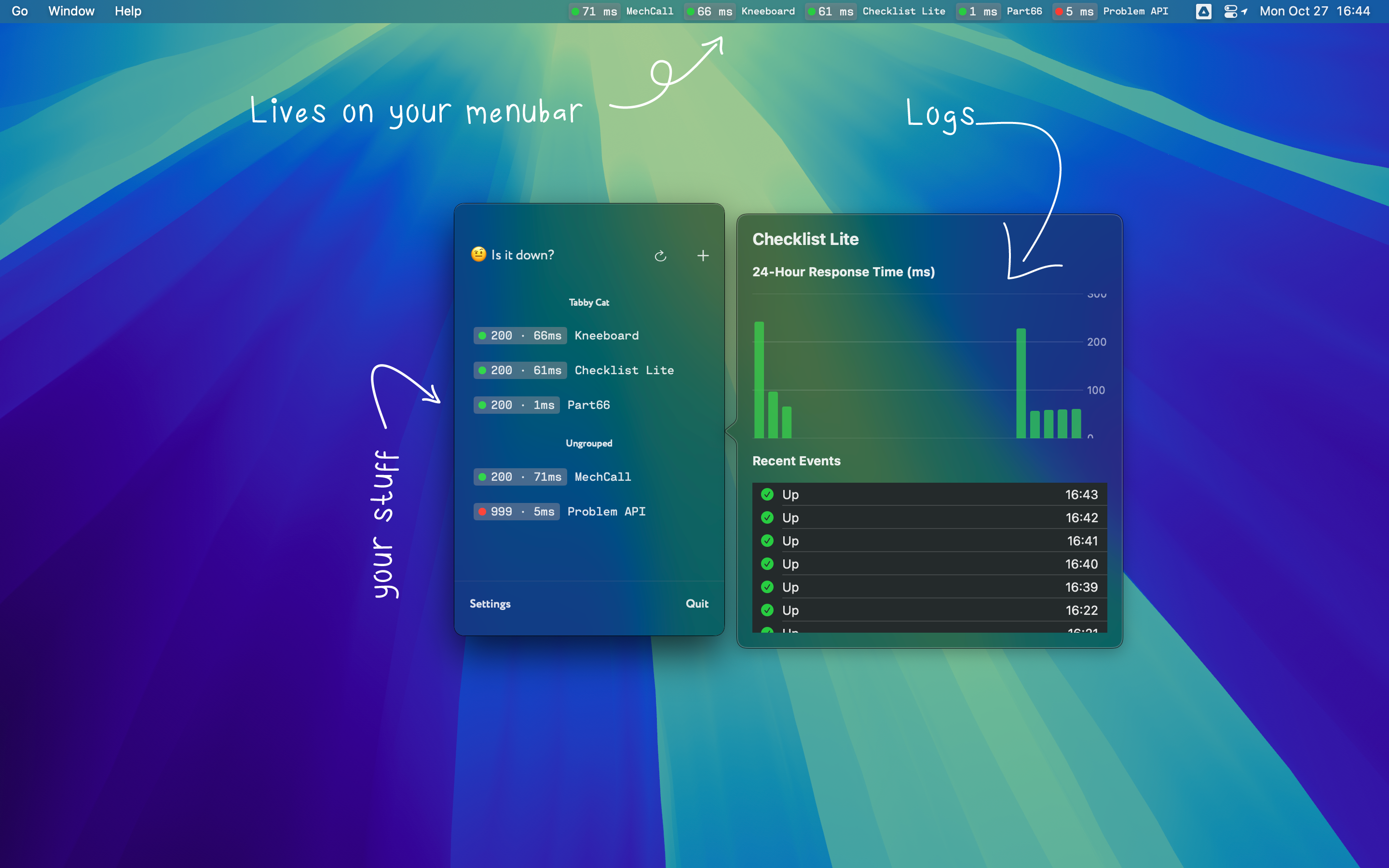
- Live Menubar Status: The most prominent feature is the ability to see the real-time status and response time of your monitored services directly in your macOS menubar. This provides instant visual confirmation of operational health.
- Performance History Charts: Beyond a simple "up" or "down," the app offers 24-hour response time charts for each monitored site. This allows users to visualize performance trends, identify slowdowns, and gain a deeper understanding of their service's historical behavior.
- Event Logging: A clear timeline of recent status changes is provided, helping users pinpoint exactly when an outage began and ended.
- Organize with Groups: For users monitoring multiple services, the ability to assign sites to custom groups (e.g., "Work Projects," "Client Sites," "APIs") helps keep the list organized and manageable.
- Consolidated Menubar Mode: To prevent menubar clutter when monitoring numerous sites, a "Consolidated Mode" displays a single smart icon that indicates the overall health of all monitored services.
- Detailed Error Diagnostics: When an outage occurs, a right-click can reveal specific technical error messages, aiding in faster problem diagnosis.
- Smart, Critical Alerts: The app is designed to deliver notifications only when a site's status changes from online to offline, avoiding repetitive alerts and focusing on critical information.
- Customizable & Lightweight: Users can set their preferred check intervals and choose which sites appear in the menubar, all within a native, efficient application.
These features combine to create a comprehensive yet user-friendly monitoring experience that caters to both casual users and developers.
Potential Drawbacks & Areas for Improvement
While "Is It Down?" offers compelling features, there are a few areas that could be considered for future enhancements.
One potential limitation, depending on the user's needs, might be the lack of advanced alerting options beyond basic online/offline notifications. For more complex scenarios, integration with third-party incident management tools (like PagerDuty or Slack, which some alternatives offer) could be a valuable addition. Currently, the product focuses on direct macOS notifications.
Another consideration is its sole reliance on being a macOS menubar application. While this is a core strength for its target audience, users who need cross-platform monitoring or a web-based dashboard for team collaboration might find it restrictive. Exploring a companion web interface or mobile app could broaden its appeal for collaborative environments, although this might diverge from its current lightweight philosophy.
Finally, while performance history is available for 24 hours, extending the historical data retention for longer periods, perhaps with tiered storage options, could provide more in-depth analytical capabilities for long-term performance tracking.
Bottom Line & Recommendation
"Is It Down?" is an excellent utility for macOS users who need a straightforward, real-time uptime monitor for their websites and APIs. Its menubar integration, combined with detailed performance charts and smart alerts, makes it an indispensable tool for staying informed about the health of your online services without constant manual checks.
I highly recommend "Is It Down?" to developers, small business owners, and anyone managing online services who prioritizes quick, accessible uptime information directly from their desktop. If you're looking for a lightweight, native macOS application that provides immediate peace of mind regarding your digital assets, "Is It Down?" is definitely worth trying.
Featured AI Applications
Discover powerful tools to enhance your productivity
MindMax
New Way to Interact with AI
Beyond AI chat, transforming conversations into an infinite canvas. Combining brainstorming, mind mapping, critical and creative thinking tools to help you visualize ideas, solve problems efficiently, and accelerate learning.
AI Slides
AI Slides with Markdown
Revolutionary slide creation fusing AI intelligence with Markdown flexibility - edit anywhere, optimize anytime, iterate easily. Turn every idea into a professional presentation instantly.
AI Markdown Editor
Write Immediately
Extremely efficient writing experience: AI assistant, slash commands, minimalist interface. Open and write, easy writing. ✍️ Markdown simplicity + 🤖 AI power + ⚡ Slash commands = Perfect writing experience.
Chrome AI Extension
AI Assistant Anywhere
Transform your browsing experience with FunBlocks AI Assistant. Your intelligent companion supporting AI-driven reading, writing, brainstorming, and critical thinking across the web.