Kanaji: Your Pocket Companion for Mastering Japanese Kanji
Learn Japanese Kanji
Published: 11/29/2025
Kanaji is an iOS application designed to simplify the often challenging journey of learning and practicing Japanese Kanji. Aimed at Japanese language learners of all levels, from beginners grappling with hiragana and katakana to advanced students tackling complex kanji, this app provides a structured and interactive environment to develop essential reading and writing skills. Its core value proposition lies in making kanji acquisition accessible and efficient, leveraging proven learning methodologies for better retention.
Problem & Solution
Learning Kanji presents a significant hurdle for many Japanese language students due to the sheer number of characters, their intricate stroke orders, and multiple readings. Traditional methods can often feel overwhelming and lack the interactive practice necessary for true mastery. Kanaji addresses this by offering a focused, mobile-first solution. It breaks down the learning process into manageable steps, providing proper stroke order guidance and utilizing a Spaced Repetition System (SRS) to optimize review timings. This intelligent approach helps learners commit kanji to long-term memory more effectively than rote memorization or less sophisticated flashcard systems.
Key Features & Highlights
Kanaji comes packed with features that cater to a diverse range of learning styles and proficiency levels:
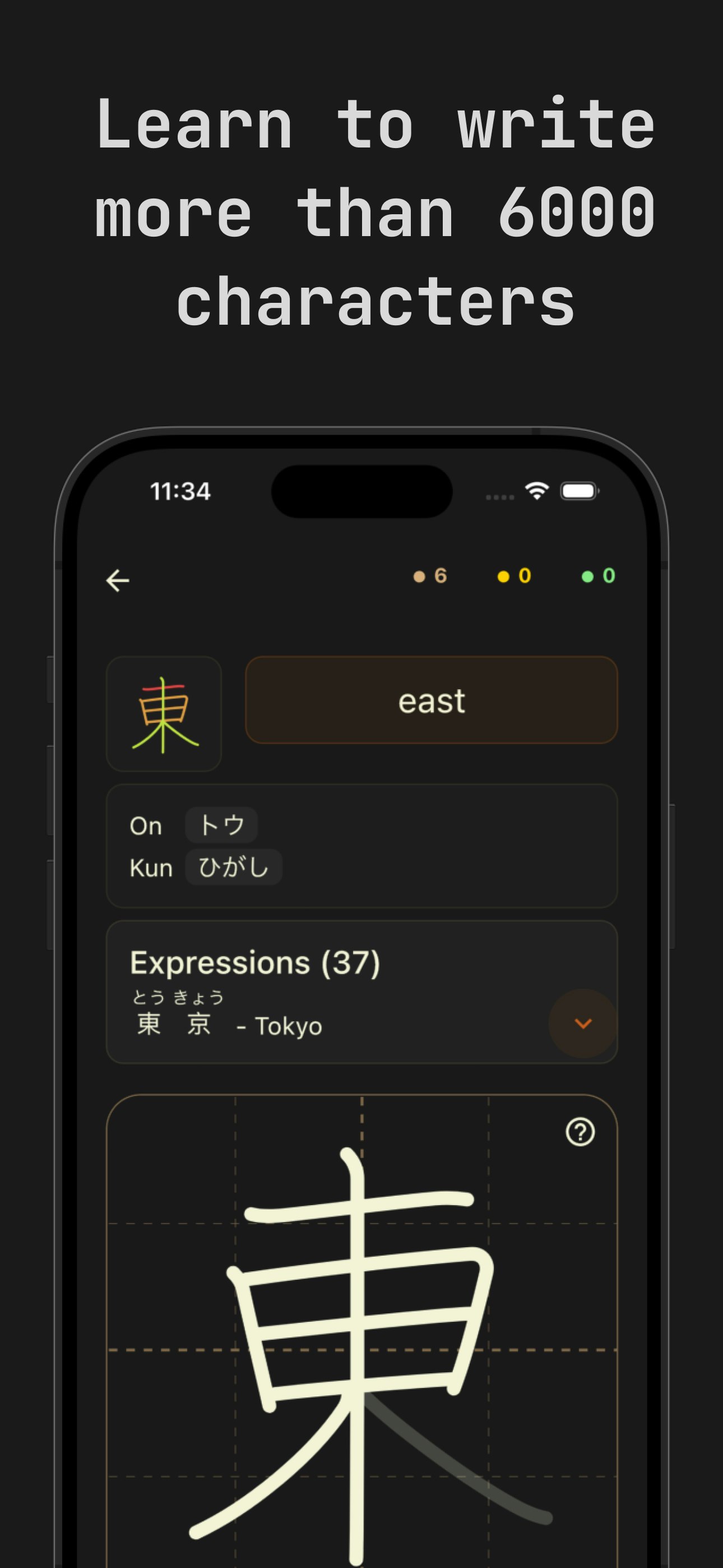
- Comprehensive Character Database: The app boasts over 6,000 kanji characters, alongside extensive vocabulary, covering a wide spectrum for both beginners and advanced learners. It also includes hiragana and katakana study.
- Flexible Learning Paths: Users can tailor their learning experience by following established frameworks like JLPT (Japanese Language Proficiency Test) levels, Japanese school grades, or even Wanikani levels. This flexibility allows learners to integrate Kanaji seamlessly with their existing study plans.
- Proper Stroke Order Practice: A crucial aspect of writing kanji correctly, the app guides users through the proper stroke order, helping to build a strong foundation for legible and accurate writing.
- Spaced Repetition System (SRS): At the heart of Kanaji's effectiveness is its intelligent SRS, which schedules reviews based on a user's memory performance. This ensures that characters are revisited just as they're about to be forgotten, maximizing retention and minimizing wasted study time.
- Built-in Dictionary: A convenient in-app dictionary allows users to quickly look up kanji meanings and readings, providing immediate access to information without needing to switch between applications.
- Flashcards with Vocabulary Examples: Kanaji uses flashcards to reinforce meanings and readings, often including vocabulary examples to provide context and practical application of the kanji.
- Offline Accessibility: The app generally does not require network access, allowing users to study anywhere, anytime, without an internet connection.
The user interface appears clean and straightforward, focusing on the learning task at hand, which can be a significant advantage for those who find other apps overly complicated.
Potential Drawbacks & Areas for Improvement
While Kanaji offers a robust set of features, there are a few areas that could be enhanced. One user noted issues with stroke recognition, particularly for characters with "J shaped strokes," suggesting that the writing sensitivity could be improved to prevent misreads. Another common desire among language learners is the ability to easily transfer in-app purchases across devices, which has been a reported challenge for Kanaji users.
Furthermore, while the app provides English to Japanese and Japanese to English quizzes, some users might benefit from more detailed explanations or mnemonics for each kanji, which can be found in alternatives like WaniKani. Although it offers JLPT and school grade levels, the option to learn kanji in strict grade-level order, mimicking how native speakers learn, could be a valuable addition for some.
Bottom Line & Recommendation
Kanaji stands out as a solid choice for anyone serious about mastering Japanese Kanji on an iOS device. Its emphasis on proper stroke order, combined with an intelligent Spaced Repetition System and flexible learning paths, makes it a highly effective tool for both self-learners and those supplementing formal instruction. While there's room for improvement in stroke recognition accuracy and purchase transferability, the core functionality for learning and practicing kanji is strong. If you're looking for a focused, efficient, and accessible iOS app to tackle the complexities of Japanese Kanji, Kanaji is definitely worth trying.
Featured AI Applications
Discover powerful tools to enhance your productivity
MindMax
New Way to Interact with AI
Beyond AI chat, transforming conversations into an infinite canvas. Combining brainstorming, mind mapping, critical and creative thinking tools to help you visualize ideas, solve problems efficiently, and accelerate learning.
AI Slides
AI Slides with Markdown
Revolutionary slide creation fusing AI intelligence with Markdown flexibility - edit anywhere, optimize anytime, iterate easily. Turn every idea into a professional presentation instantly.
AI Markdown Editor
Write Immediately
Extremely efficient writing experience: AI assistant, slash commands, minimalist interface. Open and write, easy writing. ✍️ Markdown simplicity + 🤖 AI power + ⚡ Slash commands = Perfect writing experience.
Chrome AI Extension
AI Assistant Anywhere
Transform your browsing experience with FunBlocks AI Assistant. Your intelligent companion supporting AI-driven reading, writing, brainstorming, and critical thinking across the web.