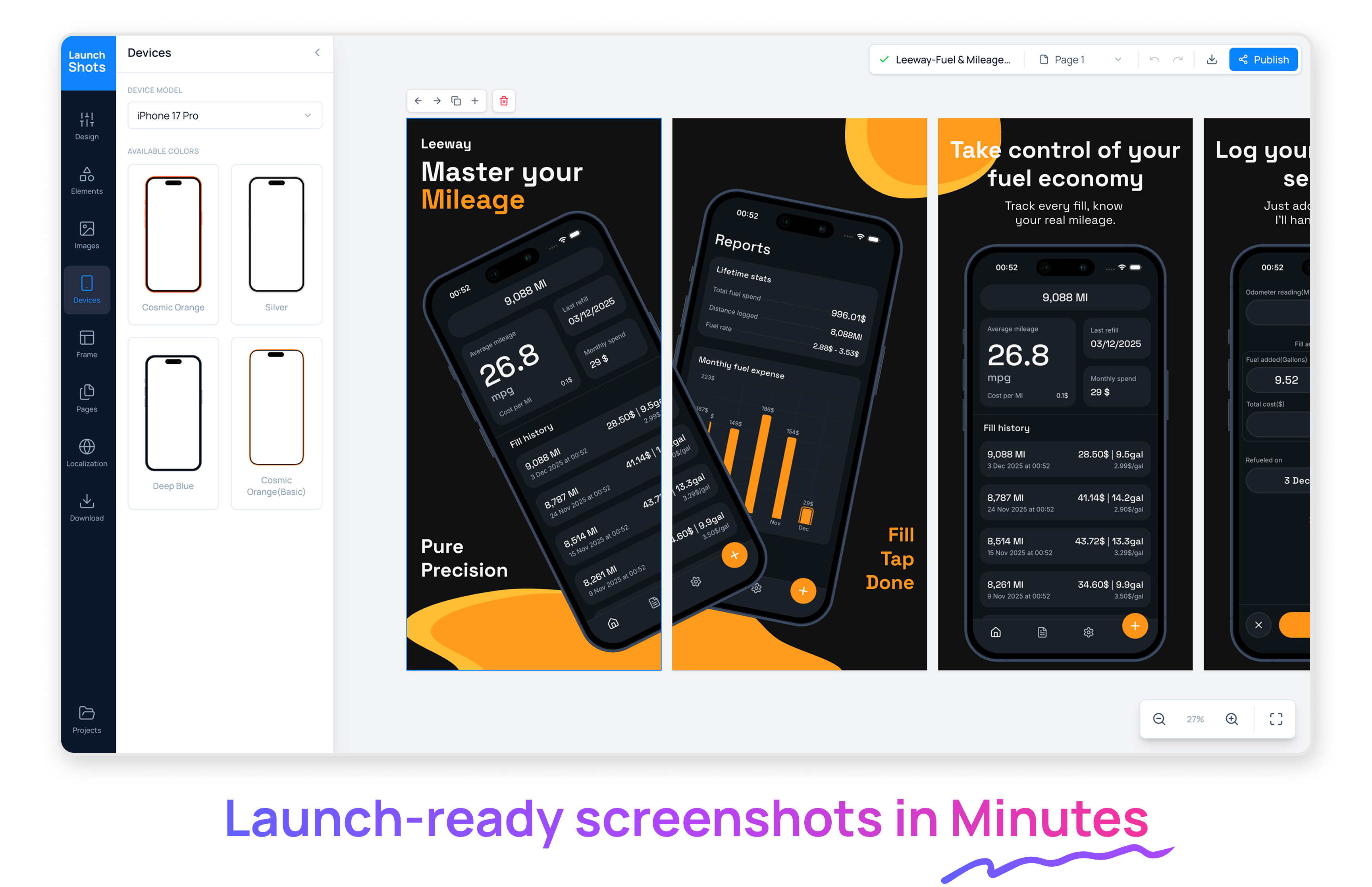
Launch Shots Review: Finally, Frictionless App Store Screenshot Design
Create stunning App/Play Store screenshots in minutes
Published: 12/24/2025
Product Overview: Simplifying ASO Visuals
Launch Shots steps into the crowded space of app store marketing with a clear, focused value proposition: to make creating stunning, compliant App Store and Google Play screenshots fast and affordable. In the highly competitive world of mobile app distribution, visual assets are non-negotiable, yet designing them often requires specialized design skills or reliance on overly complex, subscription-heavy tools. Launch Shots aims to bridge this gap by providing a template-driven yet customizable solution specifically tailored for ASO (App Store Optimization) visual requirements.
This tool is laser-focused on developers, product managers, and indie creators who need professional-looking marketing materials without the overhead of a monthly design subscription. Whether you're launching a brand-new app or frequently running A/B tests on your store listings, Launch Shots promises speed and visual fidelity using real device frames and intuitive editing.
The core appeal lies in its accessibility. By offering a generous free tier (three downloads per month) and an attractive pay-as-you-go credit system starting at just $1, Launch Shots directly challenges the industry norm of mandatory, often expensive, monthly commitments.
Problem & Solution: Escaping Subscription Lock-in
The fundamental problem Launch Shots solves is the time sink and cost burden associated with creating localized, device-specific app screenshots. Traditional methods involve:
- Manually exporting screenshots on physical devices or emulators.
- Importing them into graphic design software (like Figma or Photoshop).
- Finding and sourcing up-to-date device mockups (iPhones, various Android devices).
- Manually formatting text overlays and ensuring compliance with various store guidelines.
This process is tedious and often results in high costs if a designer is involved, or low-quality results if done internally using basic tools. Launch Shots eliminates this friction. It provides pre-set templates and real device frames directly within its interface, allowing users to drag, drop, customize text, and output perfectly sized assets in minutes, not hours. It fills a market gap for the pragmatic creator who needs quality assets intermittently, valuing flexibility over constant access.
Key Features & Highlights: Speed Meets Polish
The strength of Launch Shots is its commitment to delivering high-quality output without forcing users into a rigid structure.
Key features that stand out include:
- Real Device Frames: Access to up-to-date mockups for both Apple App Store and Google Play Store requirements, ensuring your visuals feel authentic and native.
- Template-Driven Workflow: Quick starts using professionally designed layouts that are proven effective in driving conversions.
- Powerful, Focused Editing: Tools designed strictly for screenshot enhancement—easy text editing, background adjustments, and concise feature callouts.
- Transparent Pricing Model: The most compelling feature is the pricing: 3 free downloads monthly, and subsequent needs handled via simple credits (starting at $1). This eliminates the "sudden $25/month" shock that plagues many SaaS tools right when a user is ready to publish.
The user experience, based on the premise of the tool, is clearly geared toward efficiency. If you need to spin up five slightly different versions of a screenshot for A/B testing your App Store listing copy, Launch Shots allows you to iterate rapidly while maintaining a high standard of visual polish.
Potential Drawbacks & Areas for Improvement
While the pricing model is a significant advantage, there are areas where Launch Shots could further solidify its position as the go-to screenshot tool.
Currently, the focus seems heavily weighted toward static design. For more sophisticated ASO marketers, advanced features might be necessary:
- Localization Scalability: If an app targets 10 languages, generating localized text and ensuring fonts render correctly across all language sets within the tool could become cumbersome if batch processing isn't available.
- Advanced Highlighting Tools: While text overlays are key, more granular control over visual emphasis—such as adding subtle glows, shadows, or animated pointers (if considering promotional video stills in the future)—could enhance versatility.
- Integration: Direct integration with platforms where developers pull their live app builds (e.g., TestFlight or Firebase App Distribution) could streamline the process of pulling the latest UI, minimizing manual screen captures.
However, these are suggestions for V2; for the core task—creating attractive store screenshots quickly—the current feature set appears robust.
Bottom Line & Recommendation
Launch Shots is an essential utility for any mobile developer or marketing team aiming to maximize their app store visibility without breaking the bank on design subscriptions. If you are frustrated by overly complex design tools or the mandatory monthly fees associated with competitors, you need to try Launch Shots.
It expertly balances template speed with professional output quality, and its credit-based model is a breath of fresh air in the often-infuriating world of SaaS pricing. We highly recommend developers check out Launch Shots for their next launch or store update—it promises to make one of the most critical visual tasks remarkably painless.
Featured AI Applications
Discover powerful tools to enhance your productivity
MindMax
New Way to Interact with AI
Beyond AI chat, transforming conversations into an infinite canvas. Combining brainstorming, mind mapping, critical and creative thinking tools to help you visualize ideas, solve problems efficiently, and accelerate learning.
AI Slides
AI Slides with Markdown
Revolutionary slide creation fusing AI intelligence with Markdown flexibility - edit anywhere, optimize anytime, iterate easily. Turn every idea into a professional presentation instantly.
AI Markdown Editor
Write Immediately
Extremely efficient writing experience: AI assistant, slash commands, minimalist interface. Open and write, easy writing. ✍️ Markdown simplicity + 🤖 AI power + ⚡ Slash commands = Perfect writing experience.
Chrome AI Extension
AI Assistant Anywhere
Transform your browsing experience with FunBlocks AI Assistant. Your intelligent companion supporting AI-driven reading, writing, brainstorming, and critical thinking across the web.