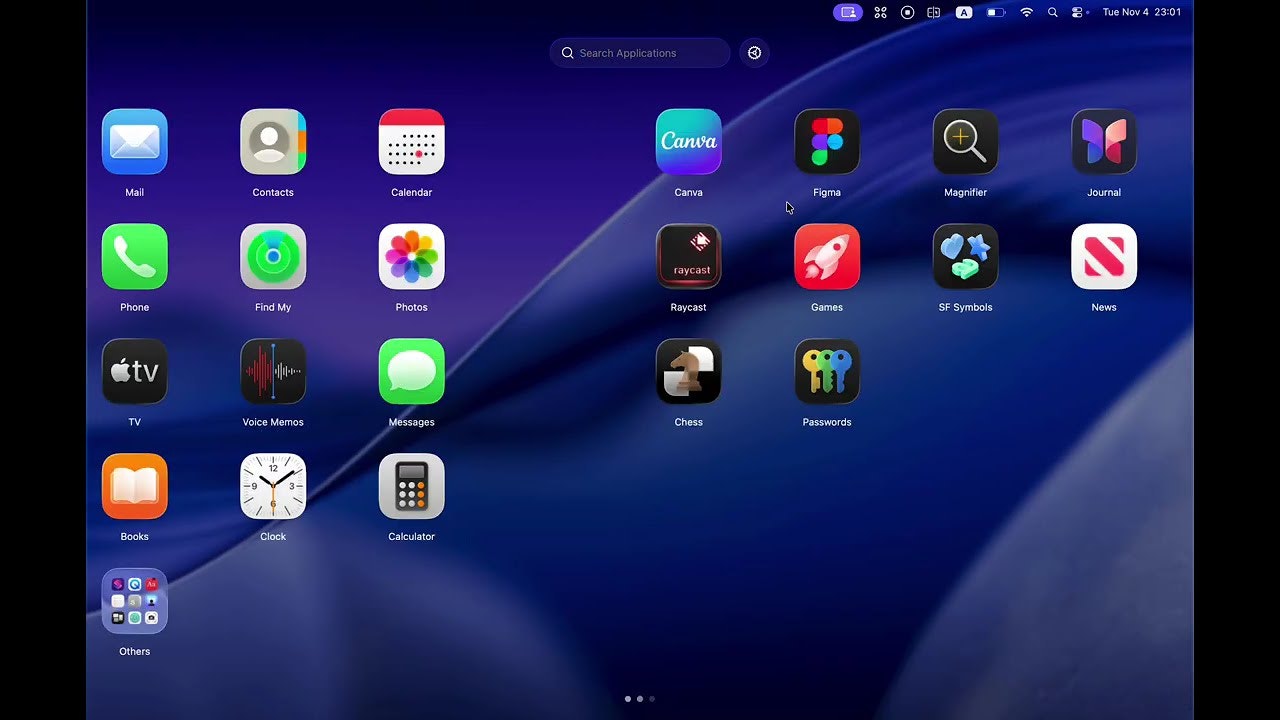
LaunchOS: Bringing Back the Beloved Launchpad Experience to macOS 26 Tahoe
A Launchpad Alternative for macOS 26(Tahoe)
Published: 11/15/2025
LaunchOS presents itself as a much-needed alternative for macOS 26 Tahoe users who are missing the familiar and functional Launchpad. With Apple having replaced the native Launchpad with a new "Apps" app in macOS Tahoe, many users are looking for a way to restore the classic grid-based application launcher. LaunchOS aims to fill this void by replicating the original Launchpad's appearance and user experience, even incorporating the "Liquid Glass" effect found in macOS 26, while adding its own set of improved features.
The product targets macOS 26 Tahoe users who prefer the visual organization and quick access that the traditional Launchpad offered. It caters to those who found the new "Apps" feature less intuitive or visually appealing due to its alphabetical list-based approach rather than a customizable grid. LaunchOS's core value proposition lies in providing a faithful, enhanced recreation of a beloved macOS feature that Apple removed, allowing users to maintain their preferred workflow for launching applications.
Addressing a Post-Tahoe Problem
The specific problem LaunchOS addresses is the removal of the traditional Launchpad in macOS 26 Tahoe. Apple's new "Apps" app, while integrating with Spotlight and offering category filters and app recommendations, lacks the customizable grid layout and tactile feel that many users appreciated in Launchpad. The "Apps" app displays applications in alphabetical order, without the ability to manually sort icons or create custom folders directly within the interface as Launchpad did.
LaunchOS solves this by offering a direct, almost identical replacement that brings back the familiar grid view, vertical scrolling, and customizable settings panel. Unlike simply dragging the Applications folder to the Dock, which provides a list or stack view, LaunchOS strives for the full-screen, organized aesthetic of the original Launchpad. It fills a clear market gap for users who desire the original Launchpad experience with modern macOS Tahoe aesthetics, providing a more visual and customizable approach to app organization than Apple's current offering.
Key Features & Highlights
LaunchOS distinguishes itself with several key features that aim to surpass the original Launchpad experience while maintaining familiarity:
- Native Launchpad Replication: LaunchOS meticulously recreates the look and feel of the native macOS Launchpad, ensuring a seamless transition for users. This includes the adjustable icon grid, vertical scrolling, and the overall visual presentation.
- Liquid Glass Effect Support: To blend seamlessly with macOS 26 Tahoe's new design language, LaunchOS incorporates the "Liquid Glass" effect, offering a transparent and reflective interface that aligns with the system's aesthetic. macOS Tahoe features a "Liquid Glass" design with more transparent menu bars, customizable menus, and interfaces.
- Improved Features: Beyond replication, LaunchOS promises "many improved features," although specific details are "still in progress." Existing Launchpad alternatives often include customizable settings panels, right-click shortcut support, and enhanced organizational capabilities.
- User Experience Focus: The emphasis is on providing an identical user experience to the native Launchpad, suggesting intuitive gestures and navigation that long-time Mac users are accustomed to.
- Customization: While not explicitly detailed in the provided information, the phrase "customizable settings panel" from similar alternatives suggests that LaunchOS will offer users control over aspects like icon size, grid layout, and potentially themes, further enhancing the personalization often desired by Launchpad users.
Potential Drawbacks & Areas for Improvement
While LaunchOS is a welcome solution, a few points warrant consideration. The description mentions that some details of the replication are "still in progress." This indicates that the initial release might not be fully feature-complete or might have minor inconsistencies compared to the original Launchpad. Users might encounter missing functionalities or subtle differences in animations or responsiveness.
A potential area for improvement would be to clearly outline the "many improved features" it offers. Providing a roadmap or a detailed list of these enhancements would help users understand the added value beyond simple replication. Additionally, given that macOS 26 Tahoe itself offers some workarounds to bring back a Launchpad-like experience (albeit less polished), LaunchOS will need to continuously innovate and demonstrate a significant advantage over these native solutions or other third-party alternatives to justify its adoption. Integration with other macOS features like Spotlight or Continuity, beyond just visual consistency, could also be a valuable future enhancement.
Bottom Line & Recommendation
LaunchOS is a highly promising product for macOS 26 Tahoe users who miss the functionality and aesthetics of the native Launchpad. If you've upgraded to macOS Tahoe and find Apple's new "Apps" feature unsatisfactory for organizing and launching your applications, LaunchOS offers a compelling solution. Its commitment to replicating the original experience, coupled with the modern "Liquid Glass" design and promised improvements, makes it a strong contender for those seeking to restore their preferred application launcher.
I recommend LaunchOS to anyone who values a visually organized, grid-based application launcher and desires a more customizable and familiar experience than the default macOS 26 Tahoe offers. Keep an eye on its development as it progresses, as the "in progress" features could further elevate it to an indispensable tool for Mac users.
Featured AI Applications
Discover powerful tools to enhance your productivity
MindMax
New Way to Interact with AI
Beyond AI chat, transforming conversations into an infinite canvas. Combining brainstorming, mind mapping, critical and creative thinking tools to help you visualize ideas, solve problems efficiently, and accelerate learning.
AI Slides
AI Slides with Markdown
Revolutionary slide creation fusing AI intelligence with Markdown flexibility - edit anywhere, optimize anytime, iterate easily. Turn every idea into a professional presentation instantly.
AI Markdown Editor
Write Immediately
Extremely efficient writing experience: AI assistant, slash commands, minimalist interface. Open and write, easy writing. ✍️ Markdown simplicity + 🤖 AI power + ⚡ Slash commands = Perfect writing experience.
Chrome AI Extension
AI Assistant Anywhere
Transform your browsing experience with FunBlocks AI Assistant. Your intelligent companion supporting AI-driven reading, writing, brainstorming, and critical thinking across the web.