Masko Code Review: The Essential Desktop Companion for Claude Code Agent Management
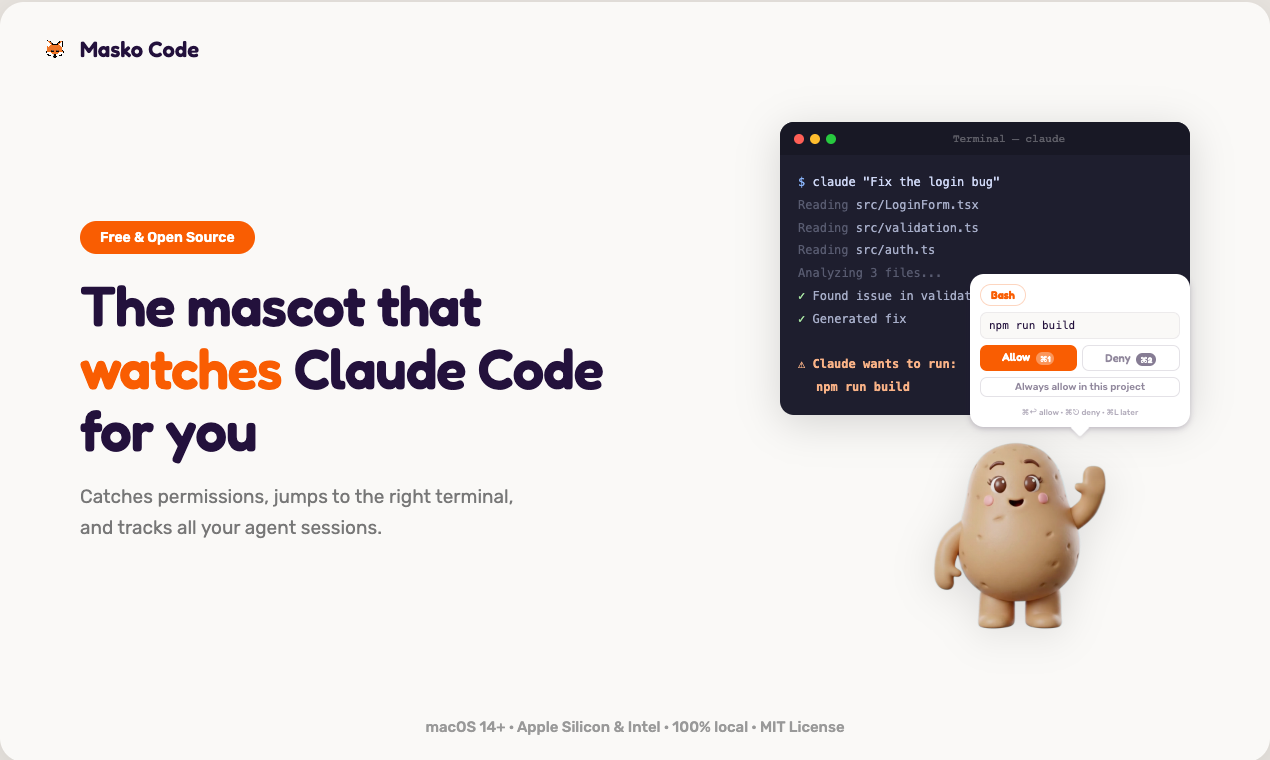
A mascot that watches Claude Code for you
Published: 3/16/2026
Product Overview: Bringing Visual Context to AI Agent Workflow
Masko Code is a fascinating and highly practical utility aimed squarely at power users managing AI agents, specifically those leveraging Claude Code environments. Tagged as "A mascot that watches Claude Code for you," this tool transforms the often-distracting, context-switching nature of agent management into a streamlined, visually engaging experience. Essentially, Masko Code acts as a real-time desktop sentinel, monitoring your background AI processes and alerting you exactly when human intervention—usually permission approval—is required.
The target audience here is clear: developers, prompt engineers, and technical researchers running complex, multi-step tasks through LLM agents. If your workflow involves constant alt-tabbing between your code editor, terminal windows, and the agent interface just to give the "go-ahead" for the next step, Masko Code is designed to give you that focus back. Its core value proposition is eliminating context fragmentation by centralizing essential notifications via a friendly, on-screen mascot.
Problem & Solution: Reclaiming Focus from Context Switching
The core problem Masko Code addresses is the notorious "Alt-Tab Tax" associated with autonomous or semi-autonomous AI workflows. When running Claude Code agents, critical steps often pause, waiting for user confirmation (e.g., "Approve execution of this script?"). This forces users to constantly check multiple application windows, leading to missed prompts, lost place in the sequence, and significant productivity drain.
Masko Code solves this by providing a dedicated, persistent visual layer. Instead of hunting through windows, the user receives an immediate, context-specific notification via the mascot—a speech bubble appears with the necessary prompt. This proactive monitoring system drastically reduces the cognitive load required to keep multiple agent sessions running smoothly. It fills a specific market gap by merging the need for real-time status updates with a fun, customizable desktop interface, something traditional terminal monitoring tools often lack.
Key Features & Highlights: Desktop Vigilance and Hotkey Efficiency
The feature set of Masko Code is deeply rooted in enhancing workflow efficiency through seamless integration and keyboard shortcuts.
The standout capability is the real-time desktop monitoring. When a permission prompt arises, the chosen mascot surfaces the alert visually. Users don't need to click; they simply use the designated hotkey—⌘1 in the example—to execute the approval action instantly. This tight coupling between visual notification and actionable command is where the productivity gains are truly realized.
Beyond permissions, Masko Code integrates several essential navigation shortcuts designed for rapid context switching:
- ⌘M: Jumps directly to the correct terminal window housing the active agent session.
- Double-tap ⌘: Allows users to quickly cycle between active agent sessions without lifting their hands from the keyboard.
Furthermore, the customization and open-source nature are huge draws. The product ships with classic mascots like Clippy, and the promise of daily community-added mascots, alongside the ability to generate your own at masko.ai, transforms a utility tool into a personalized desktop experience. Crucially, it is Free, Open Source (MIT licensed), and 100% local, addressing modern concerns about privacy and reliance on proprietary services.
Potential Drawbacks & Areas for Improvement
While Masko Code offers significant utility for its niche, there are a few areas that could be refined to broaden its appeal and robustness.
Currently, the focus seems heavily centered on permission approvals for Claude Code. While this is the primary pain point, future iterations could benefit from expanding the monitoring capability to other common agent roadblocks, such as verbose logging output alerts, resource warnings (CPU/Memory spikes), or even integration points for other LLM frameworks beyond the current primary focus.
The reliance on specific hotkeys (like ⌘1 for approval) requires users to learn a new set of muscle memories. While beneficial once learned, making the hotkeys more configurable from the outset, or perhaps offering a visual prompt list alongside the mascot, could ease onboarding for those resistant to learning new keyboard shortcuts immediately. Expanding platform support beyond macOS (implied by the use of ⌘) would also be a massive enhancement for the wider development community.
Bottom Line & Recommendation
Masko Code is an ingenious productivity hack disguised as a charming desktop utility. It directly targets the friction points inherent in managing complex, asynchronous AI agent workflows. If you spend significant portions of your day managing Claude Code agents and find yourself constantly distracted by context switching to approve permissions, this tool is an absolute must-try. Its commitment to being free, open-source, and entirely local makes the barrier to entry negligible. For developers seeking focus and efficiency in their AI experimentation, Masko Code earns a strong recommendation as the ultimate desktop co-pilot.
Featured AI Applications
Discover powerful tools to enhance your productivity
MindMax
New Way to Interact with AI
Beyond AI chat, transforming conversations into an infinite canvas. Combining brainstorming, mind mapping, critical and creative thinking tools to help you visualize ideas, solve problems efficiently, and accelerate learning.
AI Slides
AI Slides with Markdown
Revolutionary slide creation fusing AI intelligence with Markdown flexibility - edit anywhere, optimize anytime, iterate easily. Turn every idea into a professional presentation instantly.
AI Markdown Editor
Write Immediately
Extremely efficient writing experience: AI assistant, slash commands, minimalist interface. Open and write, easy writing. ✍️ Markdown simplicity + 🤖 AI power + ⚡ Slash commands = Perfect writing experience.
Chrome AI Extension
AI Assistant Anywhere
Transform your browsing experience with FunBlocks AI Assistant. Your intelligent companion supporting AI-driven reading, writing, brainstorming, and critical thinking across the web.