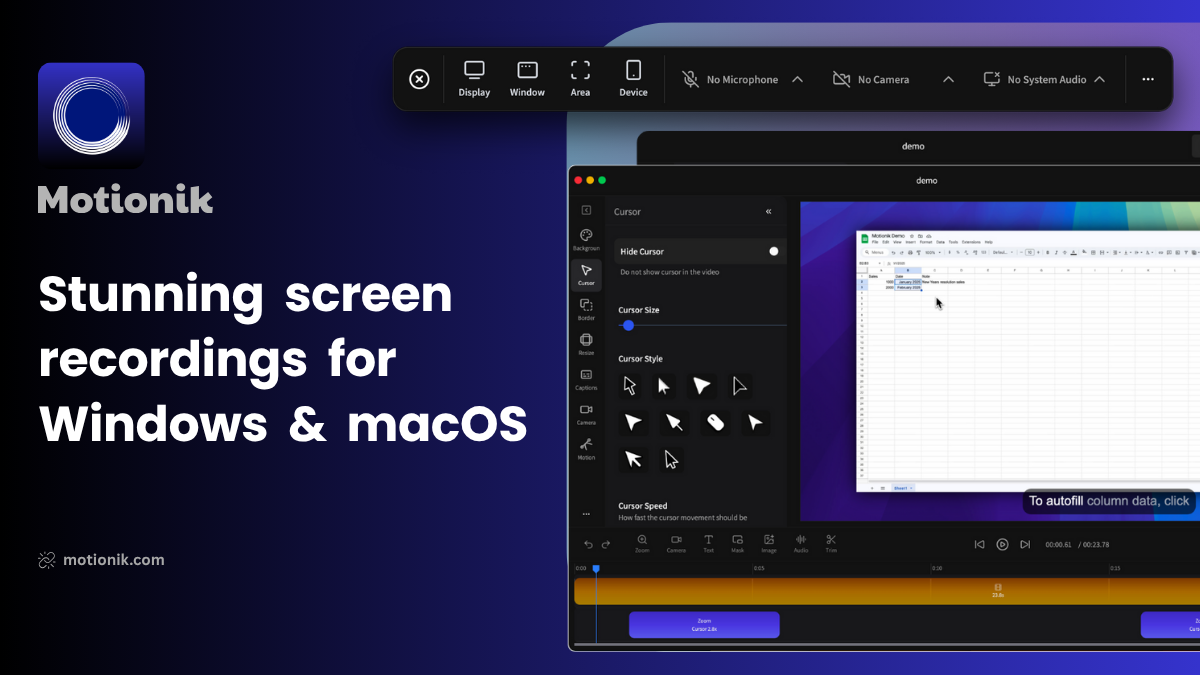
Motionik: Elevating Screen Recordings for Demos, Tutorials, and Explainer Videos
Beautiful screen recordings for Windows & macOS
Published: 11/29/2025
Motionik is a robust screen recording and editing solution designed to help users create polished and engaging product demos, tutorials, and explainer videos. Available for both Windows and macOS, Motionik aims to simplify the video creation process by integrating recording and editing into a single, user-friendly platform. Its core value proposition lies in its ability to produce naturally focused and interactive screen recordings without the need for extensive manual editing, making it an attractive tool for content creators, educators, and product marketers alike.
The software targets anyone looking to communicate complex ideas or showcase digital products effectively through video. This includes startup founders, educators, marketing professionals, and YouTubers who need to create high-quality visual content efficiently. By streamlining the workflow from capture to export, Motionik allows users to produce professional-looking videos with a minimal learning curve.
Problem & Solution
Creating compelling screen recordings often involves a multi-step process: recording the screen, then transferring the footage to a separate video editor for enhancements like zooms, annotations, and audio synchronization. This traditional workflow can be time-consuming and challenging, especially for those without advanced video editing skills. Maintaining viewer engagement and ensuring clarity, particularly when demonstrating software or intricate processes, can also be difficult when the cursor movements are not highlighted or when important areas of the screen are not emphasized.
Motionik directly addresses these pain points by offering an integrated solution. Its standout feature, "auto zoom with smart cursor tracking," automatically focuses on relevant areas and highlights cursor movements, making videos more interactive and easy to follow. This eliminates the need for tedious manual adjustments in post-production, saving users significant time and effort. Furthermore, the built-in editor allows for immediate enhancements, filling a market gap for a comprehensive yet simple tool that works seamlessly across Windows and macOS, a platform parity often lacking in similar applications.
Key Features & Highlights
Motionik boasts a strong set of features designed to enhance screen recordings:
- Auto Zoom with Smart Cursor Tracking: This core feature automatically zooms into areas of interest and tracks cursor movement, ensuring the viewer's attention is always directed to the most important part of the screen. It also includes options for motion blur on cursor movements, and custom cursor styles.
- Built-in Editor with Overlays: Users can add various overlays directly within the application, including:
- Camera and Audio: Easily include webcam footage and microphone input, with control over camera position, shadow, shape, and even auto-resizing based on zoom. System audio can also be recorded.
- Text and Images: Add titles, captions, annotations, logos, icons, and graphics to enhance clarity and branding.
- Content Masks and Highlights: Blur sensitive information or draw attention to specific elements on the screen.
- Audio Tracks: Incorporate background music or narration with custom audio tracks.
- AI-Powered Captions: Generate karaoke-style captions from mic audio, making videos more dynamic and accessible.
- Customizable Backgrounds and Appearance: Users can replace or style backgrounds, add border radius and shadows to their recordings for a polished look.
- Flexible Recording and Export Options: Record the entire screen, a specific window, or a custom area. Videos can be trimmed and exported in multiple adjustable qualities and aspect ratios.
- Noise Reduction: Clean up background noise from microphone audio for clearer narration.
The integration of these features means users can achieve a high level of polish and interactivity in their videos without needing to toggle between multiple applications, making the process much more efficient than traditional screen recording workflows.
Potential Drawbacks & Areas for Improvement
While Motionik offers a compelling feature set, there are a few areas that could be considered for future enhancement. As with many new tools, the absence of extensive user reviews beyond Product Hunt makes it challenging to gauge long-term user satisfaction and identify common pain points.
One potential drawback could be the learning curve for users completely new to video editing, even with the "zero learning curve" claim. While simplified, the array of overlay and customization options might still require some exploration. Providing more in-depth, perhaps interactive, tutorials within the application itself could further lower this barrier.
Another area for improvement could be advanced integration with other platforms. While videos can be exported, deeper connections with popular video hosting sites, learning management systems, or project management tools could streamline workflows for teams. Additionally, while blurring sensitive data is a built-in feature, more advanced redaction tools, such as automatic detection of sensitive information, could be a valuable addition for corporate users.
Bottom Line & Recommendation
Motionik stands out as an excellent tool for anyone looking to create professional-quality screen recordings for product demos, tutorials, and explainer videos on Windows and macOS. Its core strengths lie in its intelligent auto-zoom and cursor tracking, coupled with a comprehensive built-in editor that significantly reduces post-production time.
This product is highly recommended for content creators, educators, marketers, and anyone who regularly produces video content showcasing digital interactions. Users who prioritize efficiency, professional aesthetics, and an all-in-one solution for screen recording and basic video editing will find Motionik to be a valuable asset. While a free version with a watermark is available, the one-time purchase or subscription model removes the watermark and unlocks full capabilities, making it a worthwhile investment for serious creators. Motionik successfully delivers on its promise of beautiful screen recordings with a focus on ease of use and engaging viewer experience.
Featured AI Applications
Discover powerful tools to enhance your productivity
MindMax
New Way to Interact with AI
Beyond AI chat, transforming conversations into an infinite canvas. Combining brainstorming, mind mapping, critical and creative thinking tools to help you visualize ideas, solve problems efficiently, and accelerate learning.
AI Slides
AI Slides with Markdown
Revolutionary slide creation fusing AI intelligence with Markdown flexibility - edit anywhere, optimize anytime, iterate easily. Turn every idea into a professional presentation instantly.
AI Markdown Editor
Write Immediately
Extremely efficient writing experience: AI assistant, slash commands, minimalist interface. Open and write, easy writing. ✍️ Markdown simplicity + 🤖 AI power + ⚡ Slash commands = Perfect writing experience.
Chrome AI Extension
AI Assistant Anywhere
Transform your browsing experience with FunBlocks AI Assistant. Your intelligent companion supporting AI-driven reading, writing, brainstorming, and critical thinking across the web.