Notion MCP: The Bridge Between Your Second Brain and AI Agents
Your Notion workspace, inside every AI agent
Published: 3/30/2026
Product Overview
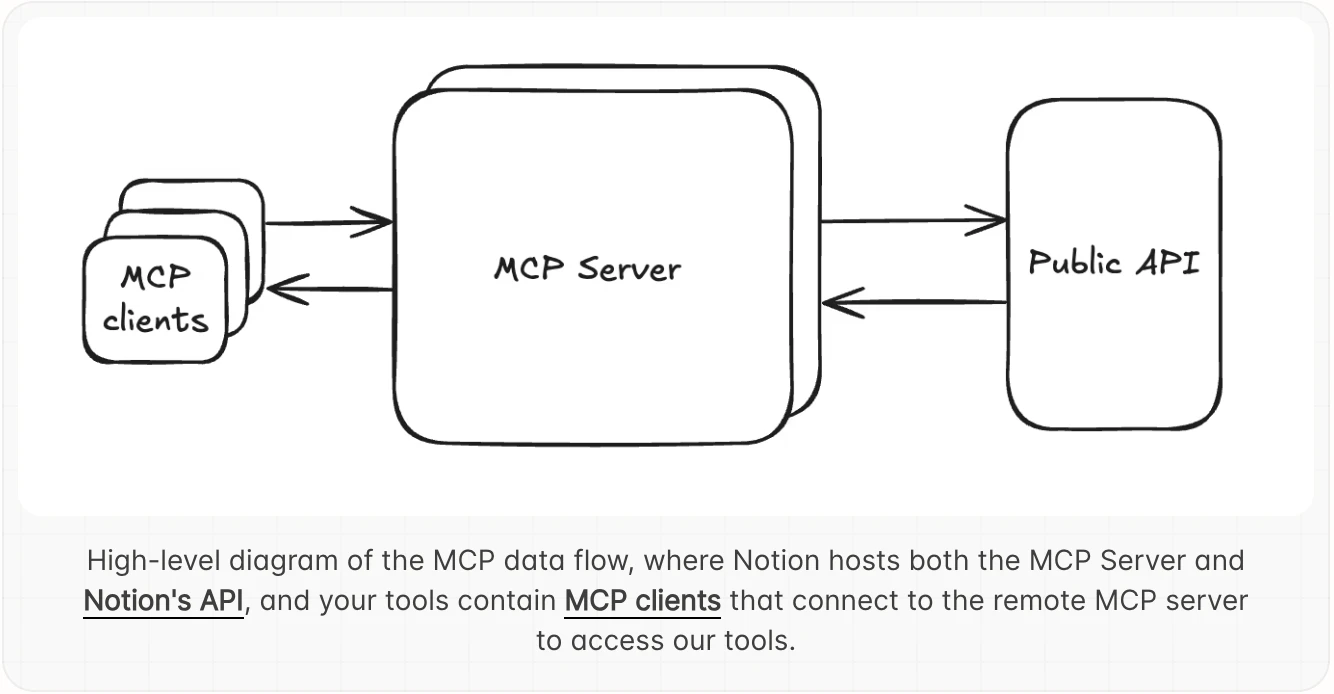
Notion MCP is a groundbreaking integration tool designed to bridge the gap between your static workspace and the rapidly evolving world of AI-driven automation. By leveraging the Model Context Protocol (MCP), this tool enables AI agents—such as Claude, ChatGPT, and Cursor—to directly interact with your Notion workspace. Rather than treating your notes and databases as isolated archives, Notion MCP transforms them into dynamic, accessible context for your AI assistants.
The product is primarily aimed at knowledge workers, developers, and power users who rely on Notion as their "second brain" but struggle with the manual friction of copying and pasting information into AI tools. Whether you are managing complex project documentation, tracking tasks across databases, or synthesizing research, Notion MCP allows your AI agents to read your existing data and execute updates, effectively turning your documentation into a living, automated workflow.
Problem & Solution
For most professionals, the primary bottleneck in AI adoption is "context starvation." AI models are powerful, but they are only as good as the information they have access to. Traditionally, users have been forced to manually export files, copy-paste text, or rely on clunky, limited API integrations to feed their AI agents relevant data. This creates a disconnect where your most valuable information—your Notion notes—remains siloed from your most powerful productivity tools.
Notion MCP solves this by establishing a direct, real-time pipeline between your workspace and your AI interfaces. By bypassing manual retrieval, it allows AI agents to act as genuine administrative assistants that understand your specific workflows, naming conventions, and project history. It fills the market gap for a low-friction, standardized way to provide LLMs with deep, private data access without requiring bespoke coding or complex middleware.
Key Features & Highlights
Notion MCP stands out due to its technical architecture and the depth of control it offers users. Its core capabilities center on high-fidelity data exchange, ensuring that AI agents can not only read your information but also contribute back to your workspace in meaningful ways.
- Read & Write Capabilities: Unlike read-only integrations, Notion MCP allows AI agents to create new pages, update database properties, and append information, facilitating true task automation.
- Context-Aware Automation: By providing agents with access to your internal documentation, it enables them to write reports, draft project briefs, or organize task lists based on your established company language and project requirements.
- Universal Tool Compatibility: Because it utilizes the Model Context Protocol, it is designed to work seamlessly across a growing ecosystem of AI platforms, including Claude Desktop, Cursor, and various CLI-based AI tools.
- Streamlined Knowledge Management: It turns your scattered databases into an actionable knowledge base, allowing for rapid querying of historical project notes or automated daily status reporting.
Potential Drawbacks & Areas for Improvement
While Notion MCP is a significant leap forward, it is not without its limitations. For non-technical users, the setup process—which likely involves configuring MCP servers or command-line parameters—might feel daunting compared to "one-click" integrations. Expanding the documentation to include more beginner-friendly tutorials or a dedicated desktop app installer would lower the barrier to entry significantly.
Additionally, as with any tool that grants AI write-access to your private workspace, users must be mindful of data privacy and "AI hallucination" risks. I would love to see more granular permission controls in future updates, allowing users to define exactly which Notion databases or pages are "read-only" versus "read-write" for specific AI models. Adding an audit log within the Notion MCP interface would also provide peace of mind for teams concerned about accidental data overwrites.
Bottom Line & Recommendation
Notion MCP is an essential tool for any power user looking to maximize the synergy between their notes and their AI assistants. If you find yourself constantly navigating between your AI chat window and your Notion pages to manage your daily workload, this integration will fundamentally change how you operate.
It is a must-try for developers building AI agents and for productivity enthusiasts who want to stop "managing" their tools and start letting their tools manage their work. While it requires a bit of technical setup, the return on investment in terms of saved time and improved context-aware output makes Notion MCP a standout addition to the modern professional’s tech stack.
Featured AI Applications
Discover powerful tools to enhance your productivity
MindMax
New Way to Interact with AI
Beyond AI chat, transforming conversations into an infinite canvas. Combining brainstorming, mind mapping, critical and creative thinking tools to help you visualize ideas, solve problems efficiently, and accelerate learning.
AI Slides
AI Slides with Markdown
Revolutionary slide creation fusing AI intelligence with Markdown flexibility - edit anywhere, optimize anytime, iterate easily. Turn every idea into a professional presentation instantly.
AI Markdown Editor
Write Immediately
Extremely efficient writing experience: AI assistant, slash commands, minimalist interface. Open and write, easy writing. ✍️ Markdown simplicity + 🤖 AI power + ⚡ Slash commands = Perfect writing experience.
Chrome AI Extension
AI Assistant Anywhere
Transform your browsing experience with FunBlocks AI Assistant. Your intelligent companion supporting AI-driven reading, writing, brainstorming, and critical thinking across the web.