Pause.do Review: Reclaiming Your Attention in the Age of Autopilot
Interrupt scrolling, tab overload, and AI autopilot
Published: 3/23/2026
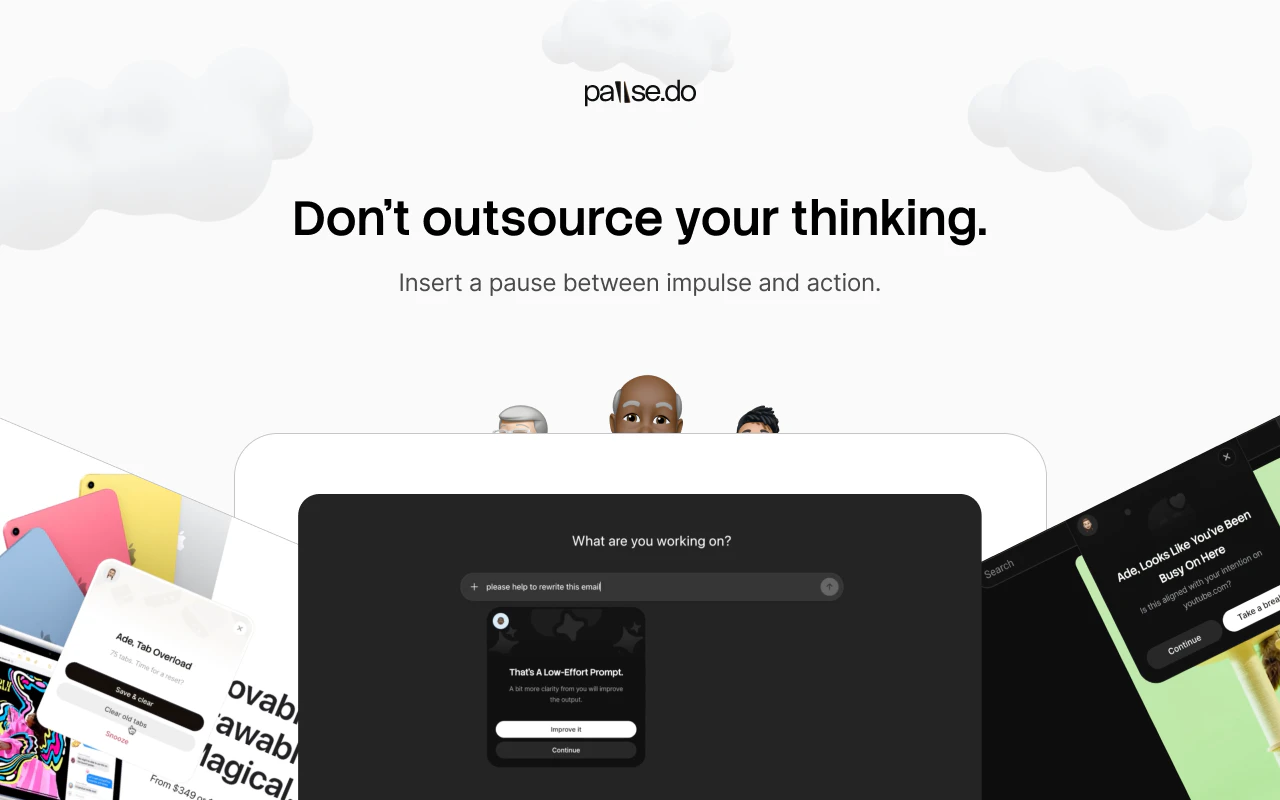
In an era where our digital environments are engineered to capture and commodify our attention, it is easy to find ourselves stuck in a cycle of mindless scrolling and chronic tab switching. Enter Pause.do, a thoughtfully designed browser extension that aims to bridge the gap between human intention and digital impulse. Unlike aggressive website blockers that shut you out of your favorite apps, Pause.do takes a psychological approach to productivity.
At its core, Pause.do acts as a "speed bump" for your brain. By introducing small, intentional friction points during high-distraction activities, the extension invites you to pause, reflect, and consciously decide if you actually want to continue your current digital path. It is aimed at knowledge workers, students, and anyone who feels their focus slipping away while navigating the web, providing a gentle mechanism to break the cycle of "AI autopilot" and doomscrolling.
The Problem: The High Cost of Mindless Browsing
Most productivity tools rely on a binary approach: either a site is available, or it is blocked completely. However, this often leads to a "rebound effect," where users disable the blockers entirely when they need to access a site for legitimate work purposes. Pause.do addresses this market gap by choosing nuance over prohibition.
The tool recognizes that the problem isn't always the website itself, but our relationship with it. Whether you are falling down a social media rabbit hole, getting overwhelmed by a workspace crowded with 50+ tabs, or blindly prompting AI without reflecting on the output, the underlying issue is a lack of intentionality. Pause.do fills this void by forcing a momentary reset, allowing the user to choose presence over reactivity.
Key Features & Highlights
The beauty of Pause.do lies in its customizable "pause types," which allow you to tailor the intervention to your specific digital habits. The user experience is clean, unobtrusive, and remarkably respectful of your privacy. Notable features include:
- Think First: A gentle interstitial that prompts you to consider your intent before loading specific high-distraction sites.
- Scroll Pause: Intermittently interrupts endless scrolling feeds, helping you break the habit of mindless consumption.
- Session Nudge: Provides real-time insights during a browsing session to keep you aware of your time spent.
- Focus Limit & Tab Overload: Helps manage mental fatigue by keeping your digital workspace lean, preventing the cognitive load that comes with having too many tabs open.
These features work together to create a more mindful browsing experience. The interface is intuitive, and the setup is quick, making it a low-friction solution to a high-impact problem.
Potential Drawbacks & Areas for Improvement
While the core philosophy of Pause.do is excellent, there is always room for expansion. As it stands, the extension is a powerful tool for self-regulation, but it currently relies heavily on user willpower once the "pause" screen appears. Integrating more robust data analytics—such as a weekly report on "successful pauses" versus "overridden pauses"—could provide users with better insights into their own behavioral patterns.
Additionally, while the privacy-first approach is a major selling point, power users might eventually desire cross-device syncing or team-based focus modes. For users who struggle with extreme digital dependency, the "pause" might be too easy to click past; adding an option for a "mandatory wait time" or a custom question/journal prompt before proceeding could add an extra layer of cognitive effort for those who need it.
Bottom Line & Recommendation
Pause.do is a breath of fresh air in the productivity tool landscape. By choosing to nudge rather than block, it respects the user’s autonomy while effectively curbing the addictive loops inherent in modern browsing.
If you are a professional who constantly finds yourself opening new tabs for no reason, or a creative whose workflow is frequently hijacked by AI-driven distraction, Pause.do is a must-try. It is not a cure-all, but it is an incredibly effective tool for those looking to regain control of their cognitive resources. Highly recommended for anyone wanting to move from a state of digital autopilot to one of intentional, focused work.
Featured AI Applications
Discover powerful tools to enhance your productivity
MindMax
New Way to Interact with AI
Beyond AI chat, transforming conversations into an infinite canvas. Combining brainstorming, mind mapping, critical and creative thinking tools to help you visualize ideas, solve problems efficiently, and accelerate learning.
AI Slides
AI Slides with Markdown
Revolutionary slide creation fusing AI intelligence with Markdown flexibility - edit anywhere, optimize anytime, iterate easily. Turn every idea into a professional presentation instantly.
AI Markdown Editor
Write Immediately
Extremely efficient writing experience: AI assistant, slash commands, minimalist interface. Open and write, easy writing. ✍️ Markdown simplicity + 🤖 AI power + ⚡ Slash commands = Perfect writing experience.
Chrome AI Extension
AI Assistant Anywhere
Transform your browsing experience with FunBlocks AI Assistant. Your intelligent companion supporting AI-driven reading, writing, brainstorming, and critical thinking across the web.