Plus AI Presentation Agent Review: Revolutionizing PowerPoint Creation Directly Inside Your Deck
AI agent that helps you design PowerPoint slides
Published: 2/15/2026
Product Overview: The AI Co-Pilot for PowerPoint
The Plus AI Presentation Agent is positioned to be the definitive AI co-pilot for anyone deeply embedded in the Microsoft PowerPoint ecosystem. Moving beyond simple cloud-based presentation generators, this tool integrates directly into the familiar PowerPoint desktop environment, offering a suite of AI capabilities that span the entire presentation lifecycle—from initial concept to final polish.
This agent is specifically designed for professionals, marketers, consultants, and educators who rely heavily on PowerPoint but often find the iterative design and content refinement process time-consuming. The core value proposition of the Plus AI Presentation Agent is speed and seamless integration: receive high-quality, editable drafts and rapidly iterate on existing messy decks without ever leaving the native application. It aims to shift the user's focus from slide formatting frustration to strategic content delivery.
Problem & Solution: Breaking Free from External Tools
The fundamental problem Plus AI addresses is the friction caused by modern AI presentation tools that operate outside of PowerPoint. Users often generate excellent slide content using web-based AI tools, only to face the tedious chore of copying, pasting, reformatting, and troubleshooting layouts when moving the content into their required corporate template within PowerPoint. This "export-import penalty" kills momentum.
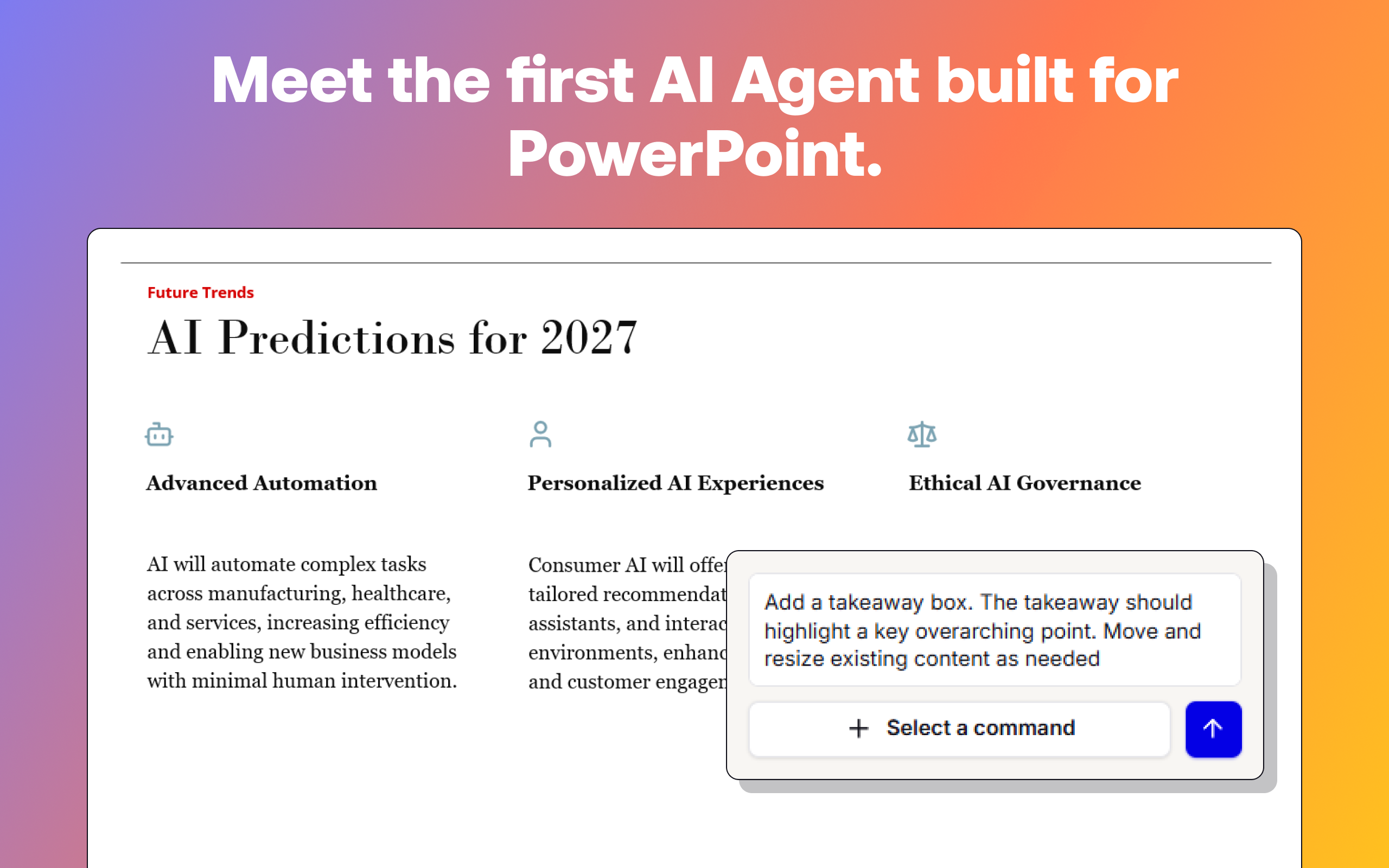
The Plus AI Presentation Agent solves this by embedding its intelligence directly where the work happens. Instead of a separate web interface, users interact with an agent inside PowerPoint via chat commands. This allows it to manage drafting, rewriting, and styling based on the actual file being worked on. It fills a critical market gap for power users who need AI assistance but cannot risk losing native PowerPoint functionality or compatibility.
Key Features & Highlights: Design, Draft, and Refine Instantly
The strength of the Plus AI Presentation Agent lies in its contextual awareness and hands-on editing capabilities. It’s not just a content spinner; it’s a structural editor.
The most notable features center around interactive refinement:
- Prompt-to-Presentation Generation: Start a new deck from scratch by simply describing the topic and goal to the agent.
- In-App Content Rewriting: Users can highlight confusing or bulky slides and ask the agent via chat to "Rewrite this for clarity" or "Summarize these bullet points."
- Direct Design Iteration: The agent handles formatting adjustments and visual layout changes through conversational commands, allowing for rapid A/B testing of designs directly within the slide deck.
- Best-in-Class PowerPoint Editing Tools: The integration feels native, leveraging the underlying architecture of PowerPoint rather than fighting against it.
The user experience highlights the efficiency gain. The ability to chat with your deck—asking it to clean up legacy slides or refine the flow mid-meeting prep—is a significant productivity boost for PowerPoint design automation.
Potential Drawbacks & Areas for Improvement
While the direct integration is a massive advantage, any early-stage AI tool integration comes with considerations. A potential drawback could be the reliance on the specific version and stability of the underlying PowerPoint installation, as add-ins can sometimes be sensitive to updates. Furthermore, while the tool handles design iteration well, the depth of its knowledge regarding highly specialized corporate branding guidelines (beyond standard templates) will need continuous tuning.
For future enhancement, I’d suggest exploring deeper integration with other Microsoft 365 tools. For example, the Plus AI Presentation Agent could benefit from the ability to pull real-time data visualizations directly from Excel sheets or connect contextual insights from linked Outlook meetings to ensure the narrative is perfectly aligned with recent communications. Expanding template compatibility and ensuring flawless performance across both Windows and Mac versions of PowerPoint will be crucial for mass adoption.
Bottom Line & Recommendation
The Plus AI Presentation Agent delivers on its promise to keep presentation workflow native and fast. For any professional who spends significant time tweaking, rewriting, and formatting slides within PowerPoint, this tool represents a compelling efficiency upgrade. If your primary output medium is the .pptx file and you are tired of jumping between web tools and your desktop application, you should absolutely try this free offering today. The Plus AI Presentation Agent is a significant step forward in embedding generative AI directly into enterprise workflows, making it a must-test for productivity hackers in the presentation space.
Featured AI Applications
Discover powerful tools to enhance your productivity
MindMax
New Way to Interact with AI
Beyond AI chat, transforming conversations into an infinite canvas. Combining brainstorming, mind mapping, critical and creative thinking tools to help you visualize ideas, solve problems efficiently, and accelerate learning.
AI Slides
AI Slides with Markdown
Revolutionary slide creation fusing AI intelligence with Markdown flexibility - edit anywhere, optimize anytime, iterate easily. Turn every idea into a professional presentation instantly.
AI Markdown Editor
Write Immediately
Extremely efficient writing experience: AI assistant, slash commands, minimalist interface. Open and write, easy writing. ✍️ Markdown simplicity + 🤖 AI power + ⚡ Slash commands = Perfect writing experience.
Chrome AI Extension
AI Assistant Anywhere
Transform your browsing experience with FunBlocks AI Assistant. Your intelligent companion supporting AI-driven reading, writing, brainstorming, and critical thinking across the web.