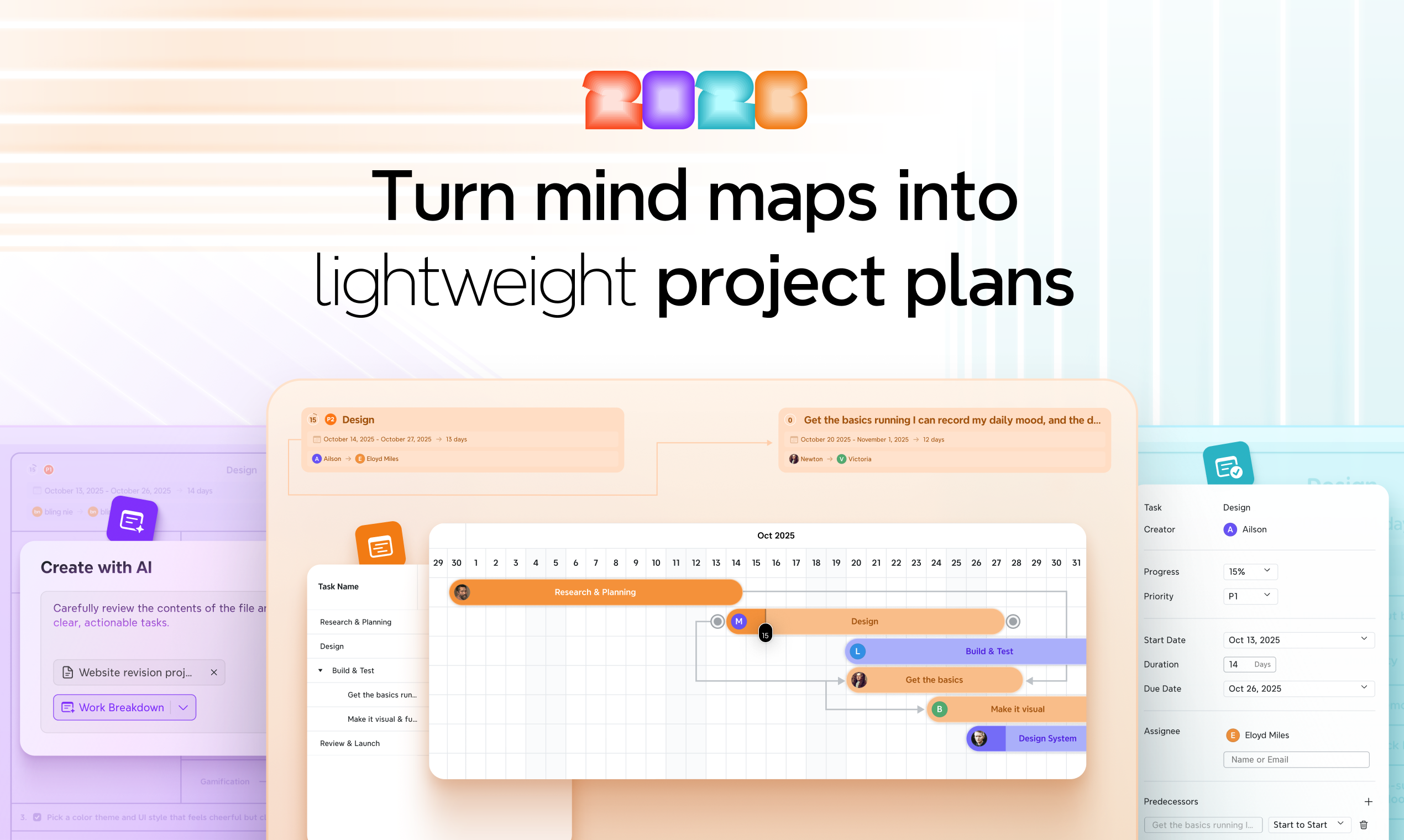
Project Management by Xmind: Bridging the Gap from Idea to Execution
Turn mind maps into lightweight project plans
Published: 11/15/2025
Project Management by Xmind is a transformative tool designed to turn brainstorming sessions and mind maps into actionable, lightweight project plans. Developed by Xmind, a company with extensive experience in mind mapping, this offering aims to provide a seamless flow from idea generation to project tracking, eliminating the need to switch between disparate tools. It caters particularly to teams and individuals who find traditional, heavyweight project management software overly complex for early-stage work, offering a more intuitive and visually driven approach to managing projects.
The core value proposition of Project Management by Xmind lies in its ability to integrate the fluidity of mind mapping with essential project management functionalities. By allowing users to plan in maps, leverage AI for task breakdown, and track progress in Gantt charts, it offers a unified solution for project planning and execution. This approach is especially beneficial for those who thrive on visual organization and want to maintain clarity without getting bogged down in extensive setups.
Problem & Solution
Many teams face a common challenge: brilliant ideas are born in brainstorming sessions, often visualized through mind maps, but the transition to executable project plans is often clunky and fragmented. This usually involves moving ideas to separate project management suites, leading to context switching and potential loss of clarity. Traditional project management tools, while powerful, can be overly complex and feature-rich for early-stage projects or smaller teams, creating unnecessary overhead.
Project Management by Xmind directly addresses this problem by bringing project management capabilities into the familiar and flexible environment of a mind map. It offers a "lightweight" solution that starts where ideas are born, allowing users to evolve their brainstormed concepts directly into structured plans. Unlike rigid tools that impose a hierarchy from the outset, Xmind provides a fluid expression space where ideas initially have equal value, gradually adding structure as needed. This distinct approach differentiates it from more comprehensive, heavyweight tools, acting as a complementary solution rather than a replacement.
Key Features & Highlights
Project Management by Xmind boasts several notable features that streamline the project planning and execution process:
- Mind Map to Task Conversion: Users can transform individual nodes within a mind map directly into tasks, complete with dates, priority levels, and progress tracking. This significantly bridges the gap between ideation and execution.
- AI-Powered Breakdown: The integration of AI assists in breaking down projects into actionable steps, streamlining the planning process and ensuring that no details are overlooked. This AI Work Breakdown feature can automatically generate structured plans with deadlines and subtasks from existing materials and ideas.
- Flexible Project Structures: Xmind offers various structures to break down work. Users can switch between an Org Chart for hierarchical breakdowns, a Timeline for setting milestones, and Gantt charts for visualizing project timelines, tracking dependencies, and managing progress. The tool also supports other structures like Matrix, Tree Table, and Logic Chart, and multiple structures can coexist within a single map.
- Gantt Chart Integration: A standout feature is the seamless integration of Gantt charts. Users can effortlessly switch between their mind map and the Gantt view, with all changes staying perfectly synced across both. This allows for easy visualization of project timelines, task dependencies, and progress tracking.
- Real-time Collaboration: Teams can collaborate on mind maps in real time, making comments and edits, which fosters a shared understanding and ensures everyone is on the same page.
- Cross-platform Availability: Project Management by Xmind is available across web, desktop, and mobile platforms, ensuring accessibility and flexibility for users.
The tool emphasizes a minimalist design, providing essential project management features without clutter, making it ideal for users who value simplicity without sacrificing functionality. Xmind also includes features like Zen mode for focused work and Pitch mode for dynamic presentations.
Potential Drawbacks & Areas for Improvement
While Project Management by Xmind offers a powerful and intuitive approach, there are potential areas for enhancement. As a "lightweight" solution, it might not offer the depth of features found in more comprehensive, enterprise-grade project management software. For very large, complex projects with intricate resource management, advanced reporting, or highly specialized workflows, users might still find themselves needing to integrate with or ultimately transition to a more robust platform.
Further integration with a broader ecosystem of project management tools and applications could also add significant value. While some integrations are mentioned, expanding these capabilities to include more direct two-way synchronization with popular CRMs, communication platforms, and development tools would further solidify its position as a central hub for project planning.
Bottom Line & Recommendation
Project Management by Xmind is an excellent choice for individuals and teams seeking a more visual, intuitive, and less overwhelming way to manage projects, particularly in their early stages. It's ideal for those who frequently use mind maps for brainstorming and ideation and want to seamlessly transition those ideas into actionable plans without the burden of complex project management software. Its AI-powered features, flexible structural views, and collaborative capabilities make it a strong contender for agile teams, creative professionals, and anyone looking to maintain clarity and efficiency from concept to completion. If you're looking to streamline your project planning process from ideation to execution in a visually engaging and intuitive manner, Project Management by Xmind is definitely worth exploring.
Featured AI Applications
Discover powerful tools to enhance your productivity
MindMax
New Way to Interact with AI
Beyond AI chat, transforming conversations into an infinite canvas. Combining brainstorming, mind mapping, critical and creative thinking tools to help you visualize ideas, solve problems efficiently, and accelerate learning.
AI Slides
AI Slides with Markdown
Revolutionary slide creation fusing AI intelligence with Markdown flexibility - edit anywhere, optimize anytime, iterate easily. Turn every idea into a professional presentation instantly.
AI Markdown Editor
Write Immediately
Extremely efficient writing experience: AI assistant, slash commands, minimalist interface. Open and write, easy writing. ✍️ Markdown simplicity + 🤖 AI power + ⚡ Slash commands = Perfect writing experience.
Chrome AI Extension
AI Assistant Anywhere
Transform your browsing experience with FunBlocks AI Assistant. Your intelligent companion supporting AI-driven reading, writing, brainstorming, and critical thinking across the web.