Prompt Library Review: The Essential Mac Tool for AI Power Users
All your best prompts. One shortcut away.
Published: 2/15/2026
Product Overview
Prompt Library enters the crowded productivity space with a sharply focused, highly functional solution for anyone regularly engaging with Large Language Models (LLMs) like ChatGPT, Claude, or any locally run AI tools on their Mac. This application lives up to its tagline: "All your best prompts. One shortcut away." At its core, Prompt Library is a dedicated, system-wide prompt management application designed to eliminate the frustrating process of copying, pasting, and context-switching required when trying to reuse effective prompts. It transforms your valuable, hard-won AI instructions into an easily accessible resource pool.
Targeted squarely at power users, content creators, developers, and knowledge workers who rely on iterative prompting for their daily tasks, Prompt Library centralizes your most successful inputs. Whether you are drafting complex marketing copy, debugging code snippets, or summarizing dense reports, the value proposition of Prompt Library lies in speed and consistency. It’s less about creating prompts and more about ensuring your best-performing ones are always at your fingertips, regardless of which application you are currently using.
Problem & Solution: Bridging the Gap Between Creation and Execution
The fundamental problem Prompt Library solves is prompt entropy. In the current AI workflow, users often discover a perfect prompt structure—a detailed persona, specific formatting instructions, or a complex multi-step command—only to lose it in a disorganized document, a messy note-taking app, or buried deep within an endless chat history. Recreating that success is time-consuming and unreliable.
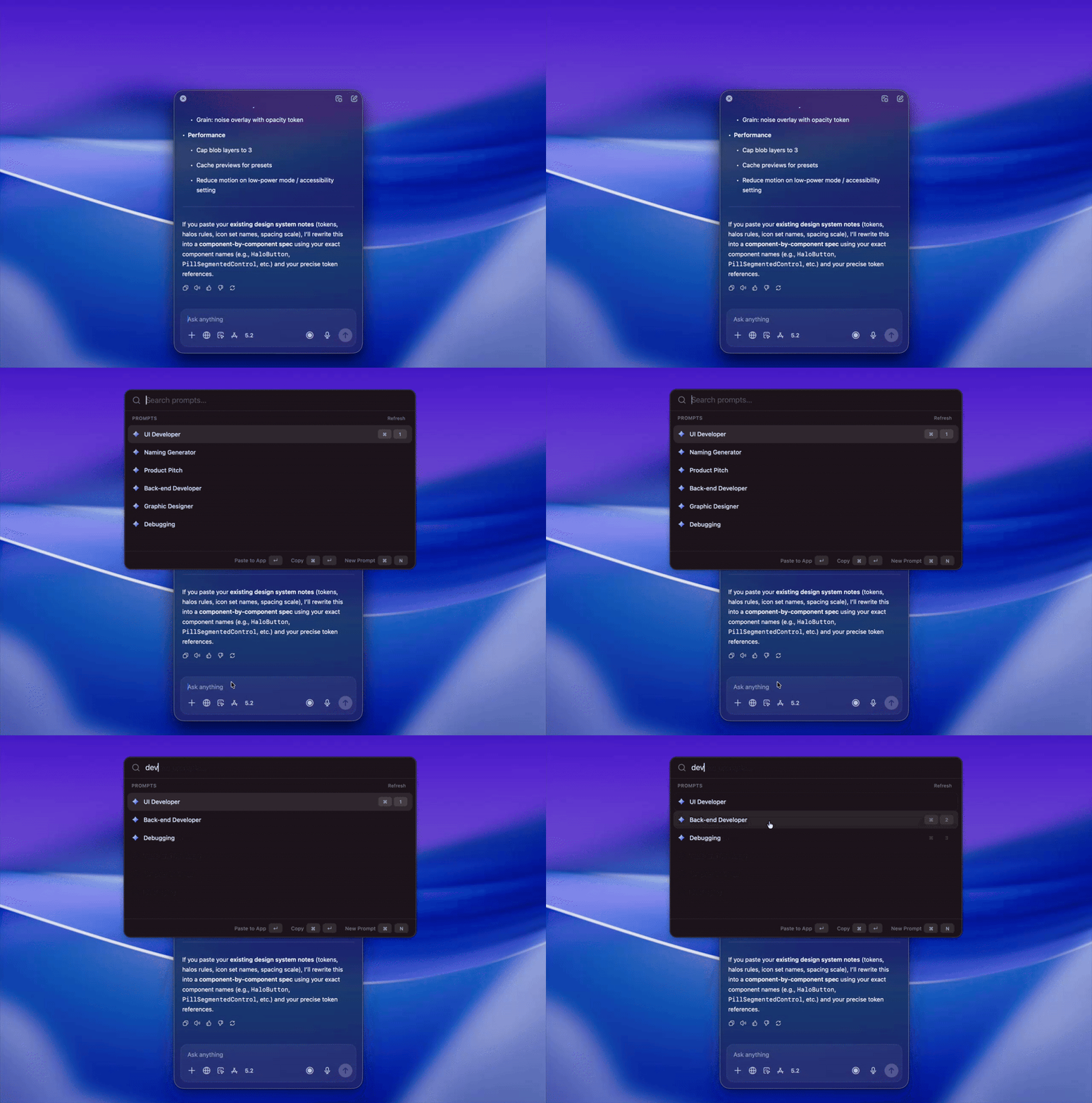
Prompt Library brilliantly tackles this by offering a dedicated, searchable, and highly integrated storage solution specifically for prompts. Unlike general clipboard managers or simple text expanders, Prompt Library is built with the AI user journey in mind. Its differentiator is the near-instantaneous global shortcut ($\text{⌘} \text{⌥} \text{P}$), which pulls up the library overlay, allowing users to select and insert text directly into any active application. This feature addresses the key market gap: the need for a dedicated, deeply integrated prompt vault for macOS users.
Key Features & Highlights
The strength of Prompt Library lies in its simplicity layered over powerful organization. The ability to save, tag, and organize prompts into dedicated collections is crucial for managing varied use cases (e.g., "SEO Outlines Collection," "Python Debugging Prompts"). This structure ensures contextually relevant prompts are surfaced quickly.
The standout feature, which defines the entire user experience, is the instantaneous global shortcut ($\text{⌘} \text{⌥} \text{P}$). This is the engine of efficiency. A few keystrokes bring the organized library overlay to the forefront, allowing users to search or browse their saved prompts, select one, and immediately resume typing in their original application, drastically reducing friction in the iterative AI loop.
Key highlights include:
- System-Wide Access: Insert prompts into any Mac application seamlessly.
- Collection Organization: Group prompts logically for specialized workflows.
- Tagging and Search: Quickly locate the right prompt when context switching is high.
- Focus on Speed: Designed explicitly to minimize time spent searching for text snippets.
The user experience feels native to macOS, suggesting a thoughtful development process focused purely on utility over unnecessary complexity.
Potential Drawbacks & Areas for Improvement
While Prompt Library excels at its core mission—quick retrieval and insertion—there are a few areas where it could enhance its value proposition for advanced users.
Currently, the description implies basic text insertion. A significant improvement would be dynamic variable support. For instance, allowing users to define placeholders within a saved prompt (e.g., Write a blog post about [TOPIC] for an audience of [AUDIENCE]) and then prompting the user for those variables upon insertion would elevate Prompt Library from a simple text storage solution to a genuine prompt template engine.
Furthermore, while collections are helpful, deeper integration with cloud sync (beyond standard Mac syncing) or version history for prompts would be beneficial, especially for teams or users working across multiple devices (though the current focus appears strictly Mac-centric). Integrating a simple way to quickly send a prompt directly to a specific API endpoint or integrated AI client (if one exists on the platform) could also streamline advanced automation pipelines.
Bottom Line & Recommendation
Prompt Library is an indispensable utility for any Mac user who spends significant time prompting AI models. It solves a genuine pain point—the friction of prompt retrieval—with an elegant, keyboard-centric solution. If your productivity hinges on reusing complex, effective AI instructions, the time saved by using the $\text{⌘} \text{⌥} \text{P}$ shortcut alone will quickly justify the adoption of Prompt Library. This is highly recommended for developers, copywriters, and professional knowledge workers looking to maximize their efficiency in the AI-augmented workplace. It’s a small tool delivering a disproportionately large boost to workflow consistency.
Featured AI Applications
Discover powerful tools to enhance your productivity
MindMax
New Way to Interact with AI
Beyond AI chat, transforming conversations into an infinite canvas. Combining brainstorming, mind mapping, critical and creative thinking tools to help you visualize ideas, solve problems efficiently, and accelerate learning.
AI Slides
AI Slides with Markdown
Revolutionary slide creation fusing AI intelligence with Markdown flexibility - edit anywhere, optimize anytime, iterate easily. Turn every idea into a professional presentation instantly.
AI Markdown Editor
Write Immediately
Extremely efficient writing experience: AI assistant, slash commands, minimalist interface. Open and write, easy writing. ✍️ Markdown simplicity + 🤖 AI power + ⚡ Slash commands = Perfect writing experience.
Chrome AI Extension
AI Assistant Anywhere
Transform your browsing experience with FunBlocks AI Assistant. Your intelligent companion supporting AI-driven reading, writing, brainstorming, and critical thinking across the web.