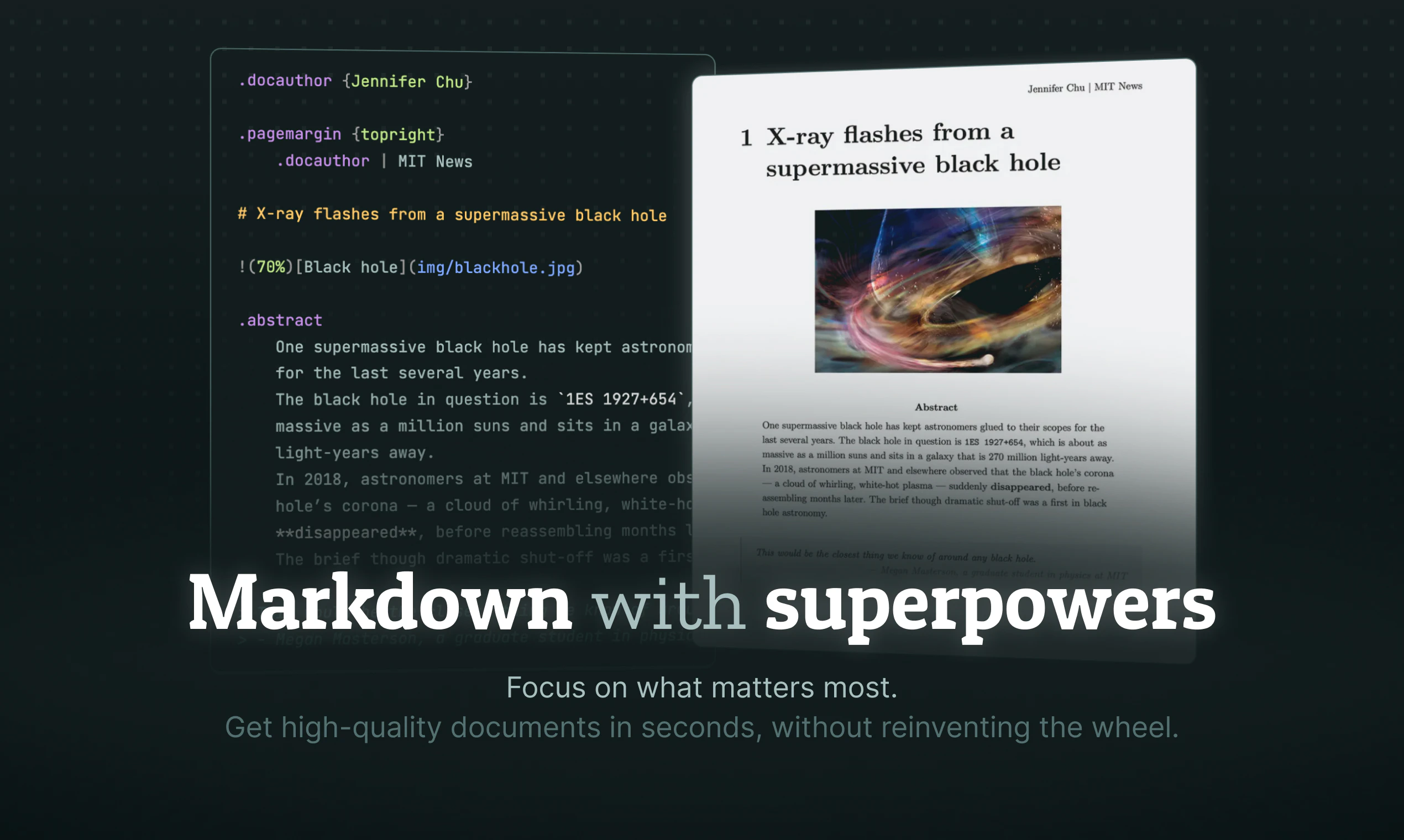
Quarkdown: Elevating Markdown into a Professional Typesetting Powerhouse
Markdown wit LaTeX in a modern typesetting system
Published: 4/30/2026
Product Overview
Quarkdown is a modern, high-performance typesetting system designed to bridge the gap between the simplicity of Markdown and the complex, precise requirements of academic and professional document creation. By leveraging the familiarity of Markdown syntax, Quarkdown allows users to draft papers, presentations, internal knowledge bases, and even full websites without the steep learning curve associated with traditional systems like LaTeX or heavy-duty DTP software.
The tool is built for creators, researchers, and developers who value speed and "flow state." Whether you are a student drafting a thesis or a developer documenting a project, Quarkdown offers a seamless environment that works directly within VS Code or your terminal. It effectively turns plain text files into polished, professional-grade outputs, proving that you don't need a bloated interface to produce beautiful, well-structured content.
Problem & Solution
For years, users have faced a binary choice: either stick to standard Markdown, which often lacks the granular control needed for scientific notation and complex layouts, or jump into the deep end of LaTeX, which is notoriously difficult to master and often creates friction in the writing process. Quarkdown addresses this "typesetting gap" by providing a platform that keeps the ease of Markdown while incorporating LaTeX-grade capabilities under the hood.
Quarkdown solves this by offering powerful extensions that give users full control over document aesthetics and structure. It fills a critical market gap for professionals who want the speed of a markup-first workflow but refuse to compromise on the final visual output. By integrating live previews, Quarkdown eliminates the constant context-switching typically found in the document creation cycle.
Key Features & Highlights
Quarkdown stands out due to its refined approach to technical writing and document generation. Its core feature set is designed to minimize distractions and maximize technical precision:
- Markdown-First Workflow: Start writing immediately using the syntax you already know, ensuring a flat learning curve from day one.
- LaTeX Integration: Easily incorporate complex mathematical formulas and advanced typesetting features that standard Markdown editors cannot handle.
- VS Code & Terminal Support: Designed for developers and power users, it integrates natively into existing workflows, ensuring that your tools don't get in your way.
- Live Preview: See your changes in real-time. This is essential for maintaining a "flow state" and ensures that your layout, formatting, and equations are exactly as intended before you finish.
- Versatile Exporting: Whether you need a crisp PDF for a paper, a dynamic slide deck for a presentation, or a static site for your documentation, Quarkdown handles the heavy lifting.
The user experience is highly optimized for performance; the software feels snappy and lightweight, which is a breath of fresh air compared to bulky document processors that consume significant system resources.
Potential Drawbacks & Areas for Improvement
While Quarkdown is a fantastic tool for those comfortable with code-like environments, its primary barrier to entry is the lack of a WYSIWYG (What You See Is What You Get) interface. For users who prefer drag-and-drop design or those who have never touched a terminal, the learning curve—though flatter than LaTeX—may still feel intimidating.
To broaden its appeal, I would love to see more "starter templates" or a library of pre-built layout themes. While the power is there, newcomers might benefit from a guided setup to understand the full extent of the custom extensions. Additionally, while VS Code integration is excellent, a standalone desktop application for non-developer writers could help capture a wider audience of academics and researchers who might not be familiar with text editors.
Bottom Line & Recommendation
Quarkdown is an essential utility for anyone who spends a significant amount of time writing technical documentation, academic research, or structured web content. It successfully manages the delicate balance between ease of use and professional-grade extensibility. If you are a developer, a student in a STEM field, or a writer who finds standard Markdown too limiting, Quarkdown is a highly recommended addition to your toolkit. It is, quite simply, the best way to get the power of professional typesetting without losing the speed and simplicity of your favorite markup language.
Featured AI Applications
Discover powerful tools to enhance your productivity
MindMax
New Way to Interact with AI
Beyond AI chat, transforming conversations into an infinite canvas. Combining brainstorming, mind mapping, critical and creative thinking tools to help you visualize ideas, solve problems efficiently, and accelerate learning.
AI Slides
AI Slides with Markdown
Revolutionary slide creation fusing AI intelligence with Markdown flexibility - edit anywhere, optimize anytime, iterate easily. Turn every idea into a professional presentation instantly.
AI Markdown Editor
Write Immediately
Extremely efficient writing experience: AI assistant, slash commands, minimalist interface. Open and write, easy writing. ✍️ Markdown simplicity + 🤖 AI power + ⚡ Slash commands = Perfect writing experience.
Chrome AI Extension
AI Assistant Anywhere
Transform your browsing experience with FunBlocks AI Assistant. Your intelligent companion supporting AI-driven reading, writing, brainstorming, and critical thinking across the web.