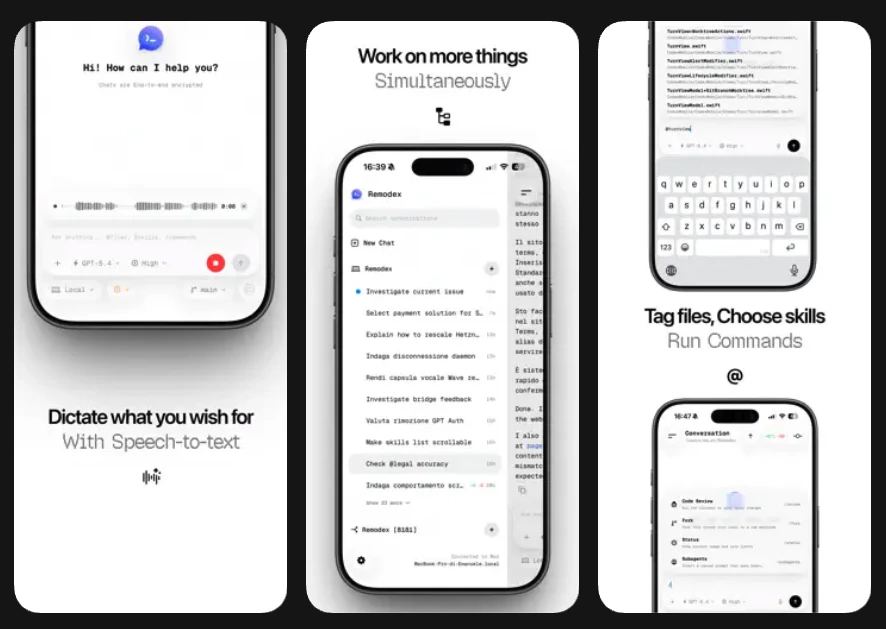
Remodex: Turning Your iPhone into a Powerful Command Center for Codex
Your Codex remote control on iOS
Published: 3/28/2026
Product Overview
Remodex is an innovative iOS companion app designed to extend the reach of Codex—a powerful Mac-based developer tool—directly to your fingertips. By bridging the gap between your workstation and your mobile device, Remodex allows developers to interact with their coding environment without being anchored to a desk. Whether you are moving around your home, office, or working remotely, Remodex transforms your iPhone into a highly capable remote control for your development workflow.
The core value proposition of Remodex lies in its ability to bring professional-grade development management to mobile. It is specifically designed for developers, engineers, and tech enthusiasts who leverage Codex on their Mac and want to maintain productivity while away from their primary monitor. By utilizing end-to-end encryption (E2EE) and a seamless QR-based pairing system, Remodex ensures that your development environment remains both secure and highly accessible.
Problem & Solution
The modern developer's life is rarely static. You might be in the middle of a complex build or a long-running subagent task and need to step away from your Mac. Traditionally, this results in a loss of oversight or the inconvenience of tethering via remote desktop software, which is often clunky on mobile screens.
Remodex solves this by providing a lightweight, dedicated interface specifically optimized for control rather than full-scale code editing. Instead of trying to replicate an entire IDE on a small screen, it focuses on the "remote control" aspect. It allows you to trigger actions, monitor subagents, and manage threads with high-fidelity control, filling a significant gap for those who need to manage their Mac’s processing power and task flows while on the move.
Key Features & Highlights
Remodex excels by stripping away unnecessary mobile complexity in favor of performance and utility. Some of its most notable capabilities include:
- Seamless Pairing: With a simple QR scan, you can link your iPhone to your Mac in seconds, eliminating the friction of traditional network configurations.
- Thread & Subagent Management: Remodex enables you to create and manage threads and utilize various subagents and skills, giving you control over your Codex workflow from anywhere in your home or office.
- Git Integration: The ability to execute Git actions directly from the app means you can commit, manage branches, or check status updates without opening your laptop.
- Security-First Architecture: With native End-to-End Encryption (E2EE), users can rest assured that their code-related commands and data remain private and secure during transmission.
- Open Source Roots: Being open source, Remodex invites transparency and community-driven improvements, which is a major win for developers concerned about tool longevity and security.
The user experience is clean and intentional. The interface feels snappy, and the responsiveness of the app when firing commands back to the Mac is impressive, making the "remote" feel almost instantaneous.
Potential Drawbacks & Areas for Improvement
While Remodex is a fantastic utility, it is inherently tied to the availability of the Mac host. If your Mac sleeps or disconnects from the network, the remote functionality is limited. Future updates could benefit from a "Wake-on-LAN" feature or deeper integration with macOS energy settings to ensure that the bridge remains stable during longer idle periods.
Additionally, while the feature set is robust for control, power users might look for more advanced diagnostic views. Adding a more granular dashboard for resource monitoring—such as CPU/Memory usage of active Codex tasks—would provide deeper value. Lastly, expanding support for more customized skill triggers via a "command builder" would allow users to automate even more of their workflow through the iOS interface.
Bottom Line & Recommendation
Remodex is a must-have utility for anyone currently utilizing Codex on macOS. It successfully shifts the paradigm of "remote development" from clunky screen sharing to efficient, task-oriented control. By focusing on the essential actions—threads, subagents, and Git commands—it manages to turn your iPhone into a legitimate productivity tool rather than just a gimmick. If you find yourself frequently stepping away from your desk but needing to keep your development threads alive and active, Remodex is an essential, well-executed addition to your dev stack. Highly recommended for developers looking to reclaim their mobility without sacrificing control.
Featured AI Applications
Discover powerful tools to enhance your productivity
MindMax
New Way to Interact with AI
Beyond AI chat, transforming conversations into an infinite canvas. Combining brainstorming, mind mapping, critical and creative thinking tools to help you visualize ideas, solve problems efficiently, and accelerate learning.
AI Slides
AI Slides with Markdown
Revolutionary slide creation fusing AI intelligence with Markdown flexibility - edit anywhere, optimize anytime, iterate easily. Turn every idea into a professional presentation instantly.
AI Markdown Editor
Write Immediately
Extremely efficient writing experience: AI assistant, slash commands, minimalist interface. Open and write, easy writing. ✍️ Markdown simplicity + 🤖 AI power + ⚡ Slash commands = Perfect writing experience.
Chrome AI Extension
AI Assistant Anywhere
Transform your browsing experience with FunBlocks AI Assistant. Your intelligent companion supporting AI-driven reading, writing, brainstorming, and critical thinking across the web.