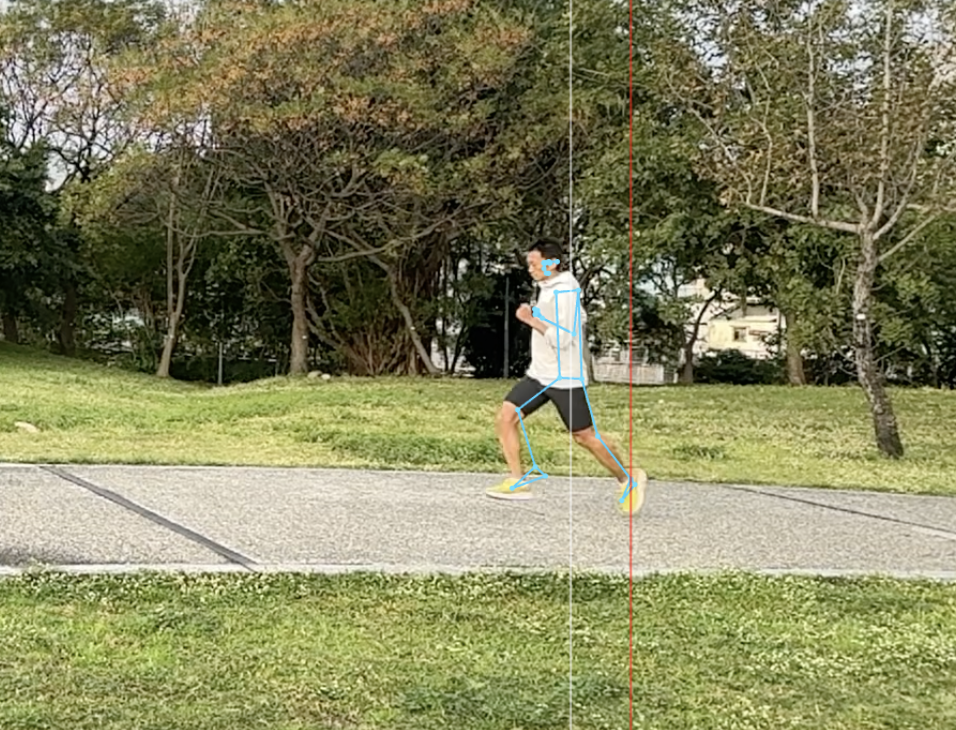
StrideIQ Review: Your Instant Digital Running Coach for Form Sanity Checks
Upload a short side-view clip, get actionable form feedback
Published: 12/31/2025
Product Overview: Demystifying Running Form Analysis
StrideIQ positions itself as the essential, on-demand sanity check for runners everywhere. This innovative running form analysis app, powered by browser-based technology, allows users to upload a short side-view video (10-20 seconds) of their run and receive immediate, actionable feedback on common running form issues. It’s designed for simplicity and speed, offering insights without the complexity or cost associated with traditional gait labs or dedicated coaching sessions.
The core value proposition of StrideIQ is accessibility. It targets everyday runners—from beginners worried about injury risk to intermediate athletes looking to optimize efficiency—who need quick, objective confirmation about their stride. It’s the perfect "first look" tool for understanding complex biomechanics, making sophisticated analysis available directly within your browser session.
Problem & Solution: Bridging the Feedback Gap
The primary problem StrideIQ addresses is the lack of immediate, affordable running form feedback. Most runners rely on feel, which is often inaccurate, or they have to schedule expensive appointments with physiotherapists or coaches, which introduces friction and delay. Runners often wonder, "Am I overstriding? Is my cadence too low?" but lack an easy way to verify these concerns mid-training cycle.
StrideIQ solves this by leveraging computer vision technology directly on the user's device. By requiring only a simple side-view clip, it streamlines the data collection process. Unlike high-end software that requires specialized sensors or lengthy setup, StrideIQ offers instant interpretation of key metrics, effectively filling the market gap between guessing and professional assessment. It’s a true digital running assistant.
Key Features & Highlights: Browser-Based Biomechanics
The most compelling feature of StrideIQ is its pure, privacy-focused, in-browser processing. This means videos are analyzed locally; they are not uploaded to a server, providing significant peace of mind for users conscious about their data. This privacy commitment is a major differentiator in the current AI analysis landscape.
The analysis focuses on identifying a few common, crucial running form indicators. While the tool explicitly states it is not a replacement for a human coach, it provides tangible, easy-to-digest feedback. Users can expect highlights related to posture, foot strike location relative to the center of mass, and potentially vertical oscillation indicators, depending on the underlying model.
User experience is clearly prioritized for speed. The focus is on capturing a stable clip at an easy-to-tempo pace, ensuring the required input is minimal. This streamlined approach makes integrating form checks into your regular training routine genuinely feasible.
Key Capabilities Include:
- Instant Form Highlighting: Identifies key areas for improvement from a short video.
- Local Processing: Ensures video data stays on the user's device for maximum privacy.
- Accessibility: Works entirely within the web browser, requiring no dedicated app download.
Potential Drawbacks & Areas for Improvement
While StrideIQ excels as a rapid diagnostic tool, its limitations are important to understand. The primary constraint is its scope: it is designed to be a quick sanity check, not a comprehensive coaching suite. For highly technical runners or those recovering from specific injuries, the generalized feedback might lack the nuance required for deep correction.
Furthermore, the performance is highly dependent on video quality. If the clip is shaky, taken from an inconsistent angle (not perfectly side-on), or if the runner is moving too fast or too slow for the model to accurately track key points, the resulting analysis might be unreliable.
To enhance StrideIQ further, future iterations could consider:
- Cadence Estimation: Integrating a simple cadence estimate based on leg turnover visible in the video, adding another critical data point.
- Visual Overlay Guides: Offering optional, subtle overlays on the uploaded video showing where the ideal contact point should be, providing a direct visual comparison for the user.
- Pace Guidance: Providing clearer pre-analysis instructions on the ideal speed range for the most accurate results.
Bottom Line & Recommendation
StrideIQ is a brilliant, pragmatic tool for the modern runner seeking immediate, low-friction insight into their performance mechanics. If you are an intermediate runner curious about whether your form is breaking down during long runs or if you are just starting out and want to avoid establishing bad habits, StrideIQ is highly recommended. It lowers the barrier to entry for running form analysis significantly. It serves its purpose perfectly: providing a quick, privacy-respecting snapshot. Use it regularly to monitor trends, but remember that for deep, personalized biomechanical correction, a human coach remains invaluable. Give this browser tool a try—it might just optimize your next mile.
Featured AI Applications
Discover powerful tools to enhance your productivity
MindMax
New Way to Interact with AI
Beyond AI chat, transforming conversations into an infinite canvas. Combining brainstorming, mind mapping, critical and creative thinking tools to help you visualize ideas, solve problems efficiently, and accelerate learning.
AI Slides
AI Slides with Markdown
Revolutionary slide creation fusing AI intelligence with Markdown flexibility - edit anywhere, optimize anytime, iterate easily. Turn every idea into a professional presentation instantly.
AI Markdown Editor
Write Immediately
Extremely efficient writing experience: AI assistant, slash commands, minimalist interface. Open and write, easy writing. ✍️ Markdown simplicity + 🤖 AI power + ⚡ Slash commands = Perfect writing experience.
Chrome AI Extension
AI Assistant Anywhere
Transform your browsing experience with FunBlocks AI Assistant. Your intelligent companion supporting AI-driven reading, writing, brainstorming, and critical thinking across the web.