Screen Ruler: The Essential Toolkit for Pixel-Perfect Web Development
Made to measure. Built for everything else.
Published: 11/15/2025
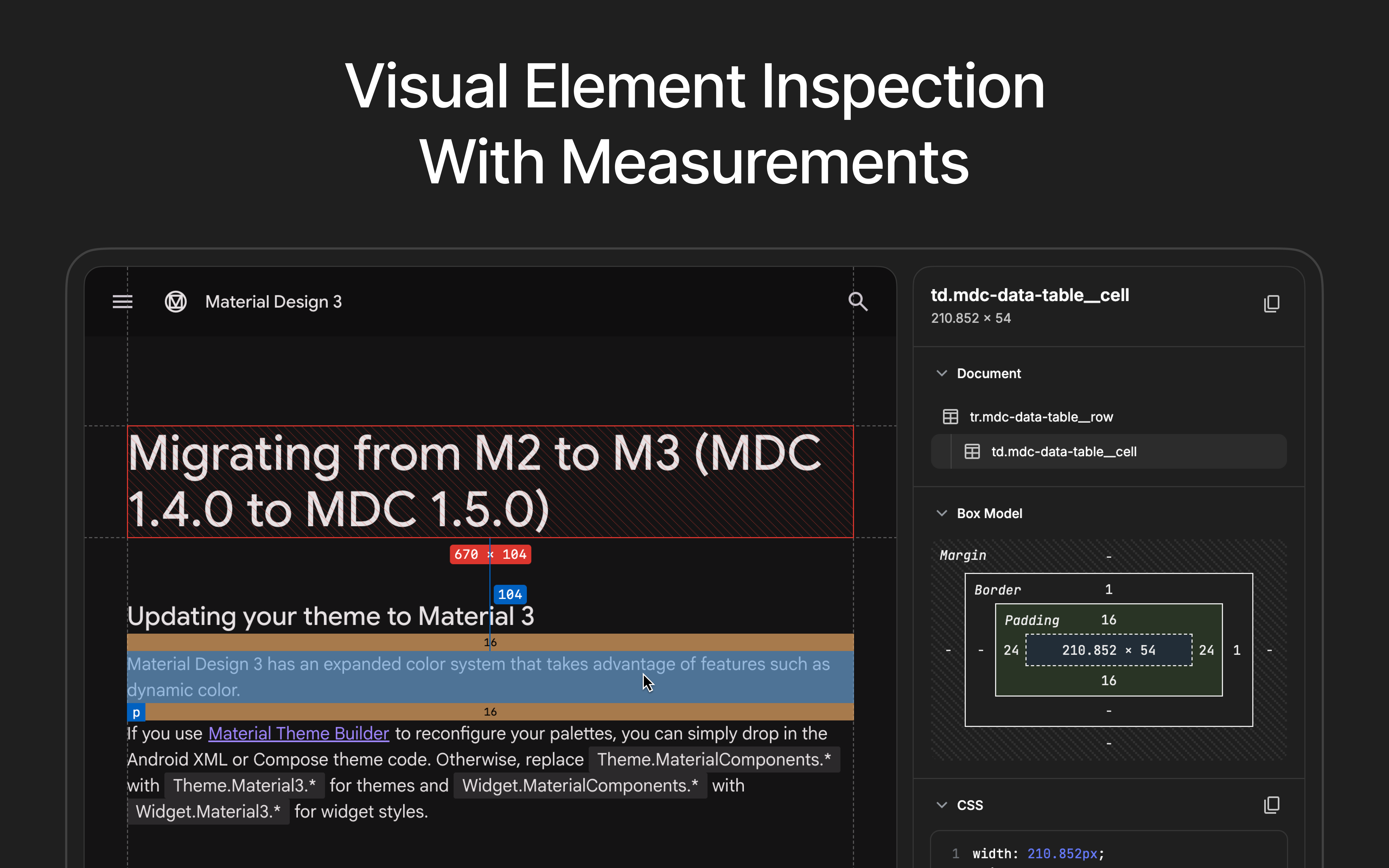
Screen Ruler is an indispensable Chrome extension designed to empower web developers and designers with a comprehensive suite of tools for inspecting, measuring, and validating web page elements. With its tagline, "Made to measure. Built for everything else," it accurately reflects its dual purpose: precise measurement and a broader range of development and design utilities. This extension caters to anyone who strives for pixel-perfect layouts, consistent spacing, and adherence to design specifications on the web. It's a valuable asset for front-end developers, UI/UX designers, and QA professionals looking to streamline their workflow and ensure high-quality web experiences.
Problem & Solution
In the intricate world of web development and design, achieving exact measurements and identifying subtle discrepancies can be a time-consuming and often frustrating task. Developers frequently grapple with ensuring elements align perfectly, spacing is consistent, and designs translate accurately from mockups to the live browser. Traditional browser developer tools offer some inspection capabilities, but they often lack the intuitive visual measurement and specialized features required for truly pixel-perfect implementation.
Screen Ruler addresses these pain points by providing an intuitive, visual interface for real-time measurements directly within the browser. Unlike generic screen rulers that measure anything on the desktop, this tool is specifically tailored for web content, allowing users to quickly identify and rectify layout issues without deep-diving into code. It fills a crucial market gap for a focused, yet versatile, inspection tool that bridges the gap between design intent and implemented reality.
Key Features & Highlights
Screen Ruler boasts a robust set of features that significantly enhance the web inspection process:
- Precise Measurement Tools: At its core, Screen Ruler allows users to measure the pixel size of any element and the distance between any two elements. This includes dimensions, margins, and paddings, crucial for validating layouts.
- Element Inspection: By simply hovering over web content, users can instantly view HTML tag names, class names, and IDs, providing quick context for the underlying structure.
- Computed CSS Inspection: A significant highlight is the ability to view and copy the computed CSS properties of any selected element directly to the clipboard. This is invaluable for understanding how styles are applied and for quick debugging or replication.
- Page Rulers and Guides: For even more precise alignment, Screen Ruler offers horizontal and vertical guides with a crosshair, enabling accurate measurements across the viewport.
- Color Picker: The integrated color picker tool allows users to sample and copy colors from anywhere on the page, extracting hex, RGB, and HSL values. This ensures color consistency across designs.
- Accessibility Issue Detection (PRO Feature): The PRO version automatically detects and highlights WCAG contrast failures, offering actionable recommendations to improve accessibility. This feature is a game-changer for building inclusive web experiences.
- Responsive Mode (PRO Feature): Also in the PRO tier, Responsive Mode enables testing designs across various device viewports with an interactive device emulator and custom dimensions. This is essential for ensuring a consistent user experience across different screen sizes.
- Asset Extraction (PRO Feature): PRO users can extract and download images, SVGs, and vector assets directly from any webpage.
The user experience is intuitive, with activation options via clicking the extension icon, right-click context menu, or a keyboard shortcut (Alt/Option + Shift + R). Parent/child selection shortcuts further streamline navigation through the element hierarchy.
Potential Drawbacks & Areas for Improvement
While Screen Ruler offers a comprehensive feature set, a few areas could be considered for future enhancement. The core measurement and inspection tools are free, but several advanced features, such as accessibility checks, responsive mode, and asset extraction, are part of a "PRO" tier requiring a one-off payment. While this is a reasonable monetization strategy, some users, particularly those with tighter budgets, might wish for a more extensive free offering or a trial period for PRO features.
Currently, Screen Ruler is designed for stability in Google Chrome and is compatible with other Chromium browsers. Expanding compatibility to other major browsers like Firefox and Safari could broaden its appeal and utility for developers working across different environments.
Given the increasing importance of animation in web design, further development in the animation analysis feature, beyond visualizing timing curves and copying properties, could be beneficial. Perhaps the ability to pause, scrub, or even visually edit animation properties directly within the extension could add significant value.
Bottom Line & Recommendation
Screen Ruler is an exceptional tool for any web developer or designer committed to crafting precise and accessible web experiences. Its blend of accurate measurement, detailed element inspection, and advanced PRO features makes it a powerful addition to any development toolkit. The emphasis on visual feedback and direct interaction within the browser significantly streamlines the design and development workflow, helping to catch and correct issues early.
I highly recommend Screen Ruler to front-end developers, UI/UX designers, and quality assurance testers who need to ensure pixel-perfect layouts, validate design implementations, and proactively address accessibility concerns. While the PRO features unlock the full potential of the suite, the free version still offers substantial value for everyday tasks. Consider upgrading to PRO to leverage its accessibility, responsive testing, and asset extraction capabilities, which are invaluable for modern web development.
Featured AI Applications
Discover powerful tools to enhance your productivity
MindMax
New Way to Interact with AI
Beyond AI chat, transforming conversations into an infinite canvas. Combining brainstorming, mind mapping, critical and creative thinking tools to help you visualize ideas, solve problems efficiently, and accelerate learning.
AI Slides
AI Slides with Markdown
Revolutionary slide creation fusing AI intelligence with Markdown flexibility - edit anywhere, optimize anytime, iterate easily. Turn every idea into a professional presentation instantly.
AI Markdown Editor
Write Immediately
Extremely efficient writing experience: AI assistant, slash commands, minimalist interface. Open and write, easy writing. ✍️ Markdown simplicity + 🤖 AI power + ⚡ Slash commands = Perfect writing experience.
Chrome AI Extension
AI Assistant Anywhere
Transform your browsing experience with FunBlocks AI Assistant. Your intelligent companion supporting AI-driven reading, writing, brainstorming, and critical thinking across the web.