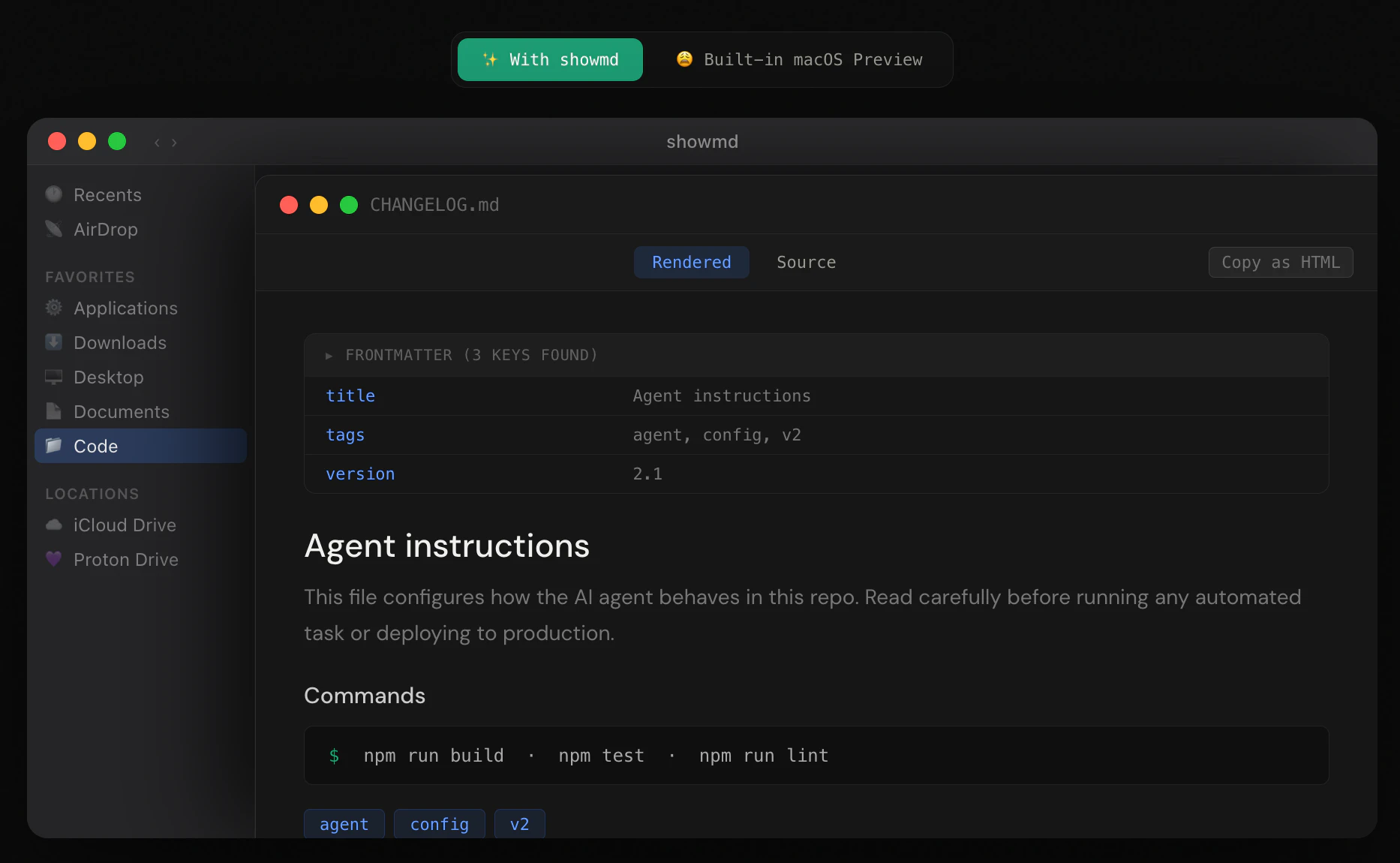
showmd: Finally, A Native Way to Preview Markdown on macOS
Markdown was never meant to be previewed plain text
Published: 4/13/2026
Product Overview
If you spend any time navigating local file systems on a Mac, you’ve likely encountered the frustration of opening a .md file, only to be met with the default macOS Preview app displaying raw, unstyled plain text. showmd changes that narrative entirely. It is a lightweight, native macOS Quick Look extension designed specifically to render Markdown files into beautiful, readable documents directly within the Finder.
Designed for developers, technical writers, and content creators who rely on Markdown for documentation or notes, showmd transforms your workflow. Instead of needing to open a heavy IDE like VS Code or Obsidian just to glance at the content of a file, you can simply tap the spacebar in Finder to get an instant, styled preview. It bridges the gap between raw code and human-readable formatting, making file navigation significantly more efficient.
Problem & Solution
The fundamental problem showmd addresses is the "Markdown readability gap" in the macOS ecosystem. While Markdown has become the industry standard for documentation (think README.md or LICENSE.md), the default macOS file handler treats these as plain text, rendering them cluttered with syntax symbols and raw formatting markers.
showmd solves this by providing a dedicated Quick Look layer that understands Markdown syntax. Unlike general-purpose text viewers or web-based plugins, showmd is built natively for macOS, ensuring lightning-fast performance and a UI that feels like it belongs in the OS. It fills a glaring gap for power users who want a distraction-free way to verify file contents without context-switching into an external editor.
Key Features & Highlights
The beauty of showmd lies in its attention to detail, specifically regarding how it handles technical documentation structure. It goes well beyond standard Markdown rendering:
- Smart Metadata Handling: One of showmd’s standout features is its ability to parse YAML frontmatter. It automatically transforms this header information into a clean, collapsible metadata table—collapsed by default to keep the interface tidy—that expands with a single click.
- AI-Friendly Formatting: For users working with LLMs, showmd renders Agentic AI XML tags (and 17 other common technical syntaxes) as clean, bordered, and labeled blocks. This makes reading complex prompts or structured data files significantly easier by removing the "noise" of raw angle brackets.
- Native Feel: Because it functions as a Quick Look extension, it requires zero configuration. It respects your system preferences and provides a polished, distraction-free reading environment that honors the formatting intended by the author.
Potential Drawbacks & Areas for Improvement
While showmd is an excellent utility, it is currently a purpose-built tool. Users who heavily rely on custom CSS themes in their Markdown editors might find the default styling a bit rigid, as there are currently limited options for customizing the visual output (such as switching between light/dark mode overrides or typography adjustments).
Additionally, while it excels at rendering, it is a read-only viewer. It would be a massive value-add if the developer considered an "Edit in Default App" button within the Quick Look overlay. Integrating a seamless jump-off point to launch the file in a preferred editor like Typora or Obsidian would streamline the transition from "previewing" to "working" on a document.
Bottom Line & Recommendation
showmd is a must-have utility for anyone who spends their day in the macOS Finder dealing with Markdown files. By transforming raw text into a professional, structured document view, it saves countless hours of opening and closing applications just to check a file's content. It is particularly valuable for software engineers and technical writers who work with structured metadata and AI prompt files. If you value a clean, native, and efficient macOS workflow, showmd is a lightweight install that provides immediate quality-of-life improvements. Highly recommended for any power user’s toolkit.
Featured AI Applications
Discover powerful tools to enhance your productivity
MindMax
New Way to Interact with AI
Beyond AI chat, transforming conversations into an infinite canvas. Combining brainstorming, mind mapping, critical and creative thinking tools to help you visualize ideas, solve problems efficiently, and accelerate learning.
AI Slides
AI Slides with Markdown
Revolutionary slide creation fusing AI intelligence with Markdown flexibility - edit anywhere, optimize anytime, iterate easily. Turn every idea into a professional presentation instantly.
AI Markdown Editor
Write Immediately
Extremely efficient writing experience: AI assistant, slash commands, minimalist interface. Open and write, easy writing. ✍️ Markdown simplicity + 🤖 AI power + ⚡ Slash commands = Perfect writing experience.
Chrome AI Extension
AI Assistant Anywhere
Transform your browsing experience with FunBlocks AI Assistant. Your intelligent companion supporting AI-driven reading, writing, brainstorming, and critical thinking across the web.