StoryMotion: Bringing Diagrams to Life with Engaging Animations
Engaging Animated Diagrams, Flowcharts Made Easy
Published: 11/15/2025
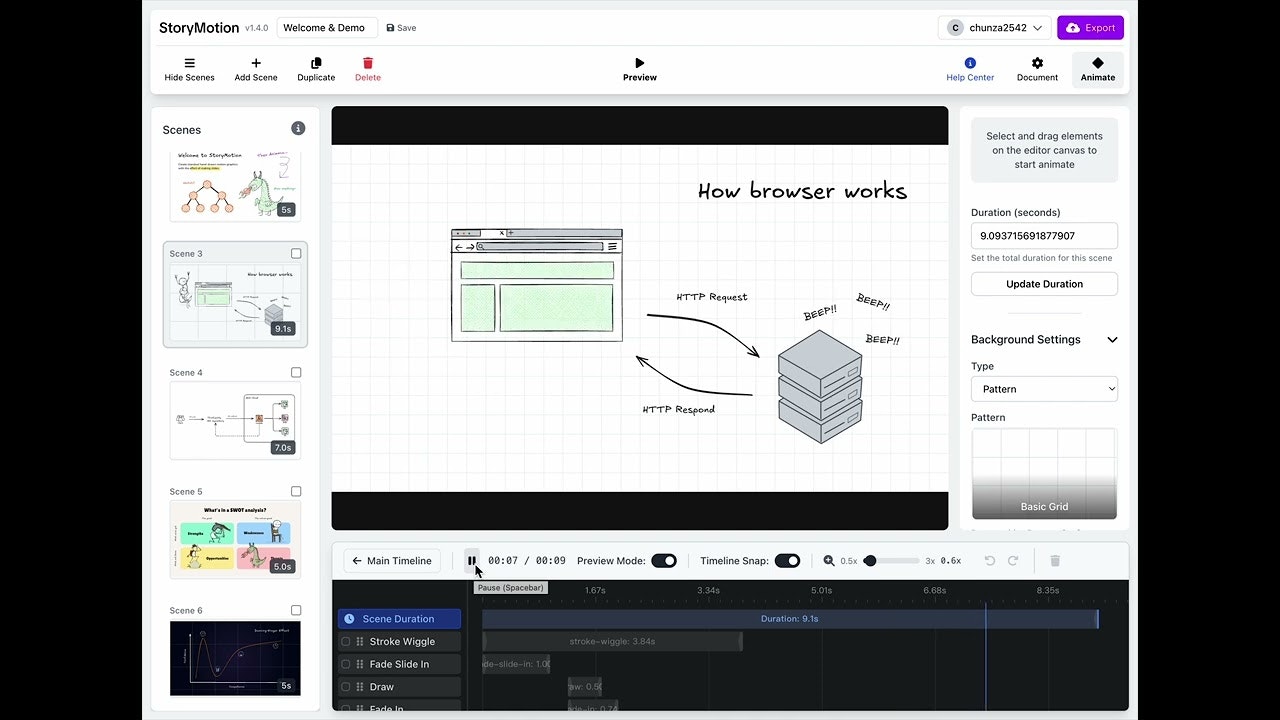
StoryMotion is a browser-based platform designed to simplify the creation of animated diagrams and flowcharts with a distinctive hand-drawn aesthetic. It caters to a broad audience, including educators, technical writers, content creators, and marketers, who need to communicate complex ideas in a more engaging and digestible format than static visuals. The core value proposition of StoryMotion lies in its ability to transform mundane diagrams into captivating video content suitable for presentations, online courses, technical documentation, and social media.
The tool allows users to sketch custom diagrams and precisely control the appearance and animation of each element, making it ideal for step-by-step explanations and process visualizations. By enabling the export of these animated diagrams as videos, StoryMotion empowers users to enhance their content and stand out in a visually saturated digital landscape.
The Problem with Static Content and StoryMotion's Dynamic Solution
In today's fast-paced digital world, static diagrams often fail to capture and retain audience attention, especially when explaining intricate concepts. Professional video editing software, while powerful, can be overly complex and time-consuming for users who primarily need to animate diagrams and flowcharts.
StoryMotion addresses this by offering an intuitive, Google Slides-like editor that democratizes the creation of animated visuals. It fills a market gap by providing a specialized tool that focuses on the unique needs of animated diagrams, rather than being a general-purpose motion graphics editor. The hand-drawn style further differentiates StoryMotion, helping content creators make their visuals stand out and keep viewers engaged.
Key Features and Highlights
StoryMotion boasts a range of features designed to make animated diagram creation effortless and effective:
- Hand-Drawn Style: A unique aesthetic that helps content stand out and keeps audiences engaged.
- Intuitive Editor: The interface is likened to Google Slides, making it accessible even for those without prior animation experience.
- Customizable Animations: Users can sketch diagrams and control the timing and appearance of each element with effects like fade, slide, draw, and stroke wiggle.
- Timeline Editor: Provides precise control over animation timing, with bulk editing functionalities for efficiency.
- Scene Management: Content can be organized into scenes, similar to presentation slides, for a structured narrative.
- Real-time Preview: Allows users to instantly see their animations as they edit.
- Video Export Options: Diagrams can be exported as MP4 videos, GIFs, and even with transparent backgrounds, ready for various platforms like YouTube and social media.
- Audio Support: Users can upload MP3 files, visualize audio waveforms, and synchronize audio with animations.
- Template Library: Offers a collection of customizable templates to jumpstart the creation process for various applications, including UI animation, data visualization, and educational content.
- Google Fonts Integration: Provides access to a wide array of fonts to enhance design.
- Team Collaboration: Available in higher-tier plans, enabling multiple users to work together on projects.
Potential Drawbacks and Areas for Improvement
While StoryMotion offers a compelling solution, there are a few areas for consideration. The pricing, starting at $19.00 per month for the "Starter + Cloud Basic" plan, is notably higher than the average cost for basic diagramming software. This might be a barrier for individual creators or small businesses with limited budgets, especially since there isn't a free plan offered, though a free trial is available. Some users have also expressed concerns about recurring pricing for a product that might not be used regularly.
For more advanced motion graphics or complex video editing needs beyond animated diagrams, users might find the features somewhat limited compared to professional video editors or dedicated motion graphics software. Integrating more advanced drawing tools or offering a wider range of pre-set animation styles could further enhance its appeal.
Bottom Line and Recommendation
StoryMotion is an excellent tool for anyone looking to create engaging, animated diagrams and flowcharts without the steep learning curve of professional video editing software. Its hand-drawn style and intuitive interface make it particularly well-suited for educators, technical writers, content marketers, and social media managers who want to elevate their visual communication.
If your goal is to simplify complex information, enhance presentations, or create eye-catching social media content with animated visuals, StoryMotion is definitely worth exploring. While the pricing might be a consideration for some, the time-saving benefits and unique aesthetic can provide significant value, making it a strong recommendation for those seeking to bring their static diagrams to life.
Featured AI Applications
Discover powerful tools to enhance your productivity
MindMax
New Way to Interact with AI
Beyond AI chat, transforming conversations into an infinite canvas. Combining brainstorming, mind mapping, critical and creative thinking tools to help you visualize ideas, solve problems efficiently, and accelerate learning.
AI Slides
AI Slides with Markdown
Revolutionary slide creation fusing AI intelligence with Markdown flexibility - edit anywhere, optimize anytime, iterate easily. Turn every idea into a professional presentation instantly.
AI Markdown Editor
Write Immediately
Extremely efficient writing experience: AI assistant, slash commands, minimalist interface. Open and write, easy writing. ✍️ Markdown simplicity + 🤖 AI power + ⚡ Slash commands = Perfect writing experience.
Chrome AI Extension
AI Assistant Anywhere
Transform your browsing experience with FunBlocks AI Assistant. Your intelligent companion supporting AI-driven reading, writing, brainstorming, and critical thinking across the web.