Termsy Review: The Essential Tool for Finally Understanding Those Endless Terms and Conditions
Scans terms and conditions for you
Published: 2/14/2026
Product Overview: Taking Control of Your Digital Agreements
In the modern digital landscape, agreeing to Terms of Service (ToS) and Privacy Policies often feels like a necessary evil—a giant wall of dense legal text standing between you and the service you want to use. Termsy, the new tool featured on Product Hunt, aims to dismantle this barrier. Tagged with the simple yet powerful promise: "Scans terms and conditions for you," Termsy is designed to act as your personal digital legal assistant, rapidly processing lengthy agreements so you don't have to wade through them manually.
This utility targets the everyday internet user, digital professionals, and anyone increasingly conscious of their data privacy and digital rights. Whether you’re signing up for a new SaaS tool, downloading an app, or subscribing to a new service, Termsy promises to provide clarity where there was previously only obfuscation. Its core value proposition is simple: speed, clarity, and informed consent delivered directly to the user, minimizing the time commitment required for compliance checks.
The functionality is integrated cleanly, operating as a lightweight, easy-to-use interface that overlays the dense legal documents. By automatically scanning and summarizing, Termsy shifts the balance of power slightly back toward the consumer, ensuring that critical information isn't buried deep within boilerplate language.
Problem & Solution: Ending the "I Agree" Blind Acceptance
The central problem Termsy addresses is ubiquitous: digital fatigue leading to uninformed consent. Users rarely read ToS because they are too long, use complex legal jargon, and frankly, are boring. This results in users unknowingly agreeing to unfavorable data sharing practices, excessive liability clauses, or restrictive usage rights.
Termsy solves this by automating the crucial analysis phase. Instead of relying on slow, expensive human review or generic, often unreliable summaries, Termsy scans the documents in real-time and highlights the most critical clauses. It fills a significant market gap by offering an instant, focused overview rather than an exhaustive legal rewrite. This immediacy is key; it allows users to make a decision at the moment of agreement rather than having to bookmark a 50-page PDF for later reading—a task few ever complete.
Key Features & Highlights: Clarity at a Glance
The effectiveness of Termsy lies in its streamlined approach to complex documentation. While the full scope of its parsing algorithms isn't fully detailed, the resulting user experience is immediately beneficial.
Key highlights that make Termsy stand out include:
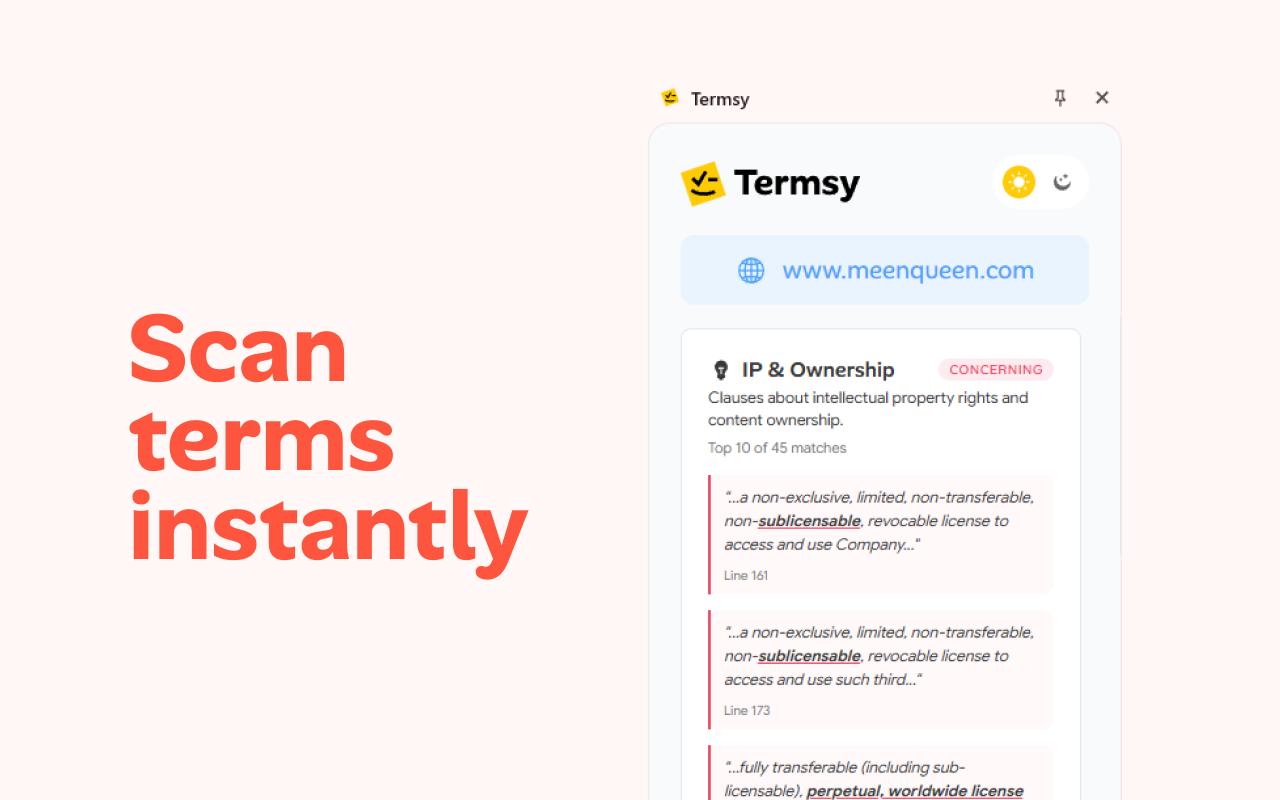
- Automatic Clause Highlighting: The system intelligently identifies and flags crucial elements within the ToS/Privacy Policy, likely focusing on data collection, intellectual property rights, mandatory arbitration, and termination clauses.
- Clean Sidebar Presentation: The extracted information isn't dumped back onto the page; it’s organized in a clean, accessible sidebar, ensuring the original document context remains visible while the summary is easily digestible.
- Lightweight Performance: Given that browser extensions and online scanners can often slow down web browsing, the promise of being "fast" and "lightweight" is a significant selling point for an always-on utility like Termsy.
- Aesthetic Flexibility: Support for both dark and light modes ensures the tool integrates seamlessly regardless of the user’s preferred operating environment, enhancing overall user experience (UX).
By distilling legalese into actionable summaries, Termsy transforms an opaque commitment into a transparent negotiation point for the user.
Potential Drawbacks & Areas for Improvement
While Termsy presents a compelling solution, any tool dealing with legal text requires cautious adoption, especially in its early stages. The primary area for improvement revolves around transparency in the scanning methodology.
Users will naturally want to know how Termsy defines a "critical clause." Is it keyword-based, contextually inferred, or does it rely on predefined templates? Greater visibility into the parsing logic would build trust. Furthermore, while highlighting is excellent, providing links directly to the source paragraph within the original document would empower users to verify the summary instantly.
A potential limitation is the tool’s reliance on language; it may perform less effectively on documents employing highly nuanced or region-specific legal phrasing. For future iterations, expanding international compliance highlights (e.g., specific GDPR vs. CCPA implementations) would significantly boost its utility for global users.
Bottom Line & Recommendation
Termsy is a highly recommended utility for the privacy-aware digital citizen, remote worker, and anyone tired of signing away their rights sight unseen. It successfully bridges the gap between necessary digital compliance and user comprehension.
If you frequently sign up for new software, download mobile applications, or worry about how your personal data is being handled, Termsy offers an immediate, low-effort way to gain peace of mind. This product tackles a universal pain point with an elegant, user-centric design. Give Termsy a spin; your future self, free from ambiguous agreements, will thank you.
Featured AI Applications
Discover powerful tools to enhance your productivity
MindMax
New Way to Interact with AI
Beyond AI chat, transforming conversations into an infinite canvas. Combining brainstorming, mind mapping, critical and creative thinking tools to help you visualize ideas, solve problems efficiently, and accelerate learning.
AI Slides
AI Slides with Markdown
Revolutionary slide creation fusing AI intelligence with Markdown flexibility - edit anywhere, optimize anytime, iterate easily. Turn every idea into a professional presentation instantly.
AI Markdown Editor
Write Immediately
Extremely efficient writing experience: AI assistant, slash commands, minimalist interface. Open and write, easy writing. ✍️ Markdown simplicity + 🤖 AI power + ⚡ Slash commands = Perfect writing experience.
Chrome AI Extension
AI Assistant Anywhere
Transform your browsing experience with FunBlocks AI Assistant. Your intelligent companion supporting AI-driven reading, writing, brainstorming, and critical thinking across the web.