Timelines 4 Review: Visual Time Tracking for Realizing Your Goals
Track your time to achieve your New Year's resolutions.
Published: 1/2/2026
Product Overview: Reclaiming Your Most Valuable Asset
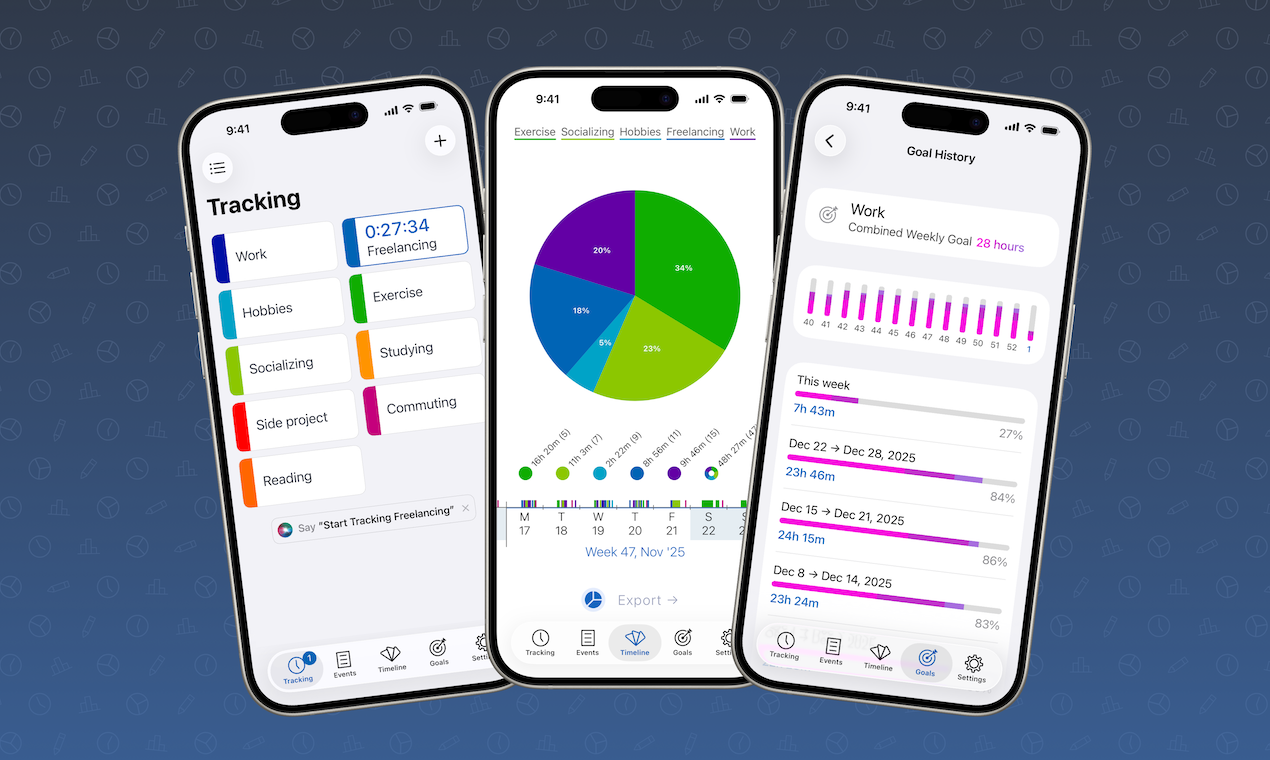
Timelines 4 steps into the crowded productivity space with a refreshingly visual and intuitive approach to time management. More than just a logging tool, this app aims to give users a clear, interactive map of where their hours are actually spent. The core concept revolves around an interactive timeline, allowing users to literally see their day, week, or month laid out, making discrepancies between perceived time usage and actual time usage immediately obvious.
This tool is perfectly positioned for individuals struggling with focus, productivity bottlenecks, or those who have set specific, long-term aspirations—the app specifically highlights its utility for achieving New Year’s resolutions. Whether you are a freelancer needing accurate billable hours, a student balancing coursework and personal projects, or simply someone determined to dedicate more time to health or learning goals, Timelines 4 offers the diagnostic insight needed to course-correct your daily routine.
The latest iteration, Timelines 4, focuses heavily on refining the user experience, introducing enhanced integration features and deeper organizational capabilities. Its value proposition rests on transforming abstract time data into actionable visual intelligence.
The Problem Solved: The Ambiguity of Time Allocation
Many people vaguely know where their time goes, but truly understanding the time allocation across multiple projects or life categories is often messy, relying on cumbersome spreadsheets or abstract estimations. The real problem Timelines 4 addresses is the lack of immediate, high-level time visibility. If you’ve committed to spending two hours daily on a new skill to meet a resolution, how do you prove you actually did it without constant manual logging friction?
Timelines 4 solves this by making the tracking process seamless and the review process instantaneous. Unlike traditional time trackers that rely heavily on lists or calendar views, the timeline interface allows users to spot patterns—or lost hours—in seconds. It fills a gap for power users who need robust categorization (subcategories and combined goals) but demand a visual representation superior to standard bar or pie charts for daily review.
Key Features & Highlights: Visualizing Success
The latest release of Timelines 4 introduces several significant upgrades that bolster its appeal to dedicated productivity enthusiasts:
- Interactive Timeline View: This is the flagship feature. Reviewing your day or week on a clear timeline makes identifying time sinks—like excessive social media browsing or unplanned meetings—incredibly easy. It’s designed for quick scanning and deep dives.
- Enhanced Subcategory Management: Managing complex goals often requires nested tracking. Timelines 4 simplifies this with easier management of subcategories, allowing users to precisely segment time spent within broader buckets (e.g., "Work" -> "Project A" -> "Coding Review").
- Combined Goals Integration: For complex resolutions that span multiple tracked activities, the ability to define and monitor combined goals ensures holistic progress tracking against long-term objectives.
- Improved Live Activity and Shortcuts: For iOS users, the integration of Live Activity provides glanceable, real-time updates on current task tracking without needing to fully open the app, while Shortcuts integration allows for lightning-fast task starting and stopping via Siri or custom automations.
The user experience emphasizes low-friction logging combined with high-impact visualization, making the tedious part of time tracking feel rewarding.
Potential Drawbacks & Areas for Improvement
While Timelines 4 excels in visualization, there are always areas where refinement can enhance its utility further. One potential drawback for new users might be the initial setup complexity. Creating meaningful subcategories and defining those combined goals requires thoughtful planning; users who prefer "set it and forget it" tracking might find the initial configuration somewhat demanding.
For a product focused on goal achievement, enhanced reporting features could offer significant value. While the timeline is great for daily review, users aiming for quarterly results would benefit from:
- Deeper export functionality: More granular data export options (beyond standard CSV) compatible with external analytical tools.
- Predictive Insights: Using historical data to suggest optimal future scheduling blocks for specific goals.
Addressing these could solidify Timelines 4 as not just a tracker, but a proactive productivity planner.
Bottom Line & Recommendation
Timelines 4 is an excellent evolution of visual time management software. It successfully marries powerful, flexible categorization tools with an intuitive, responsive timeline interface. If your primary method of tracking time has felt disconnected, abstract, or fails to motivate you towards your New Year's resolutions or ongoing projects, this app deserves serious consideration.
I highly recommend Timelines 4 for motivated professionals, serious students, and productivity enthusiasts who value visual feedback and granular control over their schedules. It’s a robust, well-engineered tool built to help you truly see where your time is going so you can consciously choose where it should go.
Featured AI Applications
Discover powerful tools to enhance your productivity
MindMax
New Way to Interact with AI
Beyond AI chat, transforming conversations into an infinite canvas. Combining brainstorming, mind mapping, critical and creative thinking tools to help you visualize ideas, solve problems efficiently, and accelerate learning.
AI Slides
AI Slides with Markdown
Revolutionary slide creation fusing AI intelligence with Markdown flexibility - edit anywhere, optimize anytime, iterate easily. Turn every idea into a professional presentation instantly.
AI Markdown Editor
Write Immediately
Extremely efficient writing experience: AI assistant, slash commands, minimalist interface. Open and write, easy writing. ✍️ Markdown simplicity + 🤖 AI power + ⚡ Slash commands = Perfect writing experience.
Chrome AI Extension
AI Assistant Anywhere
Transform your browsing experience with FunBlocks AI Assistant. Your intelligent companion supporting AI-driven reading, writing, brainstorming, and critical thinking across the web.