Tofu Maps Review: Unlocking Frictionless Map Sharing for Everyone
Create personal maps you can share without accounts
Published: 1/19/2026
Product Overview: Personal Mapping Without the Password
Tofu Maps enters the crowded digital mapping space with a refreshingly direct value proposition: Create personal maps you can share without accounts. In an era defined by mandatory sign-ups and data harvesting, this commitment to privacy and simplicity is immediately appealing. Tofu Maps functions as a lightweight, intuitive platform designed for collecting, organizing, and instantly sharing geographical data—whether they are dream travel itineraries, curated lists of local coffee shops, or specific location scouting notes for a film project.
The core functionality revolves around building custom map collections populated with saved points of interest. Unlike mainstream mapping applications that require you to log in to save a favorite spot or compile a list, Tofu Maps champions immediacy. You can start pinning locations the moment you land on the site. This focus targets users who need quick, shareable collections without the overhead of creating, managing, and securing a persistent user profile.
The target audience for Tofu Maps is broad, spanning casual travelers, local explorers, small content creators, and even professionals needing simple location dissemination. If your use case requires temporary organization or sharing a focused geographical subset without forcing recipients (or yourself) into an account ecosystem, Tofu Maps is designed specifically for you.
Problem & Solution: Solving the Sign-Up Stranglehold
The primary problem Tofu Maps solves is the friction introduced by modern digital platforms. Traditional mapping solutions often gate useful features—like creating and sharing custom lists—behind mandatory account creation. This creates hurdles for one-off tasks, raises privacy concerns for the user, and requires recipients to navigate logins if the sharing mechanism is proprietary.
Tofu Maps bypasses this entirely. Its solution is elegantly simple: use link-based sharing for access and collection management, eliminating the need for user authentication. By focusing on "link-first" map sharing, it fills a distinct market gap for truly ephemeral or low-commitment cartography. It’s not trying to replace heavy-duty GIS software or massive city guides; rather, it’s solving the need for personal, portable, and private map collections that can be shared instantly.
Key Features & Highlights: Simplicity is the Ultimate Feature
The standout feature of Tofu Maps is its inherent privacy-first approach. The ability to create meaningful, shareable digital assets without providing an email address or setting a password is its unique selling proposition.
Beyond the lack of friction, the platform delivers on core map-making essentials:
- Instant Pinning: Quickly add locations to your private map collections.
- Link-Based Sharing: Share your entire curated map via a simple URL. This is perfect for sending travel plans to friends or providing location references to colleagues.
- Personal Organization: While built for sharing, it serves effectively as a personal digital scrapbook for places you want to remember or revisit.
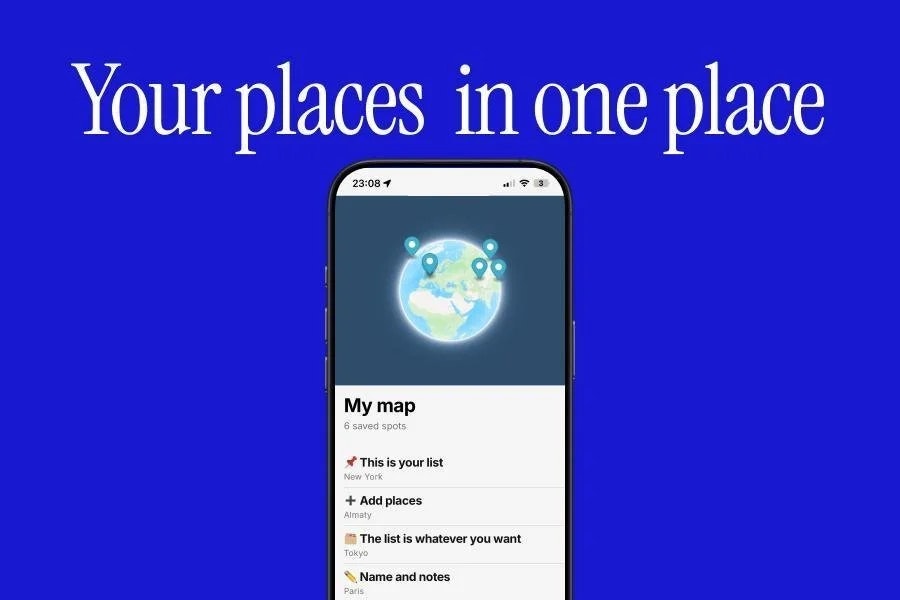
The user experience appears intentionally streamlined. From the available imagery, the interface looks clean and unburdened by clutter, ensuring that the focus remains squarely on the map content. This simplicity makes Tofu Maps highly accessible, even for users less comfortable with complex web applications.
Potential Drawbacks & Areas for Improvement
While the simplicity of Tofu Maps is its strength, it also presents potential limitations for power users. Because the platform prioritizes account-free access, persistent data management and advanced collaboration features might be naturally constrained.
One area for potential improvement is data backup and transferability. Since maps are intrinsically linked to the creation session or link, users might worry about data longevity if the link is lost or the underlying service changes its structure. Providing an optional export feature (e.g., exporting the map data as a GeoJSON or standard KML file) would significantly enhance user trust and data portability without compromising the core "no account" philosophy.
Furthermore, while great for basic pin placement, advanced customization—such as drawing custom boundaries, adding rich multimedia attachments (photos/videos) to pins beyond simple text notes, or offering more granular access permissions (e.g., view-only vs. suggestion access)—could be valuable additions if the team decides to introduce optional, lightweight management tiers in the future.
Bottom Line & Recommendation
Tofu Maps is an excellent utility for anyone who needs to organize and share geographical information quickly and securely without the baggage of traditional account systems. If you frequently plan trips, curate local spot lists, or need to relay specific locations to others, Tofu Maps offers a refreshingly fast and private solution.
I highly recommend trying Tofu Maps if your primary goal is frictionless map creation and sharing. It successfully delivers on its promise: simple, fast, and privacy-focused mapping. It’s a fantastic tool that cuts through digital red tape, making custom map curation accessible to absolutely everyone.
Featured AI Applications
Discover powerful tools to enhance your productivity
MindMax
New Way to Interact with AI
Beyond AI chat, transforming conversations into an infinite canvas. Combining brainstorming, mind mapping, critical and creative thinking tools to help you visualize ideas, solve problems efficiently, and accelerate learning.
AI Slides
AI Slides with Markdown
Revolutionary slide creation fusing AI intelligence with Markdown flexibility - edit anywhere, optimize anytime, iterate easily. Turn every idea into a professional presentation instantly.
AI Markdown Editor
Write Immediately
Extremely efficient writing experience: AI assistant, slash commands, minimalist interface. Open and write, easy writing. ✍️ Markdown simplicity + 🤖 AI power + ⚡ Slash commands = Perfect writing experience.
Chrome AI Extension
AI Assistant Anywhere
Transform your browsing experience with FunBlocks AI Assistant. Your intelligent companion supporting AI-driven reading, writing, brainstorming, and critical thinking across the web.