Typeletter Review: Reclaiming the Joy of Writing in a Digital Age
Turn your browser into a cozy, nostalgic writing nook
Published: 2/13/2026
Product Overview: Your Browser's Nostalgic Writing Nook
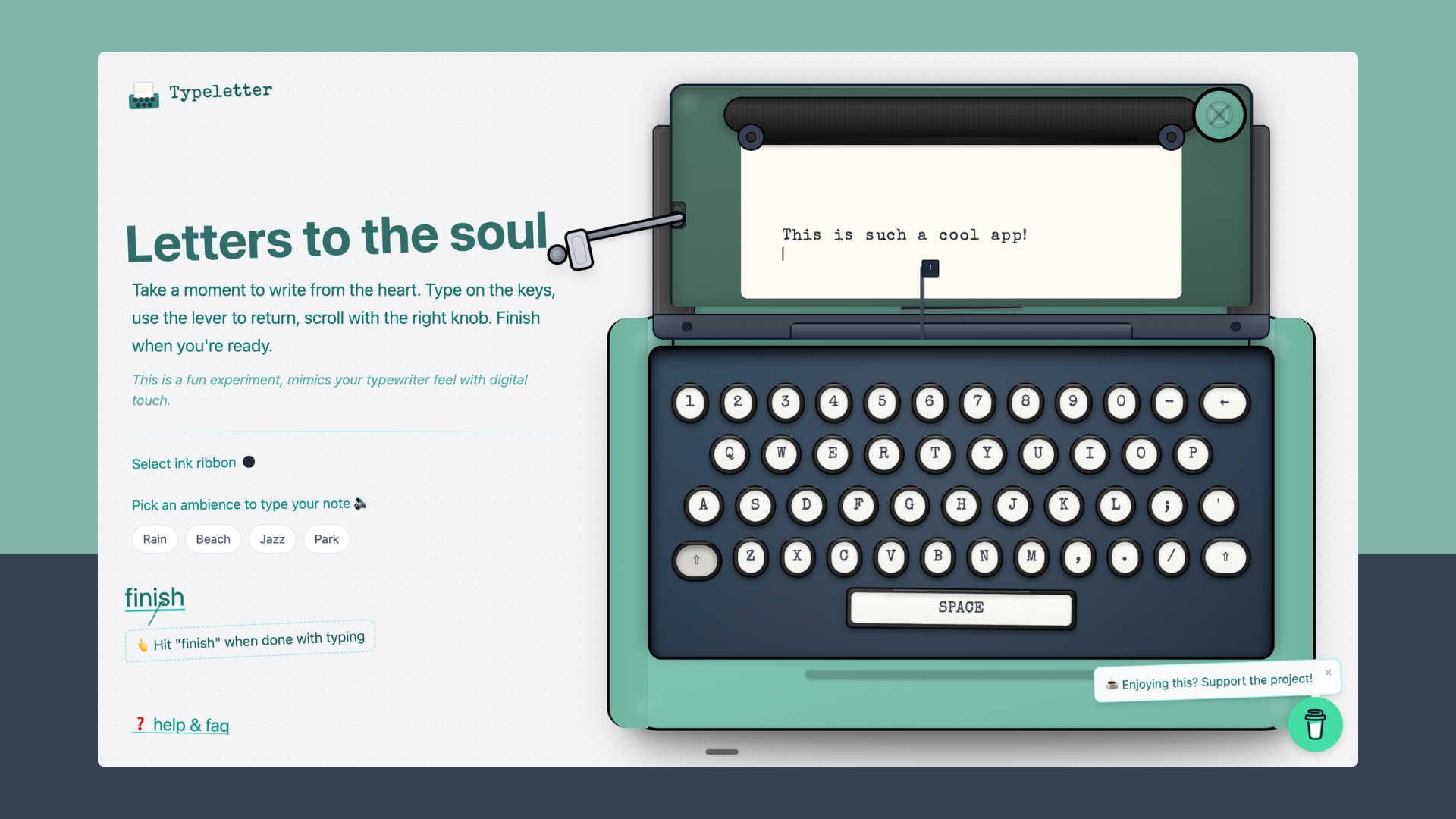
In an era dominated by rapid-fire messaging and sterile text editors, Typeletter offers a delightful and necessary counterpoint. This innovative web application transforms your standard browser window into a deeply immersive, nostalgic writing environment designed for contemplation, journaling, and crafting meaningful correspondence. Taglined as turning your browser into a "cozy, nostalgic writing nook," Typeletter succeeds by focusing entirely on the experience of writing, rather than just the mechanics.
The core value proposition of Typeletter is sensory immersion. It’s built for anyone who misses the tactile satisfaction of analogue creation but demands the immediacy of digital accessibility. It caters perfectly to bloggers, journal enthusiasts, creative writers, or simply individuals who need a distraction-free zone to process their thoughts without the usual pings and notifications of modern productivity suites.
This tool isn't about collaboration or speed; it’s about slowing down. By stripping away complex features and focusing on atmosphere—complete with realistic typewriter sounds and customizable ambient settings—Typeletter bridges the gap between vintage charm and modern web utility, offering a unique space for heartfelt composition.
Problem & Solution: Fighting Digital Distraction
The modern digital writing experience is inherently fragmented. We write emails in Gmail, notes in Notion, and journal entries in specialized apps, all while fighting the constant temptation of tabs, notifications, and endless formatting options. The problem Typeletter targets is the loss of focus and the emotional sterility of standard text input fields.
Typeletter solves this by creating an intentional, walled-garden experience within the browser. It bypasses the need for complex software downloads or mandatory sign-ups, offering instant access to a highly customized environment. While many tools offer "distraction-free" modes, Typeletter differentiates itself by injecting rich, tactile ambiance—simulating the physical feedback of a vintage typewriter, complete with the satisfying clack of keys and the distinct thwack of a carriage return. It addresses the market gap for high-fidelity, low-friction digital nostalgia.
Key Features & Highlights: Sensory Immersion Meets Digital Output
The strength of Typeletter lies in its meticulously crafted sensory details. The customization options allow users to tailor their writing environment precisely to their mood:
- Authentic Typewriter Simulation: The soundscape is paramount. Users experience realistic key presses and the signature mechanics of a traditional typewriter, enhancing focus and making the act of typing feel more rewarding.
- Atmospheric Ambiences: Beyond the sound effects, users can select background ambiances like Rain, Beach, Jazz, or Park. This audio layering creates a powerful, immersive headspace perfect for deep work or emotional journaling.
- Ink Customization: The choice of "ink ribbon" (Black, Red, Blue, Sepia) provides visual flair, making each composition feel distinct, almost like choosing a specific physical notepad.
Once the writing is complete, Typeletter provides elegant digital output options that honor the effort put into the piece. Users can choose to email the note directly or, perhaps the most charming feature, download the final product as a beautifully rendered image, complete with stylized wax seal stamps—perfect for sharing on social media or archiving treasured memories.
Potential Drawbacks & Areas for Improvement
While Typeletter excels at atmosphere, its deliberate minimalism might be a limitation for power users. Because it prioritizes the "nook" experience, it lacks standard features found in conventional text editors.
For instance, there appears to be no built-in revision tracking or basic word count display, which could be crucial for writers tracking daily output. Furthermore, while downloading as an image is charming, a simple, clean PDF export option would greatly enhance its utility for archiving longer journal entries or preparing text for cleaner printing later.
To truly become indispensable, the makers of Typeletter could consider:
- Optional Formatting: Allowing very basic formatting (e.g., bolding a title) without breaking the immersive spell.
- Saving Drafts Locally: Currently, the process ends upon emailing or downloading; a secure, local browser save function would be beneficial for multi-session projects.
Bottom Line & Recommendation
Typeletter is more than just a novelty; it’s a brilliantly executed piece of ambient software design. It successfully taps into a collective longing for simplicity and tactile satisfaction in our hyper-connected world.
Who should try Typeletter? Anyone needing a genuine escape from standard text editing environments—journalers, creative writers seeking inspiration, or individuals drafting heartfelt, personal communications. If you value how you write as much as what you write, Typeletter is a must-try. It’s a simple tool that delivers profound emotional resonance, making it a standout feature on Product Hunt. Highly recommended for instant creative decompression.
Featured AI Applications
Discover powerful tools to enhance your productivity
MindMax
New Way to Interact with AI
Beyond AI chat, transforming conversations into an infinite canvas. Combining brainstorming, mind mapping, critical and creative thinking tools to help you visualize ideas, solve problems efficiently, and accelerate learning.
AI Slides
AI Slides with Markdown
Revolutionary slide creation fusing AI intelligence with Markdown flexibility - edit anywhere, optimize anytime, iterate easily. Turn every idea into a professional presentation instantly.
AI Markdown Editor
Write Immediately
Extremely efficient writing experience: AI assistant, slash commands, minimalist interface. Open and write, easy writing. ✍️ Markdown simplicity + 🤖 AI power + ⚡ Slash commands = Perfect writing experience.
Chrome AI Extension
AI Assistant Anywhere
Transform your browsing experience with FunBlocks AI Assistant. Your intelligent companion supporting AI-driven reading, writing, brainstorming, and critical thinking across the web.